Solved

Screen Lock Time = never

  • Jun 26, 2019 1:00 PM UTC
  • 7 replies
  • 442 views

Forum|alt.badge.img+7

Hi Nation,

does anyone know why some iOS devices are able to set the screen lock time to never and other ones not?
I have no idea if there are some configuration profiles or anything else in jamf PRO wich causes this.

Thanks for your help :)

Best answer by sshort

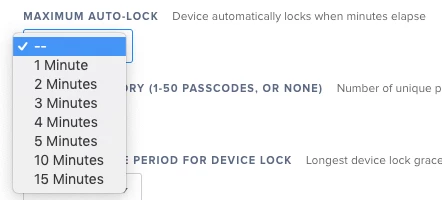
You can use a passcode profile to set the auto lock settings, it's also possible that an Exchange email account setup on the device includes an organization-set restriction (like in Office 365) that prevents devices from having no screen lock.

iPod touch and iPhone will accept 5 minutes as the max value, iPad can go up to 15 minutes. Not setting a value allows a user to select "never."
View original

7 replies

Forum|alt.badge.img+15
  • Valued Contributor
  • Answer
  • Jun 26, 2019 3:46 PM UTC

You can use a passcode profile to set the auto lock settings, it's also possible that an Exchange email account setup on the device includes an organization-set restriction (like in Office 365) that prevents devices from having no screen lock.

iPod touch and iPhone will accept 5 minutes as the max value, iPad can go up to 15 minutes. Not setting a value allows a user to select "never."


Forum|alt.badge.img+7
  • Author
  • Contributor
  • Jun 27, 2019 2:24 PM UTC

Thanks for your quick respond.
That solves the problem.


Forum|alt.badge.img+6
  • Contributor
  • Nov 9, 2021 3:17 PM UTC

Is this option still available? I can't find the  "--" symbol to choose, only time.


Forum|alt.badge.img+7
  • Author
  • Contributor
  • Nov 9, 2021 3:27 PM UTC

Excluding the auto-lock restriction should work. The "--" option is now unnecessary.


Forum|alt.badge.img+2

Problem:  I want to set the auto-lock to never, but no PIN code requirement.   Seems like "excluding the auto-lock restriction" requires enabling PIN code.  

Anyone else have a workaround to disable auto-lock without requiring PIN code?


Forum|alt.badge.img
  • New Contributor
  • Nov 29, 2023 8:50 PM UTC

Problem:  I want to set the auto-lock to never, but no PIN code requirement.   Seems like "excluding the auto-lock restriction" requires enabling PIN code.  

Anyone else have a workaround to disable auto-lock without requiring PIN code?


@user-kqpqsmfYoB Did you ever find a work for this? I'm in the same boat.


Forum|alt.badge.img
  • New Contributor
  • Feb 24, 2025 9:46 PM UTC

Go to Config Profiles - search Passcode. Turn on Maximum Auto Lock (which is 15 minutes).