Question

Secure Disposal of Apple SSD units (NAND storage)

  • May 9, 2023
  • 10 replies
  • 207 views

Forum|alt.badge.img+1

How is everyone securely disposing or destroying their own Apple SSD storage units?

Considering that MacBooks from 2016 to 2022 have an SSD (NAND storage) that is not upgradeable,
and it is not replaceable either, since it is soldered onto the main board:
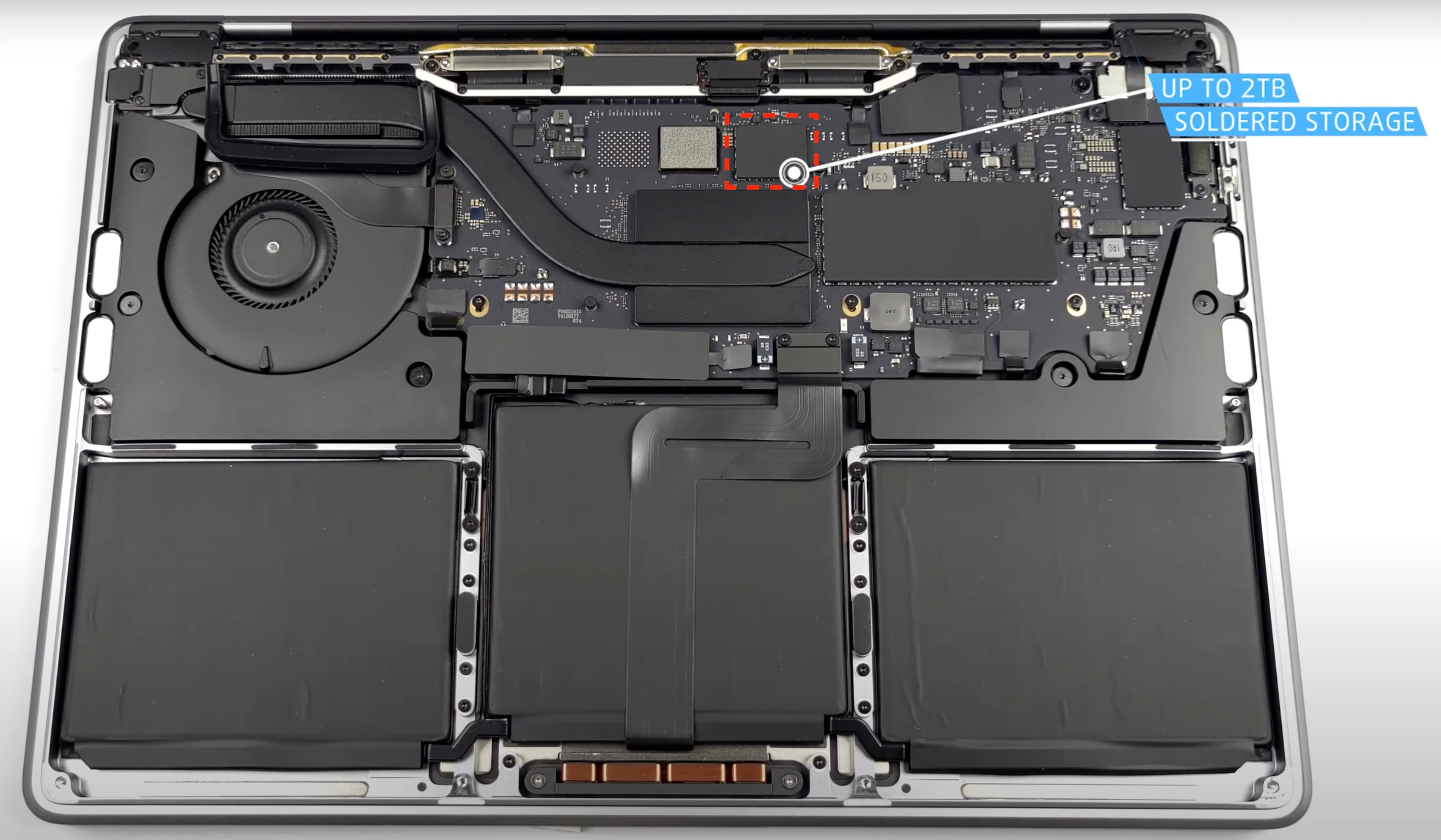
If a company has decommissioned a MacBook and the device reaches its end-of-life,
the NAND storage cannot be extracted and re-used on a different device.

Also:

  • How can businesses assert that their data is securely wiped before device disposal?

10 replies

AJPinto
Forum|alt.badge.img+26
  • Legendary Contributor
  • May 9, 2023

Apple recommends cryptographic erasure. Basically, make sureFileVault is enabled, then reinstall macOS. Reinstalling macOS will destroy the decryption key for your organizations data if FileVault was enabled as well as randomly erasing/overwriting data. 


Encryption and Data Protection overview - Apple Support (GE)


Forum|alt.badge.img+5

I believe that assertation can be certified with 3rd party products. 
The recovery mode: remove volumes/delete deisk, then reinstall is fairly secure given SSD and not HDD. 
But I still am required to certify a wipe before destruction. We use https://www.blancco.com/


Forum|alt.badge.img+5

I believe that assertation can be certified with 3rd party products. 
The recovery mode: remove volumes/delete deisk, then reinstall is fairly secure given SSD and not HDD. 
But I still am required to certify a wipe before destruction. We use https://www.blancco.com/


incidentally, we have to wipe and reinstall due to USB restrictions we push via JAMF, before we can use blancco to certify the wipe. 


Wanderers7
Forum|alt.badge.img+1
  • New Contributor
  • October 23, 2025

I believe that assertation can be certified with 3rd party products. 
The recovery mode: remove volumes/delete deisk, then reinstall is fairly secure given SSD and not HDD. 
But I still am required to certify a wipe before destruction. We use https://www.blancco.com/


incidentally, we have to wipe and reinstall due to USB restrictions we push via JAMF, before we can use blancco to certify the wipe. 

Apologies for really late reply, but would you have any info on the JAMF integration? or are they two diferent processes? and is this all onsite over USB?


AJPinto
Forum|alt.badge.img+26
  • Legendary Contributor
  • October 23, 2025

@Wanderers7 I suggest that you open a new discussion as this one is 2 years old. However, the documentation below should answer your questions.


If you use the Wipe Device button in the device inventory record, Jamf sends the EraseDevice Command to the device. This working over the open internet or not is dependent on how your Jamf environment is configured. The EraseDevice command accomplishes cryptographic erasure which is sufficient to meet NIST 800.88 r2 requirements for data sanitization. 


Wanderers7
Forum|alt.badge.img+1
  • New Contributor
  • October 23, 2025

@Wanderers7 I suggest that you open a new discussion as this one is 2 years old. However, the documentation below should answer your questions.


If you use the Wipe Device button in the device inventory record, Jamf sends the EraseDevice Command to the device. This working over the open internet or not is dependent on how your Jamf environment is configured. The EraseDevice command accomplishes cryptographic erasure which is sufficient to meet NIST 800.88 r2 requirements for data sanitization. 


Yeah, but that doesnt really help with the Blancco integration piece, thanks anyway.


AJPinto
Forum|alt.badge.img+26
  • Legendary Contributor
  • October 23, 2025

@Wanderers7 I suggest that you open a new discussion as this one is 2 years old. However, the documentation below should answer your questions.


If you use the Wipe Device button in the device inventory record, Jamf sends the EraseDevice Command to the device. This working over the open internet or not is dependent on how your Jamf environment is configured. The EraseDevice command accomplishes cryptographic erasure which is sufficient to meet NIST 800.88 r2 requirements for data sanitization. 


Yeah, but that doesnt really help with the Blancco integration piece, thanks anyway.


Blancco has no functional role in the Apple device erasure stack. The correct integration path is to not use it, Apple’s MDM framework already supports cryptographic erasure via the EraseDevice command, which meets the requirements of NIST SP 800-88 Rev. 2 for data sanitization.


Jamf issues this command through the device inventory record, and when received, macOS performs a secure wipe of all user data and cryptographic keys. This is equivalent to “Purge” level sanitization under NIST guidelines, assuming the device is supervised and FileVault is enabled.


If you're working with a recycler, it's important to understand that macOS does not support PXE boot or external USB-based mass erasure workflows like Windows. Apple Silicon and T2-equipped Macs require Secure Boot and external boot to be manually enabled, which most organizations disable for security. That means the device must be wiped via MDM before handoff, or the vendor will not be able to access recovery to perform any additional steps.


Blancco may be useful in Windows environments or for physical drive destruction workflows, but it is not architecturally relevant for macOS endpoints managed via MDM. If your compliance team is asking for Blancco integration, it is worth revisiting the platform-specific sanitization standards. Apple’s native cryptographic erase is sufficient, and third-party tooling does not enhance or validate that process.


Wanderers7
Forum|alt.badge.img+1
  • New Contributor
  • March 19, 2026

@Wanderers7 I suggest that you open a new discussion as this one is 2 years old. However, the documentation below should answer your questions.


If you use the Wipe Device button in the device inventory record, Jamf sends the EraseDevice Command to the device. This working over the open internet or not is dependent on how your Jamf environment is configured. The EraseDevice command accomplishes cryptographic erasure which is sufficient to meet NIST 800.88 r2 requirements for data sanitization. 


Yeah, but that doesnt really help with the Blancco integration piece, thanks anyway.


Blancco has no functional role in the Apple device erasure stack. The correct integration path is to not use it, Apple’s MDM framework already supports cryptographic erasure via the EraseDevice command, which meets the requirements of NIST SP 800-88 Rev. 2 for data sanitization.


Jamf issues this command through the device inventory record, and when received, macOS performs a secure wipe of all user data and cryptographic keys. This is equivalent to “Purge” level sanitization under NIST guidelines, assuming the device is supervised and FileVault is enabled.


If you're working with a recycler, it's important to understand that macOS does not support PXE boot or external USB-based mass erasure workflows like Windows. Apple Silicon and T2-equipped Macs require Secure Boot and external boot to be manually enabled, which most organizations disable for security. That means the device must be wiped via MDM before handoff, or the vendor will not be able to access recovery to perform any additional steps.


Blancco may be useful in Windows environments or for physical drive destruction workflows, but it is not architecturally relevant for macOS endpoints managed via MDM. If your compliance team is asking for Blancco integration, it is worth revisiting the platform-specific sanitization standards. Apple’s native cryptographic erase is sufficient, and third-party tooling does not enhance or validate that process.


That is a little simplistic, most remote wipe solutions send a wipe but have no way to validate that the request gets there or the wipe actually happens. Blancco have some cool tools that meet a lot of corporate compiance standards and allow for certification.


AJPinto
Forum|alt.badge.img+26
  • Legendary Contributor
  • March 19, 2026

@Wanderers7 

Interesting — I’ve gone through Apple’s documentation on the EraseDevice command several times, and I’m not seeing any mechanism that would allow a more complex integration or any post‑wipe confirmation beyond what Apple already provides. The workflow seems pretty straightforward: the device receives the wipe command, sends back an acknowledgment to the MDM, and then the OS — along with the MDM enrollment — is removed. At that point there’s nothing left on the device that could report back.

If Blancco has some additional visibility into the wipe process that Apple hasn’t documented, I’d genuinely be curious to see it. Is there some magic sauce they’re using that isn’t exposed in the published API?


After checking their system requirements, the best I can tell is that Blancco doesn’t even support Apple Silicon Macs. Their tooling appears to run on a host machine and requires the target device to be connected over USB, relying on the same Apple frameworks used by Configurator/Finder/iTunes. That workflow can certainly meet 800‑88r3, but it’s not competing with MDM — it’s a completely different process.

Also worth noting: their hardware requirements list only x64 processors and make no mention of ARM64 support, which strongly suggests Apple Silicon isn’t supported as a host or as a device in their erasure workflow.


https://developer.apple.com/documentation/devicemanagement/erase-device-command

https://support.blancco.com/space/KB/11633472/Hardware+requirements+and+recommendations+for+Blancco+Mobile+Diagnostics+and+Erasure


Wanderers7
Forum|alt.badge.img+1
  • New Contributor
  • March 19, 2026

@Wanderers7 

Interesting — I’ve gone through Apple’s documentation on the EraseDevice command several times, and I’m not seeing any mechanism that would allow a more complex integration or any post‑wipe confirmation beyond what Apple already provides. The workflow seems pretty straightforward: the device receives the wipe command, sends back an acknowledgment to the MDM, and then the OS — along with the MDM enrollment — is removed. At that point there’s nothing left on the device that could report back.

If Blancco has some additional visibility into the wipe process that Apple hasn’t documented, I’d genuinely be curious to see it. Is there some magic sauce they’re using that isn’t exposed in the published API?


https://developer.apple.com/documentation/devicemanagement/erase-device-command

Its not strictly post-wipe, a script runs the wipe (well the crypto key kill) and the report back  at the same time. 
The PC process is actualy a bit more what you’d expect, it loads a bootablIe ISO, boots off that, wipes and reports back.