Question

Select Wifi on Lock Screen with Golden Gate

  • October 6, 2026
  • 7 replies
  • 45 views

npesh
Forum|alt.badge.img

Hi, 


Has anyone has sucess with the new OS 27, Golden Gate and being to select the wifi on lock screen. 

It was mentioned as a new feature but it’s not working for me at this time and would be a great help in higher ed for our labs and using platform SSO for new users logging in. 


Any feedback would be greatly appreciated. 


Thanks!

7 replies

dletkeman
Forum|alt.badge.img+19
  • Jamf Heroes
  • October 6, 2026

I missed this.  I was checking on changes at https://support.apple.com/en-us/148830 and it says this:

Additional enhancements for Platform SSO include network controls and captive network support at login or unlock, options to require Touch ID or Apple Watch at login or unlock, and FileVault support for Authenticated Guest mode.

I don’t read this as being able to select a network at the lock screen.  I tried it on my computer running macOS v27.0.1 and I could not select a network from the login or lock screen.

I did check further and I found this page https://note.com/too_applebiz/n/n85ef614ecfad?hl=en referring to the ability to do it.  I’ll check with the latest v27.2 beta 3 and get back to you on what I see there.  Maybe it’s a broken feature at the moment.  There’s a lot of busted things in v27.0 and v27.0.1.


npesh
Forum|alt.badge.img
  • Author
  • New Contributor
  • October 6, 2026

Thanks for the reply. Appreciate it. Yes, we were informed from our Apple Account reps that this would be a new feature on v27. 

We just have to be patient and see, but yes do keep me posted if you see anything on the beta.


Thanks!


AlexDMaldo
Forum|alt.badge.img+1
  • New Contributor
  • October 6, 2026

We have the setting enabled with JamfConnect, but my understanding is that it’s something you have to toggle as a policy in Jamf Pro, not something that’s automatically available. 


dletkeman
Forum|alt.badge.img+19
  • Jamf Heroes
  • October 6, 2026

I did check with macOS v27.2 beta 3 and it doesn’t work with that.  ​@AlexDMaldo may be right but I can’t find the configuration that makes it work as you wanted ​@npesh.  I’m interested in this too.  I’ll post here if I find anything.


AlexDMaldo
Forum|alt.badge.img+1
  • New Contributor
  • October 6, 2026

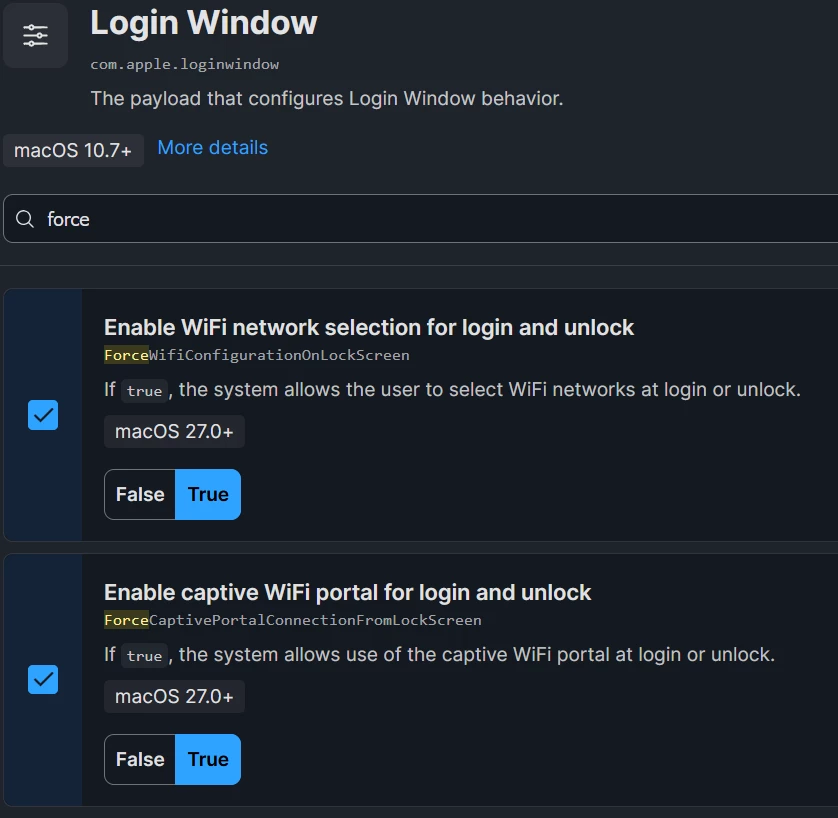
I reviewed our setup and it’s a toggle directly in Jamf Connect Login plist. However, I was able to find it in Blueprints, but not configuration Profiles. In Blueprints it’s Login Window and the setting is ForceWifiConfigurationOnLockScreen


dletkeman
Forum|alt.badge.img+19
  • Jamf Heroes
  • October 6, 2026

Thanks!  I see that where you said and toggled it on:

In macOS v27.2 beta 3 I got a selection of networks from the lock screen.  From the login screen it only displayed the connected network.  I’m guessing that this would show available networks if no connection is currently available.  I didn’t check.


Forum|alt.badge.img+10
  • Contributor
  • October 6, 2026

Really helps when testing if you scope it to the right machine ;-) DOH!  Thanks for posting here as it made me take a second look!