Solved

Self Service+.app renamed to Self Service.app?

  • March 10, 2026
  • 18 replies
  • 406 views

Forum|alt.badge.img+5

Is this supposed to happen?  Our automatic upgrading of the Self Service+ app has changed back to /Applications/Self Service.app (was /Applications/Self Service+.app).  Also is prompting for keychain access since, well, the application name changed.  Anybody else?

Best answer by Chubs

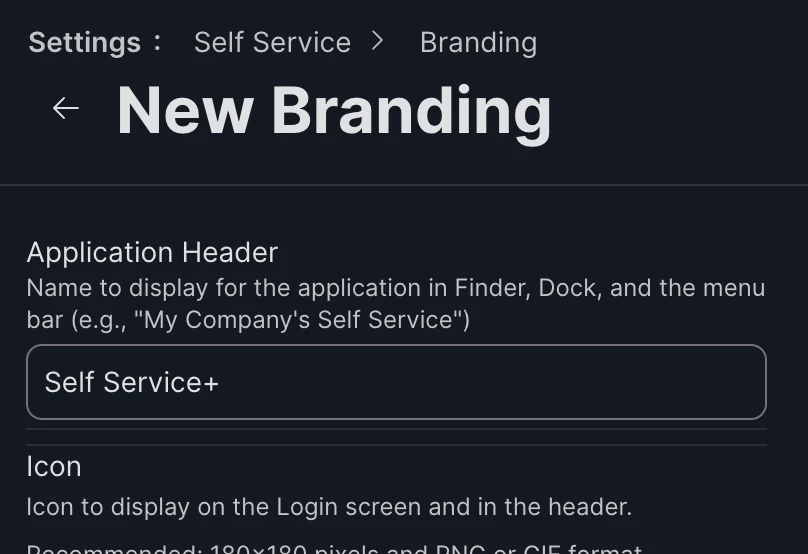
Go back into branding and rename it like this.  This fixes the name/path:


18 replies

Josh-Q
Forum|alt.badge.img+4
  • Jamf Heroes
  • March 10, 2026

I don’t think this is supposed to happen; I just checked our environment and everything is still Self Service+.app. If you launch the app, is it Plus or Classic that loads? My first thoughts are maybe something to do with custom branding, if you are using that, or double check that Plus is still the default deployment under Settings > Jamf Apps > Self Service+


Forum|alt.badge.img+5
  • Author
  • New Contributor
  • March 10, 2026

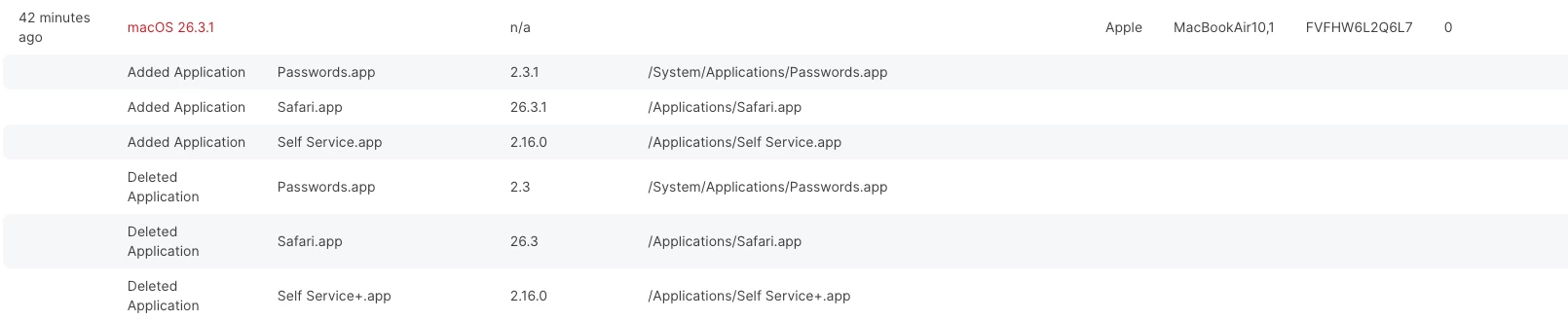
Launching “Self Service.app” brings up the Plus interface.  In the Hardware and Software History page, you can see the following happen:


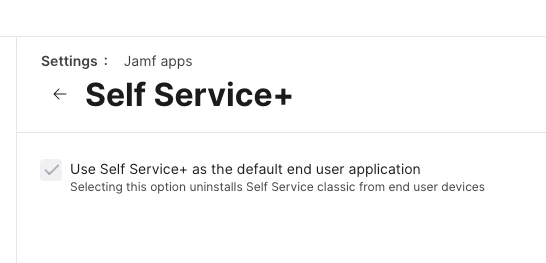
And I did indeed verify that Plus is still the default deployment:


It had been working perfectly fine with our custom branding since we rolled out Plus many months ago.

Thanks!


Chubs
Forum|alt.badge.img+24
  • Jamf Heroes
  • March 10, 2026

It changed for us too - hasn’t affected functionality, but I think this is how they are moving around making SSP the “main”.  Regardless, there’s nothing in the release notes stating this and for some of my workflows, this breaks them.

I’m engaging my account team - I suggest you all do the same if it affects your stuff.  We found the fix though...posting it below.


Forum|alt.badge.img+5
  • Author
  • New Contributor
  • March 10, 2026

Alright!  Good to have verification that I’m not hallucinating!  Though I would suggest for you to keep an eye out for any keychain issues.


Chubs
Forum|alt.badge.img+24
  • Jamf Heroes
  • Answer
  • March 10, 2026

Go back into branding and rename it like this.  This fixes the name/path:



FerrisBNA
Forum|alt.badge.img+4
  • Contributor
  • March 10, 2026

I don’t think this is supposed to happen; I just checked our environment and everything is still Self Service+.app. If you launch the app, is it Plus or Classic that loads? My first thoughts are maybe something to do with custom branding, if you are using that, or double check that Plus is still the default deployment under Settings > Jamf Apps > Self Service+

I have that setting checked and I also see that Self Service app just updated on a test device today. 

I haven’t gotten a keychain issue or had any reported so far.

-Pat


Chubs
Forum|alt.badge.img+24
  • Jamf Heroes
  • March 10, 2026

As far as your keychain stuff goes, we had something similar when jamf connect wasn’t licensed or the jamf connect config wasn’t quite right.


Forum|alt.badge.img+5
  • Author
  • New Contributor
  • March 10, 2026

Thank you, Chubs!  I think that did it!  I had another computer update its Jamf binaries just now after changing the branding, and the application name didn’t change.  Now I’ll just have to see how this will affect machines that have already had the change happen.

As for the keychain issues relating to jamf connect licensing, that’s just another ball of wax.  Just got a new license key a few weeks ago, updated it in my configuration profile, and I have at least one user getting a license expiry message.  Oh well.  

But thanks again!  I’ll need to check the Jamf Pro release notes.  I hope they would have mentioned something about changing the default branding of the app name.


PaulHazelden
Forum|alt.badge.img+13
  • Jamf Heroes
  • March 10, 2026

Its your Branding that has changed it. You can delete the name in there and it will pick Self Service + by default.
It is all part of a part of allowing the ability for branding your app. 


Chubs
Forum|alt.badge.img+24
  • Jamf Heroes
  • March 10, 2026

Its your Branding that has changed it. You can delete the name in there and it will pick Self Service + by default.
It is all part of a part of allowing the ability for branding your app. 

It's not actually their branding that did it.  We don’t modify the branding of ours and it organically changed over the weekend from the upgrade.


PaulHazelden
Forum|alt.badge.img+13
  • Jamf Heroes
  • March 10, 2026

Its your Branding that has changed it. You can delete the name in there and it will pick Self Service + by default.
It is all part of a part of allowing the ability for branding your app. 

It's not actually their branding that did it.  We don’t modify the branding of ours and it organically changed over the weekend from the upgrade.

I had my legacy branding in there, and it all changed over. I deleted the name and it all changed back to the default name of Self Service +
Just spent months teaching them where to find it under the default name, so I set it back to that.


Forum|alt.badge.img+5
  • Author
  • New Contributor
  • March 10, 2026

Yeah, I never had changed the default banding of the app name.  Originally, it was “Self Service,” then when we opted into Self Service+ months ago, default name changed to “Self Service+.”  It must have been this past update that changed the default name back to “Self Service.”


BT501
  • New Contributor
  • March 10, 2026

We hadn’t changed our branding but over the weekend devices went from Self Service+.app to Self Service.app.  After changing in branding to Self Service+ it changed it back and looks like so far on my test device the keychain issue went away as well.


Chubs
Forum|alt.badge.img+24
  • Jamf Heroes
  • March 10, 2026

Sooooo the keychain thing is a PI that I confirmed from Jamf.  I don’t have a number, it is indeed a product issue - so don’t pull your hair out over it.  Just submit a ticket so you can be earmarked as being affected and they should update you when it’s resolved.


Forum|alt.badge.img+1
  • New Contributor
  • March 10, 2026

26.4 b1-3 introduced another keychain issue that we thought was JAMF Connect but after speaking with JAMF they stated this was an Apple issue and they were working with them on it.  macOS 26.4 b4 does indeed solve the issue.

Apple’s 26.4 b4 Release notes highlight:

(Beta 4) The user is no longer prompted to unlock the login keychain when logging in
using 3rd party authentication plugins.


bmcdade
Forum|alt.badge.img+5
  • Contributor
  • March 11, 2026

We seem to be running into the authentication issue with people running both 26.x and 15.x.  It seems to be related to the Self Service change, as we had the + version installed along with the Standard, moved it to the Dock which also broke as well, and we had to redeploy a policy to remove it and add back the standard Application.

We also have Connect and Protect installed on devices.  We are currently pushing out 3.7.0 of Connect to the devices to update from 3.5.0.

Let’s hope we don’t see too many more of these people needing to give Self Service access.


Forum|alt.badge.img+8
  • Contributor
  • March 11, 2026

It changed for us too - hasn’t affected functionality, but I think this is how they are moving around making SSP the “main”.  Regardless, there’s nothing in the release notes stating this and for some of my workflows, this breaks them.

I’m engaging my account team - I suggest you all do the same if it affects your stuff.  We found the fix though...posting it below.


It’s included in the 11.25.0 release notes:

https://learn.jamf.com/en-US/bundle/jamf-pro-release-notes-current/page/New_Features_and_Enhancements.html#ariaid-title2


I’m suspecting that the default name of Self Service in Branding was “Self Service” when Jamf Pro servers are spun up upon creation.
So whilst orgs might have moved to SSP a while ago, now that 11.25.0 enabled SSP to match the branding settings configured, it would pick up the default name and use that.


I’m only seeing this as an issue where people use the default name - for orgs that use a custom name, they don’t seem to be reporting issues, or I’m just missing them...


Chubs
Forum|alt.badge.img+24
  • Jamf Heroes
  • March 11, 2026

It changed for us too - hasn’t affected functionality, but I think this is how they are moving around making SSP the “main”.  Regardless, there’s nothing in the release notes stating this and for some of my workflows, this breaks them.

I’m engaging my account team - I suggest you all do the same if it affects your stuff.  We found the fix though...posting it below.


It’s included in the 11.25.0 release notes:

https://learn.jamf.com/en-US/bundle/jamf-pro-release-notes-current/page/New_Features_and_Enhancements.html#ariaid-title2


I’m suspecting that the default name of Self Service in Branding was “Self Service” when Jamf Pro servers are spun up upon creation.
So whilst orgs might have moved to SSP a while ago, now that 11.25.0 enabled SSP to match the branding settings configured, it would pick up the default name and use that.


I’m only seeing this as an issue where people use the default name - for orgs that use a custom name, they don’t seem to be reporting issues, or I’m just missing them...

It’s definitely not included that if it was never changed in the past that it would change after the 11.25.2 upgrade.  You guys are attempting to normalize this when it’s not defined at all and the company should know that.

While you may have normalized on “Self Service”, orgs that have moved to SSP when it was released to find/fix the bugs for the rest of you are the ones that are suffering after the 11.25.2 upgrade.  Instead of gaslighting, try being encouraging such as “oh yea, it’s not explicitly stated that you guys would have a bad day - only that it regulates the custom branding for SSP” or something like that.  Our org never uses the branding area, so in essence nothing should have changed for us - but it did because of that (which was not mentioned at all).