Solved

Self Service doesn’t install

  • October 22, 2021
  • 11 replies
  • 279 views

gadsden_flag
Forum|alt.badge.img+6

Hi

I’m trying to set up a BYOD environment besides our company owned devices. As shown here 


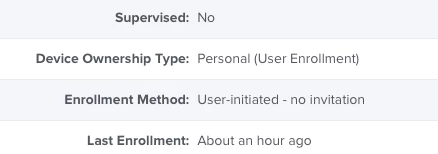
With PreStage Enrollments it works like a charm but on the personally owned devices it doesn’t install at all. I followed this manual but it doesn’t work. All I got is an error, shown here

What is going wrong here? Thanks

Best answer by gadsden_flag

Are there any other apps you can try installing automatically?

If they come down we can narrow down the issue to just Self Service


I think I’m a step further. I deleted the app from the Mobile Device Apps and get it again from the Apple Business Manager. Unfortunately I forgot to add the App Config, but the app was installed immediately. So I deleted the app from my iPhone, put code to App Config and now the installation is pending since minutes.

11 replies

Forum|alt.badge.img+8
  • Contributor
  • October 22, 2021

Is there a reason you are manually installing Self Service? You can just set it to AutoInstall and this should work on DEP and User Enrolled devices.


gadsden_flag
Forum|alt.badge.img+6
  • Author
  • Contributor
  • October 22, 2021

Is there a reason you are manually installing Self Service? You can just set it to AutoInstall and this should work on DEP and User Enrolled devices.


First I tried to autoinstall. With the DEP it’s working. But when I have a personal device

it doesn’t install neither. I would be very happy to have an autoinstall. 😉
How to get there? I’ll give it a try.

Thanks.


BTW. Sorry, I’m very new to Jamf, so I have to ask many dumb questions.


Forum|alt.badge.img+8
  • Contributor
  • October 22, 2021

First I tried to autoinstall. With the DEP it’s working. But when I have a personal device

it doesn’t install neither. I would be very happy to have an autoinstall. 😉
How to get there? I’ll give it a try.

Thanks.


BTW. Sorry, I’m very new to Jamf, so I have to ask many dumb questions.


No problem! You can navigate to Settings > Self Service > Mac OS (or iOS depends on the device) and select install automatically...


It should populate automatically on the MacOS side, but if it doesn't for some reason, I just put /Applications in the install field!


gadsden_flag
Forum|alt.badge.img+6
  • Author
  • Contributor
  • October 22, 2021

No problem! You can navigate to Settings > Self Service > Mac OS (or iOS depends on the device) and select install automatically...


It should populate automatically on the MacOS side, but if it doesn't for some reason, I just put /Applications in the install field!


Yes, I found that. But on the Personal devices it doesn’t work. Maybe I did something wrong.


Forum|alt.badge.img+8
  • Contributor
  • October 22, 2021

Yes, I found that. But on the Personal devices it doesn’t work. Maybe I did something wrong.


Can you post your App Configuration? Also when you are in Mobile Device Apps > Self Service Mobile for "Managed Distribution" do you see all your available licenses?


gadsden_flag
Forum|alt.badge.img+6
  • Author
  • Contributor
  • October 22, 2021

Can you post your App Configuration? Also when you are in Mobile Device Apps > Self Service Mobile for "Managed Distribution" do you see all your available licenses?


I did everything like here https://docs.jamf.com/10.33.0/jamf-pro/administrator-guide/Jamf_Self_Service_for_iOS.html 

<dict> <key>INVITATION_STRING</key> <string>$MOBILEDEVICEAPPINVITE</string> <key>JSS_ID</key> <string>$JSSID</string> <key>SERIAL_NUMBER</key> <string>$SERIALNUMBER</string> <key>DEVICE_NAME</key> <string>$DEVICENAME</string> <key>MAC_ADDRESS</key> <string>$MACADDRESS</string> <key>UDID</key> <string>$UDID</string> <key>JSS_URL</key> <string>$JPS_URL</string><key>MANAGEMENT_ID</key><string>$MANAGEMENTID</string></dict>

I tried also with the real URL here

<key>JSS_URL</key> <string>https://myjamf.example.com</string>

I have some licenses here

I also added the MAID of the user of the personal device. 

If you need more information, please ask. I want to get it running asap.


Forum|alt.badge.img+8
  • Contributor
  • October 22, 2021

I did everything like here https://docs.jamf.com/10.33.0/jamf-pro/administrator-guide/Jamf_Self_Service_for_iOS.html 

<dict> <key>INVITATION_STRING</key> <string>$MOBILEDEVICEAPPINVITE</string> <key>JSS_ID</key> <string>$JSSID</string> <key>SERIAL_NUMBER</key> <string>$SERIALNUMBER</string> <key>DEVICE_NAME</key> <string>$DEVICENAME</string> <key>MAC_ADDRESS</key> <string>$MACADDRESS</string> <key>UDID</key> <string>$UDID</string> <key>JSS_URL</key> <string>$JPS_URL</string><key>MANAGEMENT_ID</key><string>$MANAGEMENTID</string></dict>

I tried also with the real URL here

<key>JSS_URL</key> <string>https://myjamf.example.com</string>

I have some licenses here

I also added the MAID of the user of the personal device. 

If you need more information, please ask. I want to get it running asap.


Are there any other apps you can try installing automatically?

If they come down we can narrow down the issue to just Self Service


gadsden_flag
Forum|alt.badge.img+6
  • Author
  • Contributor
  • October 22, 2021

Are there any other apps you can try installing automatically?

If they come down we can narrow down the issue to just Self Service


Thanks for your time.

Yes, other apps do install like expected. It’s only the Self Service. I don’t understand why the error message (first post) is in german. But it says the mobile device management request is not valid. I don’t know, what this means. Google cannot find anything about it. Maybe the original error message is different and the translation is bad so I can’t find any hits on Google.


MikaelDez
Forum|alt.badge.img+6
  • Contributor
  • October 22, 2021

Thanks for your time.

Yes, other apps do install like expected. It’s only the Self Service. I don’t understand why the error message (first post) is in german. But it says the mobile device management request is not valid. I don’t know, what this means. Google cannot find anything about it. Maybe the original error message is different and the translation is bad so I can’t find any hits on Google.


Edited my response because I missed that this was regarding iOS, not macOS


gadsden_flag
Forum|alt.badge.img+6
  • Author
  • Contributor
  • Answer
  • October 22, 2021

Are there any other apps you can try installing automatically?

If they come down we can narrow down the issue to just Self Service


I think I’m a step further. I deleted the app from the Mobile Device Apps and get it again from the Apple Business Manager. Unfortunately I forgot to add the App Config, but the app was installed immediately. So I deleted the app from my iPhone, put code to App Config and now the installation is pending since minutes.


gadsden_flag
Forum|alt.badge.img+6
  • Author
  • Contributor
  • October 23, 2021

Now I try with another device and get the same message again. Very strange.