Question

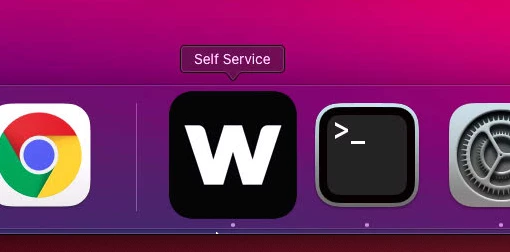
Self Service icon larger than orther icons in dock on Big Sur

  • Jan 15, 2021 1:46 PM UTC
  • 7 replies
  • 303 views

Forum|alt.badge.img+3

Tried resetting the dock, reinstalling self service but the icon is always larger than the other icons in the dock. Any reason why? Theres no magnification enabled or anything obvious I can see, the icon uploaded to Jamf is 512x512 as per the recommendations, even the stock icon appears larger than other dock icons.
7 replies

Forum|alt.badge.img+8

If you want to be consistent with system icons, preparing an icon in correct size (412x412) placed correctly within a 512x512px PNG file with a properly rounded corners and a drop shadow is unfortunately on you. But this at least gives you freedom to go beyond, as is the case for icons of Automator, Chess, Photo Booth, Preview, TextEdit and the likes.
Refer to Apple's Human Interface Guidelines for more info.


MikaelDez
Forum|alt.badge.img+6
  • Contributor
  • Aug 25, 2022 5:54 PM UTC

Did you ever solve this?


Forum|alt.badge.img+4
  • New Contributor
  • Jan 11, 2023 10:21 AM UTC

I am seeing the exact same issue.

In Jamf, under Settings - Self Service - Branding, it shows "Icon to display on the Login screen and in the header. Recommended 180x180 pixels and PNG or GIF format".

I uploaded a 180x180 pixels icon in PNG format and with rounded corners, but it still shows up as bigger than the other icons on the Dock and it's super annoying.

Was anyone able to find a solution?


iOllie
Forum|alt.badge.img+3
  • New Contributor
  • Nov 12, 2024 10:39 AM UTC

I’m facing the same issue with the Self-Service logo (180x180 pixels). So my question remains: does anyone know how to create it in the correct size?


Forum|alt.badge.img+2
  • New Contributor
  • Nov 12, 2024 11:50 AM UTC

The first answer is correct. You need to have a tool like photoshop or illustrator to make an icon that is 412px, but the image you make is 512px and then make the background transparent. That way you still upload the big picture, but because the background is transparent, it only shows the 412px visible image. Its a bit confusing to explain, but this is working atleast.

I uploaded an image to explain what i mean, it shows the app icon, but the total image size is larger, than the icon itself, only the background is transparent and that way making the icon smaller.


Forum|alt.badge.img+2
  • New Contributor
  • Nov 12, 2024 11:51 AM UTC

See the image here: 


iOllie
Forum|alt.badge.img+3
  • New Contributor
  • Nov 12, 2024 12:41 PM UTC

The first answer is correct. You need to have a tool like photoshop or illustrator to make an icon that is 412px, but the image you make is 512px and then make the background transparent. That way you still upload the big picture, but because the background is transparent, it only shows the 412px visible image. Its a bit confusing to explain, but this is working atleast.

I uploaded an image to explain what i mean, it shows the app icon, but the total image size is larger, than the icon itself, only the background is transparent and that way making the icon smaller.


This workaround worked for me—thank you for the recommendation!