
Question

Self Service+ URL Schemes

  • Mar 27, 2025 7:31 PM UTC
  • 11 replies
  • 1396 views

emily
Forum|alt.badge.img+26

Hey folks! Dropping in for another quick Self Service+ post on how to:

  • determine available URL schemes for a macOS app (in this example, Self Service+.app)
  • how to map policy URLs from Jamf Pro to the new schema and have the actions load within Self Service+

The Self Service app has historically supported URL schemes to automatically run a policy or open the app directly to a description of a given policy. Within the Self Service settings of an app policy in Jamf Pro there are installation and description URLs provided. Those URLs tie into URL schemes for the Self Service app, and can be launched in scripts and by sharing them directly via link.
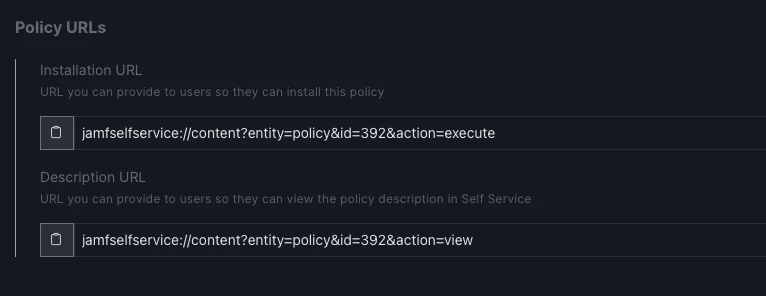
For example, running the simple Terminal command open "jamfselfservice://content?entity=policy&id=392&action=view" one can launch Self Service classic and deep link right into a policy and view the description.

Self Service+ also includes this functionality, though the URL schemes are not displayed in Jamf Pro for policies yet. To find the available URL scheme for an app on macOS (in this example, Self Service+.app) PlistBuddy can be used to parse the Info.plist of the application and extract the CFBundleURLTypes:

/usr/libexec/PlistBuddy -c "Print :CFBundleURLTypes" "/Applications/Self Service+.app/Contents/Info.plist"

 The array that returns will show the available URL schemes that the application supports.

/usr/libexec/PlistBuddy -c "Print :CFBundleURLTypes" "/Applications/Self Service+.app/Contents/Info.plist" Array { Dict { CFBundleURLSchemes = Array { selfservicenotification } } Dict { CFBundleURLSchemes = Array { selfservicecapability } } }

As of this writing selfservicecapability is the main URL scheme to trigger policy actions within the app catalog component of Self Service+. Meaning, if you take:

open "jamfselfservice://content?entity=policy&id=392&action=view"

and want that policy to run in Self Service+ instead of Self Service classic, the URL scheme would update to:

open "selfservicecapability://content?entity=policy&id=392&action=view"

(For those curious, that is the ID of our Zoom installer policy on computers managed by Jamf IT.)

For admins interested in having policies run in one app versus the other, knowing that base URL scheme from the app makes some of that possible.

Hope this is helpful!

Related resources:

11 replies

Jordy-Thery
Forum|alt.badge.img+18
  • Valued Contributor
  • Mar 28, 2025 2:11 PM UTC

Thank you, Emily! 


os-tech_r828
Forum|alt.badge.img+2
  • New Contributor
  • Mar 31, 2025 2:10 PM UTC

Interesting. Good stuff!


peterlbk
Forum|alt.badge.img+11
  • Jamf Heroes
  • Apr 7, 2025 9:30 AM UTC

Cheers, Emily!


Forum|alt.badge.img+6
  • New Contributor
  • May 14, 2025 6:53 PM UTC

OOOH This'll be so useful when I roll out Self Service+ to my users :)


It's nice to be able to link directly to other Self Service pages. Linking to the Teams installer from the Teams uninstall page or the Ricoh driver installer from the department Ricoh printer's install page? *chef's kiss*


Forum|alt.badge.img+11
  • Valued Contributor
  • Jul 11, 2025 1:50 PM UTC

good find!  thanks for sharing!


emily
Forum|alt.badge.img+26
  • Author
  • Hall of Fame
  • Jul 11, 2025 2:07 PM UTC

There have been some updates on this topic so I thought I’d share some new details. Here are some updates to the URL types for Self Service (classic) and Self Service+ that I shared on the Mac Admins Slack:

emily.kausalik@12:34:~$ /usr/libexec/PlistBuddy -c "Print :CFBundleURLTypes" "/Applications/Self Service+.app/Contents/Info.plist"
Array {
Dict {
CFBundleURLSchemes = Array {
selfservicenotification
}
}
Dict {
CFBundleURLSchemes = Array {
selfservicecapability
}
}
Dict {
CFBundleURLSchemes = Array {
selfservice
}
}
Dict {
CFBundleURLSchemes = Array {
jamfselfservice
}
}
}
emily.kausalik@12:39:~$ /usr/libexec/PlistBuddy -c "Print :CFBundleURLTypes" "/Applications/Self Service.app/Contents/Info.plist"
Array {
Dict {
CFBundleURLName = com.jamfsoftware.selfservice.mac
CFBundleURLSchemes = Array {
jamfselfservice
selfservice
}
}
}

If you’re testing and want to guarantee that a policy link opens SSP instead of SSc I’d suggest sticking with selfservicecapability:// if both apps are installed on a computer.


Forum|alt.badge.img+11
  • Valued Contributor
  • Jul 11, 2025 2:12 PM UTC

if anyone uses the bundle ID of self service & self service apps, they differ as well:


Self service is: com.jamfsoftware.selfservice.mac

Self Service+ is: com.jamf.selfserviceplus


Forum|alt.badge.img+5
  • Contributor
  • Feb 10, 2026 2:45 PM UTC

I used to be able to open directly to a self service category / catalog by running. Im using an app called support that allows me to create nice and easy shortcut buttons to things like printers. 

jamfselfservice://content?action=category&id=50

This is my printer category

However now that i have self service + turned on that no longer works. Any one have an idea. I asked on the mac slack and they mentioned this URL and to try 
selfservicecapability://content?entity=category&id=50

But that does not load to the correct category / catalog either. 

Thanks for any help you might be able to provide.  


Forum|alt.badge.img+11
  • Valued Contributor
  • Feb 17, 2026 5:20 PM UTC

I havent found any way to refer to a category.

In similar cases I make use of swiftDialog and create a simple Message Window which offers Links to the Policies in the category.

This is some extra work but most times very handy...


mm2270
Forum|alt.badge.img+24
  • Legendary Contributor
  • Mar 27, 2026 3:01 PM UTC

It would be great to see the category link options return for Self Service+, now that we are fully moving to the new application. The categories still work in the classic version, but not in the newer application, unless there is some new scheme we need to use for those now. I haven’t found it though.


emily
Forum|alt.badge.img+26
  • Author
  • Hall of Fame
  • Mar 27, 2026 3:27 PM UTC

I just dug through the Feature Request portal and I don’t actually see one in there for Self Service+ to have a URL scheme for categories. I kind of get why we all want it, because at the very least I think we all want to see feature parity between classic and Plus.

(I did find one for iOS category URL schemes, but not macOS… actually, there is one for macOS but it’s a very old one for the classic app from back in 2018 or so.) 

That all said, I’ve opened a new Feature Request: https://ideas.jamf.com/ideas/USER-I-204

Please upvote 🔺