Question

Separate the installation of app in different smart group ?

  • May 31, 2016
  • 7 replies
  • 49 views

Forum|alt.badge.img+3

We have smart groups on Student and Teacher. It use to maintenance BYOD device. If we want to install app automatically to student's iPad but not Teacher's iPad. Teacher can still see that App available in self service. Can it being achieve?

Thank you very much!

Aiken

7 replies

Forum|alt.badge.img+16
  • Valued Contributor
  • May 31, 2016

Just put the app in twice, once for Students set to install, once for Teachers set to Self Service. Use scoping to decide who gets what.
Not sure how this will interact with VPP (you might need seperate codes) though, it certainly works in a free apps and Apple ID scenario.


Forum|alt.badge.img+3
  • Author
  • New Contributor
  • June 1, 2016

Thanks Look, It works! =)

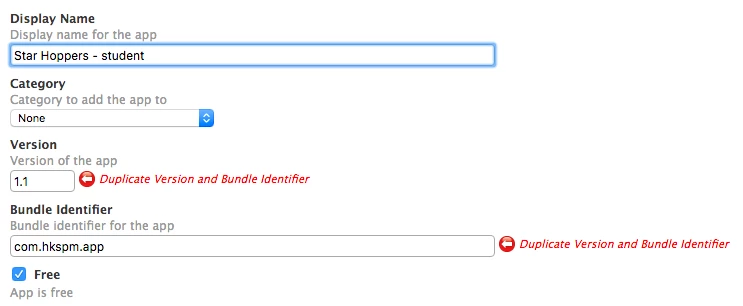
But I need to fill in fake version number and bundle ID to prevent the duplication. ( I don't know why it works for fake bundle ID ) I still finding a better method. Since we have around 350 apps in catalog and using VPP. If I need to add those app twice. It will be quite tedious. :(


Forum|alt.badge.img+14
  • Honored Contributor
  • June 2, 2016

@aikenau You don't want fake data in there.. Rename one of the apps (i.e. 'App - Student') and you can then have both!


Forum|alt.badge.img+16
  • Valued Contributor
  • June 2, 2016

@aikenau as @cdenesha says, give it a different name, this is exactly how we did it.


Forum|alt.badge.img+3
  • Author
  • New Contributor
  • June 3, 2016

But it warned me the duplicated version number and bundle ID.. ?? :(


Forum|alt.badge.img+16
  • Valued Contributor
  • June 3, 2016

Hmm just looking in our JSS now and we don't seem to have the duplication we had previously, maybe your right and it's not working (we have more than one administrator) and was removed.


Forum|alt.badge.img+14
  • Honored Contributor
  • June 9, 2016

It turns out it is an issue with 9.92, PI-002302.