Question

Sharepoint Online Intranet site prompting for Authentication

  • June 30, 2026
  • 8 replies
  • 55 views

Forum|alt.badge.img+3

Hi,

We’ve migrated our on-prem Intranet site to SharepointOnline and I’ve been tasked to deploy the new site to our Mac fleet of about 180 Macbooks. Microsoft Edge is our Organisational standard and the way it’s going to work is that whenever Edge is launched the landing page will be the new Sharepoint Online Intranet site. The issue is, upon launching Edge it keeps prompting to authenticate via login.microsoftonline.com before the site loads. On Google Chrome it works as expected without requiring authentication. Is there anything i must configure in the configuration profile? Our Macs are not domain joined.

8 replies

AJPinto
Forum|alt.badge.img+26
  • Legendary Contributor
  • June 30, 2026

Edge uses the macOS Enterprise SSO extension, and it has to be configured for silent auth. It works differently than Chrome because Google has basically walked away from the whole Platform SSO idea. Chrome just uses its own token persistence and whatever auth state the user already has.

If the SSO extension is not configured on macOS, Edge will always prompt at login.microsoftonline.com because it is trying to use the extension and there is no token available. Chrome looks like it works because it is not trying to use the extension at all.

https://learn.microsoft.com/en-us/DeployEdge/microsoft-edge-policies#alloweddomainsforapps


Chubs
Forum|alt.badge.img+26
  • Jamf Heroes
  • June 30, 2026

A few questions…

Are you using the SSOe?  Do you register your devices with company portal?  Do you have a config already set for Chrome with the integration authentication servers/kerberos delegation servers pre-set?

Are you using any configurations for Edge?  


Forum|alt.badge.img+3
  • Author
  • New Contributor
  • June 30, 2026

Edge uses the macOS Enterprise SSO extension, and it has to be configured for silent auth. It works differently than Chrome because Google has basically walked away from the whole Platform SSO idea. Chrome just uses its own token persistence and whatever auth state the user already has.

If the SSO extension is not configured on macOS, Edge will always prompt at login.microsoftonline.com because it is trying to use the extension and there is no token available. Chrome looks like it works because it is not trying to use the extension at all.

https://learn.microsoft.com/en-us/DeployEdge/microsoft-edge-policies#alloweddomainsforapps


Thanks ​@AJPinto Guess I’m going to have look into having SSOe enabled in our Environment. In the last coupla months I have been reading up on it and watching some webinars. Our solutions Architect approached us MacAdmins a coupla months ago regarding InTune integration for Device Compliance and I was thinking macOS Platform SSO will maybe need to be configured for that.


Forum|alt.badge.img+3
  • Author
  • New Contributor
  • June 30, 2026

A few questions…

Are you using the SSOe?  Do you register your devices with company portal?  Do you have a config already set for Chrome with the integration authentication servers/kerberos delegation servers pre-set?

Are you using any configurations for Edge?  

Thanks ​@Chubs Not yet. I’ve configured a SSOe configuration profile a coupla months ago and only scoped my Mac for testing. Company keeps bombing out, but I’ve found the reason why is that our Microsoft System Admin team needs to perform some configuration on their side 1st on Microsoft Entra ID I believe. I think I’m going to have to liaise with them to have SSOe enabled for our Macs.

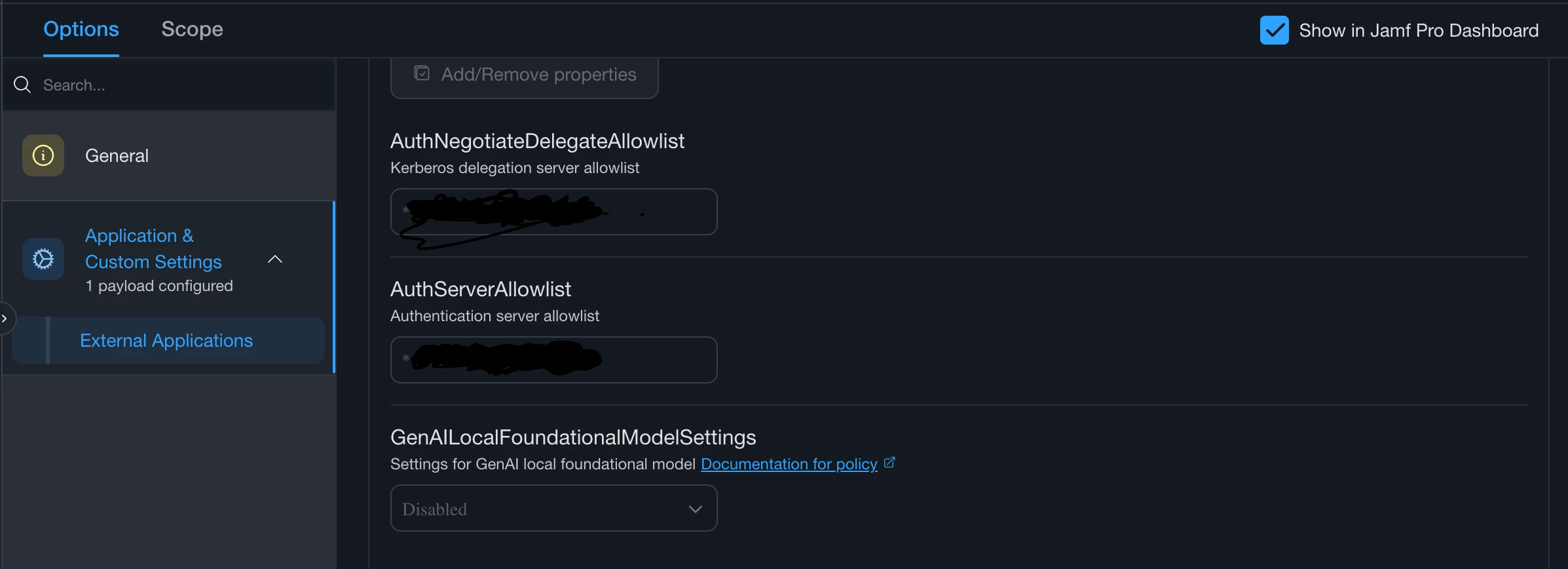
This is what our Google Chrome config profile looks like. Only three keys


Forum|alt.badge.img+3
  • Author
  • New Contributor
  • June 30, 2026

A few questions…

Are you using the SSOe?  Do you register your devices with company portal?  Do you have a config already set for Chrome with the integration authentication servers/kerberos delegation servers pre-set?

Are you using any configurations for Edge?  

Thanks ​@Chubs Not yet. I’ve configured a SSOe configuration profile a coupla months ago and only scoped my Mac for testing. Company keeps bombing out, but I’ve found the reason why is that our Microsoft System Admin team needs to perform some configuration on their side 1st on Microsoft Entra ID I believe. I think I’m going to have to liaise with them to have SSOe enabled for our Macs.

I just cloned our exisiting Edge Config Profile, then changed the HomePage URL to that of the new Sharepoint Online URL. I thought that was all that needed to be done, but clearly it’s not

This is what our Google Chrome config profile looks like. Only three keys


Forum|alt.badge.img+3
  • Author
  • New Contributor
  • June 30, 2026

A few questions…

Are you using the SSOe?  Do you register your devices with company portal?  Do you have a config already set for Chrome with the integration authentication servers/kerberos delegation servers pre-set?

Are you using any configurations for Edge?  

Thanks ​@Chubs Not yet. I’ve configured a SSOe configuration profile a coupla months ago and only scoped my Mac for testing. Company keeps bombing out, but I’ve found the reason why is that our Microsoft System Admin team needs to perform some configuration on their side 1st on Microsoft Entra ID I believe. I think I’m going to have to liaise with them to have SSOe enabled for our Macs.

This is what our Google Chrome config profile looks like. Only three keys


Chubs
Forum|alt.badge.img+26
  • Jamf Heroes
  • June 30, 2026

A few questions…

Are you using the SSOe?  Do you register your devices with company portal?  Do you have a config already set for Chrome with the integration authentication servers/kerberos delegation servers pre-set?

Are you using any configurations for Edge?  

Thanks ​@Chubs Not yet. I’ve configured a SSOe configuration profile a coupla months ago and only scoped my Mac for testing. Company keeps bombing out, but I’ve found the reason why is that our Microsoft System Admin team needs to perform some configuration on their side 1st on Microsoft Entra ID I believe. I think I’m going to have to liaise with them to have SSOe enabled for our Macs.

This is what our Google Chrome config profile looks like. Only three keys


Gotcha.  So the top setting (called Kerberos delegation in google admin center) is what’s doing it.  It’s grabbing a kerb token locally which allows it to “just work”. I’m assuming you still have on premise AD and that’s where you’re testing all of this.

Get CP working properly (enrolled with a TGT) and the SSOe configured….and  Edge will work beautifully.


Forum|alt.badge.img+3
  • Author
  • New Contributor
  • July 1, 2026

Yes, still have on premise AD. But thanks you guys ​@Chubs ​@AJPinto for the info. I’m reading up on SSOe again