Solved

Smart Computer Group - All Macs enrolled into JAMF after specific date

  • February 13, 2020
  • 4 replies
  • 33 views

Forum|alt.badge.img+3

Hi

I'm wanting to create a smart computer group in JAMF Pro, for any Macs we enrol after a specific date. This is so I can scope a policy I have created to only deploy to Macs enrolled on or after the date set in smart group. I cant see an option to do this, any advice or help would be great.
Thanks
Best answer by mm2270

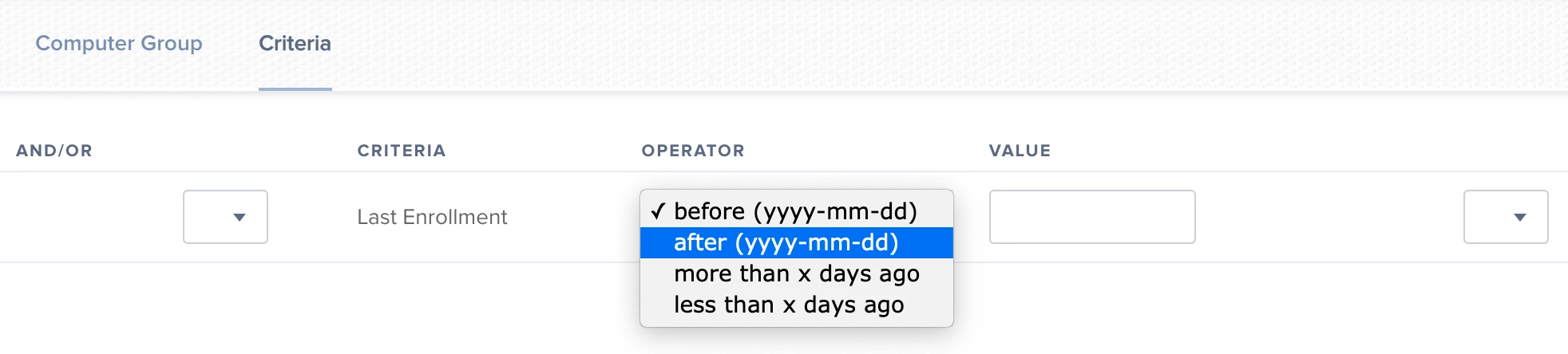
There is a Last Enrollment criteria item that is geared exactly for this scenario. It uses a Date format, so you can pick a date and use the "after (yyyy-mm-dd)" drop down option.

4 replies

sdagley
Forum|alt.badge.img+25
  • Jamf Heroes
  • February 13, 2020

@J_JohnstonAT Last Enrollment is the Smart Group criteria you want to use for this


mm2270
Forum|alt.badge.img+24
  • Legendary Contributor
  • Answer
  • February 13, 2020

There is a Last Enrollment criteria item that is geared exactly for this scenario. It uses a Date format, so you can pick a date and use the "after (yyyy-mm-dd)" drop down option.


Forum|alt.badge.img+3
  • Author
  • New Contributor
  • March 9, 2020

thanks alot mm2270 i did actually find this in the end and worked a treat. Thank you for your reply :-)


eric-p
Forum|alt.badge.img+1
  • New Contributor
  • March 29, 2024

There is a Last Enrollment criteria item that is geared exactly for this scenario. It uses a Date format, so you can pick a date and use the "after (yyyy-mm-dd)" drop down option.


I tried using last enrollment date less than x days ago and set the value to 2, but computers enrolled before two days ago still show up.  any thoughts?