Solved

SMART Notebook Activation

  • June 14, 2016
  • 7 replies
  • 24 views

Forum|alt.badge.img+7

We're imaging using a monolithic image and I'm having issues activating SMART Notebook on OS X. I'm trying to activate SMART Notebook automatically using their silent image command, but it isn't working. When I run the command in Terminal, it works fine. When I try to push the script or run it through Self Service I can see it run in the dock, but it has no effect. No errors, no activation, nothing. I've tried searching JMF Nation, but I haven't found a real solution. Any help here is appreciated!

Best answer by CasperSally

Create a smart group "has Smart notebook X version installed" (15 or 16 or whatever you use)

Create a policy that runs once per computer - no script needed. go to execute command 'tab' and enter (putting in your activation key). Scope policy to your smart group.

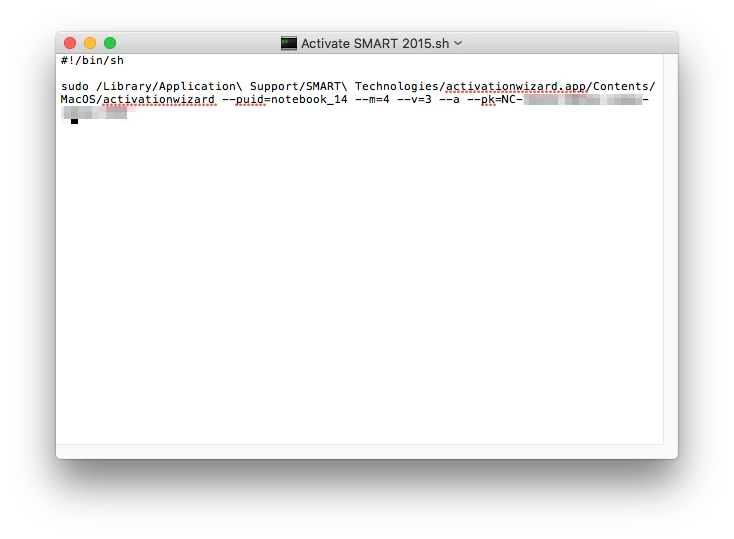
/Library/Application Support/SMART Technologies/activationwizard.app/Contents/MacOS/activationwizard --puid=notebook_14 --m=4 --v=3 --a --pk=NC-xxxxx-xxxxx-xxxxx-xxxx-AAA

works for us. Above is command we run for Notebook 15 smart group

For Notebook 16 smart group we run this one (putting in your activation key)

/Library/Application Support/SMART Technologies/activationwizard.app/Contents/MacOS/activationwizard --puid education_bundle --uipack education_bundle --m=4 --v=3 --pks NC-xxxxx-xxxxx-xxxxx-xxxx-AAA --a


7 replies

Forum|alt.badge.img+17
  • Honored Contributor
  • 1143 replies
  • Answer
  • June 14, 2016

Create a smart group "has Smart notebook X version installed" (15 or 16 or whatever you use)

Create a policy that runs once per computer - no script needed. go to execute command 'tab' and enter (putting in your activation key). Scope policy to your smart group.

/Library/Application Support/SMART Technologies/activationwizard.app/Contents/MacOS/activationwizard --puid=notebook_14 --m=4 --v=3 --a --pk=NC-xxxxx-xxxxx-xxxxx-xxxx-AAA

works for us. Above is command we run for Notebook 15 smart group

For Notebook 16 smart group we run this one (putting in your activation key)

/Library/Application Support/SMART Technologies/activationwizard.app/Contents/MacOS/activationwizard --puid education_bundle --uipack education_bundle --m=4 --v=3 --pks NC-xxxxx-xxxxx-xxxxx-xxxx-AAA --a


mvu
Forum|alt.badge.img+20
  • Jamf Heroes
  • 963 replies
  • June 14, 2016

Which SMART Notebook package did you burn in the image: "Delayed Activation" or the one with it activated?

We did something similar to CasperSally but as a script. The script was set to run when users logged in (it ran once).


Forum|alt.badge.img+7
  • Author
  • Contributor
  • 37 replies
  • June 14, 2016

@CasperSally Your idea worked, but for some reason I had to use the Notebook 16 command to activate 15.2... Not sure why.

I actually wasn't aware of the "Execute Command" function under "Files and Processes". We've only had Casper for a few weeks. Thanks!


Forum|alt.badge.img+17
  • Honored Contributor
  • 1143 replies
  • June 14, 2016

@whippst it's a nice little trick to have in your toolbox. Glad it worked out for you.


Forum|alt.badge.img+2
  • New Contributor
  • 1 reply
  • January 11, 2018

The command for Notebook 16 worked for me on Notebook 17 running in Sierra OS. Nice little feature that I didn't know existed until now. Thanks!


Forum|alt.badge.img+17
  • Honored Contributor
  • 1143 replies
  • January 11, 2018

Glad the info helps some.

We've started using their Smart Install Manager that builds the key into a customized pkg installer for your environment, you can access that here:
https://education.smarttech.com/en/products/notebook/download#admin

However, we've found it seems like if staff members don't open it after 30 days it asks them to register/activate anyway. We put a self service policy in place with the command from above to address those teachers.


Forum|alt.badge.img+3
  • New Contributor
  • 2 replies
  • September 24, 2018

We recently started having an error message pop up in Smart Notebook that our subscription has expired. Some error prevented the software from getting the new license upon renewal. Re-activating the license with this script using the original NC-xxxxx..xxxxx-AAA license did successfully activate and pull the new license.