Question

Snagit 2019

  • June 24, 2019
  • 13 replies
  • 84 views

Forum|alt.badge.img+4

Has anyone deployed Snagit 2019 with the license key? Ive tried using composer and installing snagit, activating it then creating the package but so far I havent had any luck doing it that way.
Any Suggestions?

13 replies

talkingmoose
Forum|alt.badge.img+36
  • Community Manager
  • June 24, 2019

I use Snagit myself but haven't had a need to deploy it, however, I believe activation requires online connectivity to communicate with TechSmith's activation servers. If that's the case, then there's probably not a file you can deploy to other systems after activation. It would likely be tied to the hardware of the device and not be transferrable.

You might reach out to TechSmith and ask for a solution for mass deployment from a centralized location to see what they offer.


Forum|alt.badge.img+6
  • Contributor
  • June 24, 2019

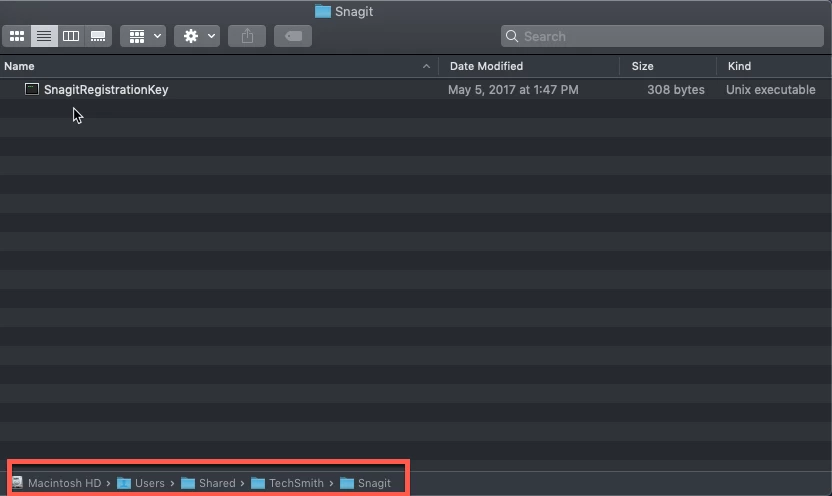
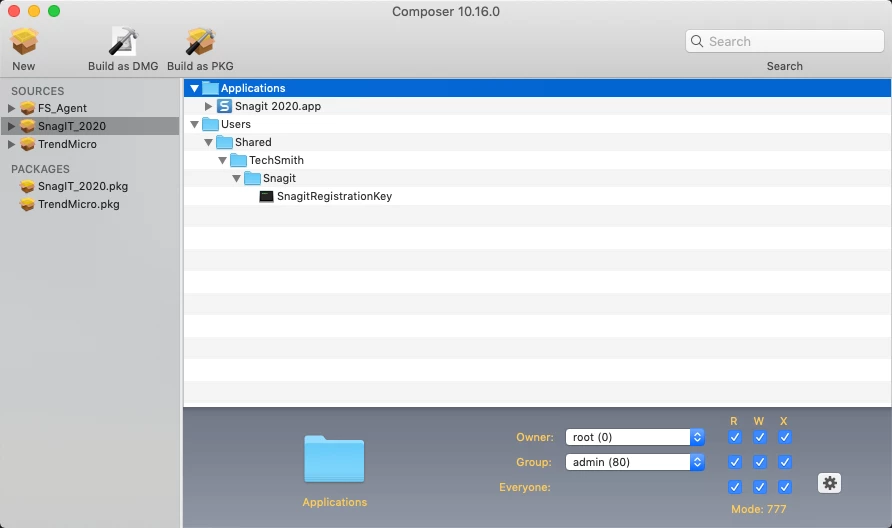
From my experience (but i have not done 2019 yet), Snag It is just looking for the Activation Key in a specific file path and then send to their servers (does require online connectivity). I just add the PKG from their website and just deploy the key as a separate PKG or DMG in my policy to the necessary location (see screen shot).


Forum|alt.badge.img+20
  • Valued Contributor
  • June 24, 2019

Agree with @TJ.Edgerly on this. We do the same thing for SnagIt.


Forum|alt.badge.img+4
  • Author
  • Contributor
  • June 24, 2019

@TJ.Edgerly So I used composer and created a pkg for the snagit application and a separate pkg for the users/shared/techsmith/snagit with the Snagitregistrationkey file in it. I create a policy in Jamf pro containing the both pkgs then I install it on my test machine from Self Service and when I open Snagit it still asks for the license key or start trial. So I tried to just run the registrationkey file but didnt have permissions it said. So I went back and made the pkg for the registrationkey and edited the permissions for that and changed the owner. Now it works properly. Thanks for the help!


Forum|alt.badge.img+11
  • Valued Contributor
  • November 26, 2019

Wouldn't you be able to compile this in one package as apposed to two?

I created a package with the installer and the key in one package I have not tested it though just theory crafting.


Forum|alt.badge.img+31
  • Hall of Fame
  • November 26, 2019

There's an AutoPkg recipe for SnagIt, which includes the option to add the license code to the installer via an AutoPkg override:

https://github.com/autopkg/bkerns-recipes/tree/master/TechSmithSnagit


rqomsiya
Forum|alt.badge.img+12
  • Honored Contributor
  • February 10, 2020

Has anyone successfully deployed snagit 2020 PPPC?


roiegat
Forum|alt.badge.img+16
  • Valued Contributor
  • March 11, 2020

Also wondering if anyone has done the Snagit 2019 PPPC?


Forum|alt.badge.img+5
  • Contributor
  • July 23, 2020

I can't figure out how to get the Audio Capture Engine (ACE) component to automatically install as well. Anyone find a way to do this?


Forum|alt.badge.img+5
  • New Contributor
  • August 12, 2020

Can someone please help me with the autopkg and applying the snagit key. I am very new to this, and don't know much about anything. I can create the package with autopkg fine, but i am not sure how to apply the reg key as per:
*To use SNAGIT_KEY, create an override and add the key value. The needed key value can be pulled from a machine that has already been registered with the following:

cp /Users/Shared/TechSmith/Snagit/SnagitRegistrationKey /Users/Shared/TechSmith/Snagit/SnagitRegistrationKey.plist
defaults read /Users/Shared/TechSmith/Snagit/SnagitRegistrationKey.plist RegKey | sed 's/[<> ]//g'*

I tried editing the override file to add the key provided by snagit it to : here:
<dict> <key>NAME</key> <string>TechSmithSnagit</string> <key>SNAGIT_KEY</key> <string>xxx</string>

But that didn't generate the Snagitregistrationkey in the /Users/Shared dir when i installed the package.

The command cp /Users/Shared/TechSmith/Snagit/SnagitRegistrationKey /Users/Shared/TechSmith/Snagit/SnagitRegistrationKey.plist
defaults read /Users/Shared/TechSmith/Snagit/SnagitRegistrationKey.plist RegKey | sed 's/[<> ]//g'
shows {length=60, bytes=0xfffxxxx...30434} and not sure how that then needs to be applied to the overwrite file.

Any help would be greatly appreciated.


Forum|alt.badge.img+1
  • New Contributor
  • September 28, 2020

I have Snagit 2020 deployed to my end users devices, they are not admins. Build one Package in Composer with the Snagit installer and your license key, Build a second Package for ACE. You can download the installer here, https://assets.techsmith.com/Downloads/TechSmith-Record-System-Audio-Installer.app.zip, and use composer to Snapshot the install. Then bundle that with your policy to install your Snagit app with a higher priority so it installs before Snagit. Create a PPPC for Snagit and Snagit Helper. Force a restart after success of the entire policy and you are good to go. Enjoy.


Forum|alt.badge.img+3
  • New Contributor
  • November 17, 2020

@tonymuni do you have idea on creating the snagit 2021 pkg and PPPC ?


Forum|alt.badge.img+4
  • New Contributor
  • June 17, 2021

@sendhil103 this is the updated installation advice by Snagit https://support.techsmith.com/hc/en-us/articles/115007344888-Enterprise-Install-Guidelines-for-Snagit-on-MacOS