Question

Snagit 2022 - Audio and PPPC

  • July 28, 2022
  • 15 replies
  • 50 views

Forum|alt.badge.img+9

Hello All,

Reaching out to the community to see if anyone has resolved the issue on M1 Macs with Snagit 2022 and the Audio component (Boot into recovery to allow system extension).

I have a successful package for Snagit 2022 (Application and license file)

I am looking for solutions for these problems

  • PPPC for some of the approvals. I could probably wing this with PPPC and try out a few settings.
  • System Extensions for M1 - right now the user has to boot into recovery, lower the security settings, boot into macOS, accept the System Extension. You can then boot back into macOS recovery and elevate the security settings.  
    • We cannot expect a C Level user to do this (or even any user to do this). What if a firmware password is on the device.

Thanks all.

15 replies

sdagley
Forum|alt.badge.img+25
  • Jamf Heroes
  • July 29, 2022

@pueo Are you're looking to record a Mac's screen and audio coming from an app? If so you might want to consider an alternative to SnagIt which doesn't require the degraded security shuffle like the combination of QuickTime Player included with macOS which does screen captures and Loopback from Rogue Amoeba (https://rogueamoeba.com/loopback/ and will run as a free trail) which will allow you to pipe the audio from an app into QuickTime Player.


Forum|alt.badge.img+9
  • Author
  • Contributor
  • July 29, 2022

@pueo Are you're looking to record a Mac's screen and audio coming from an app? If so you might want to consider an alternative to SnagIt which doesn't require the degraded security shuffle like the combination of QuickTime Player included with macOS which does screen captures and Loopback from Rogue Amoeba (https://rogueamoeba.com/loopback/ and will run as a free trail) which will allow you to pipe the audio from an app into QuickTime Player.


@sdagley Thanks for replying.  I cannot say what our users use Snagit for, but I'm sure its screen and video capture.  I will mention the alternate and see how that flies.
We have to consider our audience as well. What ever we use has to be pretty easy and not complex for our end users (Ea's, Managers etc). We are a corporate resource company. The experience 'should' be similar.  I am more shocked at  ACE for not developing a System Extension. Apple Silicon has been around for 2years now.  


sdagley
Forum|alt.badge.img+25
  • Jamf Heroes
  • July 29, 2022

@sdagley Thanks for replying.  I cannot say what our users use Snagit for, but I'm sure its screen and video capture.  I will mention the alternate and see how that flies.
We have to consider our audience as well. What ever we use has to be pretty easy and not complex for our end users (Ea's, Managers etc). We are a corporate resource company. The experience 'should' be similar.  I am more shocked at  ACE for not developing a System Extension. Apple Silicon has been around for 2years now.  


@pueo yeah, my reply didn't exactly offer a simple alternative, I was just looking for a way to skip the requirement to change the Security settings.

Agreed, I would have no desire to spend money with a vendor who hasn't yet introduced updates for System Extensions instead of Kernel Extensions, or native support for M-Series processor. 


Forum|alt.badge.img+3
  • New Contributor
  • August 9, 2022

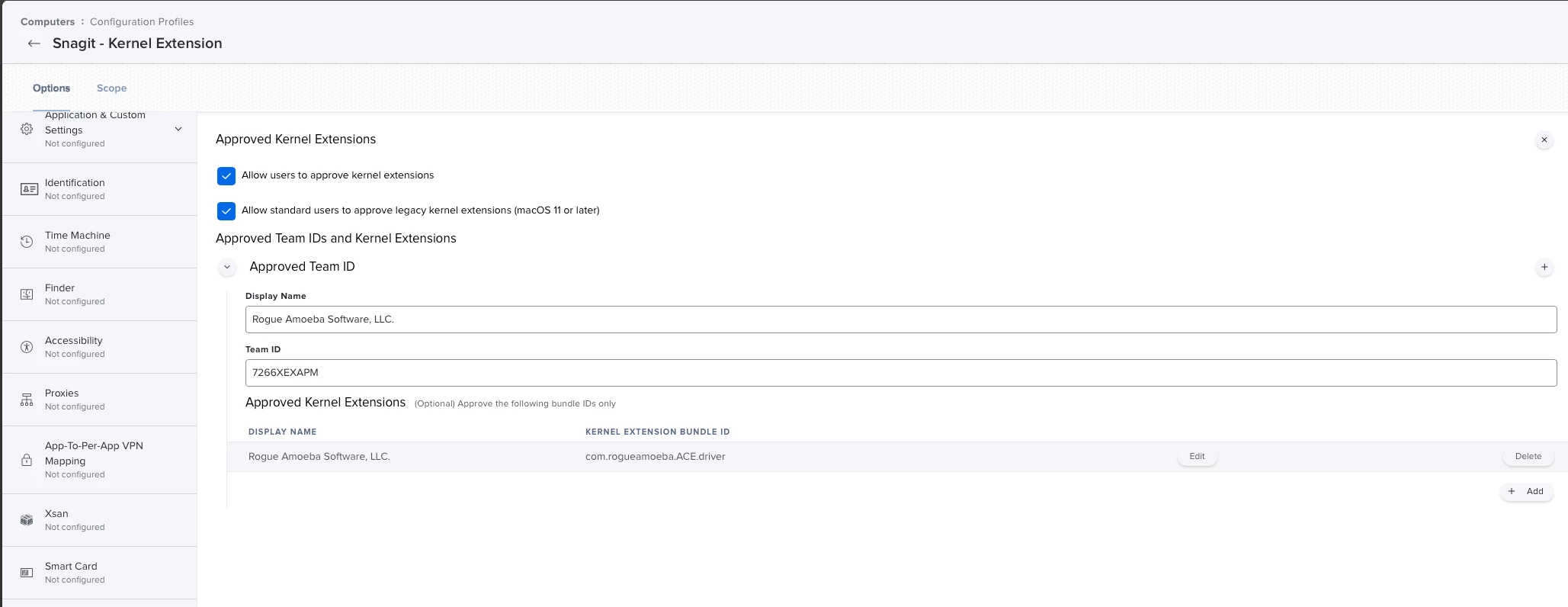
Good news! As long as you have MDM available to you (and if you're here, I'm guessing you do), you can skip the Recovery Mode shuffle. I was able to successfully add an "Approved Kernel Extensions" payload to my config profile and add a "MDM Restart with Kernel Cache Rebuild" payload to my deployment policy, and Snagit 2022 seems to be perfectly happy with the result as far as the system audio is concerned. 

If you haven't seen this reference, it may be worth a read:  https://docs.jamf.com/technical-articles/Managing_Legacy_Kernel_Extensions_in_macOS_Using_Jamf_Pro.html

I've only tried this on Monterey, but I believe it would work similarly with the past few major versions.

That said, I'm afraid there's still a fly in the ointment. So far, I am struggling a bit with the Screen Recording permission. I built out a PPPC payload on the same config profile, and it does indeed allow the user to allow SR for both Snagit and its Helper, but Snagit isn't detecting that correctly. It somehow thinks the Helper hasn't been allowed. So I'm still working on it.

It's a little weird that the system audio component doesn't show up in any list of kexts that I can see, but the program is working. Hope that helps!


Forum|alt.badge.img+9
  • Author
  • Contributor
  • August 9, 2022

Good news! As long as you have MDM available to you (and if you're here, I'm guessing you do), you can skip the Recovery Mode shuffle. I was able to successfully add an "Approved Kernel Extensions" payload to my config profile and add a "MDM Restart with Kernel Cache Rebuild" payload to my deployment policy, and Snagit 2022 seems to be perfectly happy with the result as far as the system audio is concerned. 

If you haven't seen this reference, it may be worth a read:  https://docs.jamf.com/technical-articles/Managing_Legacy_Kernel_Extensions_in_macOS_Using_Jamf_Pro.html

I've only tried this on Monterey, but I believe it would work similarly with the past few major versions.

That said, I'm afraid there's still a fly in the ointment. So far, I am struggling a bit with the Screen Recording permission. I built out a PPPC payload on the same config profile, and it does indeed allow the user to allow SR for both Snagit and its Helper, but Snagit isn't detecting that correctly. It somehow thinks the Helper hasn't been allowed. So I'm still working on it.

It's a little weird that the system audio component doesn't show up in any list of kexts that I can see, but the program is working. Hope that helps!


Sounds like a good fix. But I did not have any success on my first attempt. :-(

I used 7266XEXAPM as my Team ID and gave a Display name of Rogue Amoeba Software.  The Kernel Extension would not load onto the Mac.

Any chance you can share your Profile? I am very interested in testing this.

Thanks


Forum|alt.badge.img+3
  • New Contributor
  • August 9, 2022

I don't think I can share my whole profile, but I can confirm that Team ID is correct.  I also used the kernel extension bundle ID of "com.rogueamoeba.ACE.driver".


Forum|alt.badge.img+9
  • Author
  • Contributor
  • August 10, 2022

I don't think I can share my whole profile, but I can confirm that Team ID is correct.  I also used the kernel extension bundle ID of "com.rogueamoeba.ACE.driver".


The profile is not loading onto my Silicon Mac.  Fails every time.

My profile is not revealing any company information so here it is.


Forum|alt.badge.img+3
  • New Contributor
  • August 10, 2022

I might have an idea. You say the profile isn't loading - do you mean if you go to System Preferences > Profiles on your target machine, you don't see the profile present there?

I think the profile needs to be already present at the time of app installation. What I did was create a static group in Jamf that I assigned both the profile and the self-service installation policy to. When I add a computer to the group, it gets the policy almost immediately, definitely before the user has a chance to run the self-service install.

If, maybe, you had assigned the profile to a smart group instead, and the smart group was based on having Snagit installed, I don't think it would work because the profile wouldn't land until after the app installation was complete and Jamf recon had run.
Do you think it could be an order-of-operations problem like something like that?


Forum|alt.badge.img+3
  • New Contributor
  • August 10, 2022

Oh, and yes, those settings look functionally identical to what I have for the Approved Kernel Extensions payload, so I think that part should be ok.


Forum|alt.badge.img+9
  • Author
  • Contributor
  • August 12, 2022

I might have an idea. You say the profile isn't loading - do you mean if you go to System Preferences > Profiles on your target machine, you don't see the profile present there?

I think the profile needs to be already present at the time of app installation. What I did was create a static group in Jamf that I assigned both the profile and the self-service installation policy to. When I add a computer to the group, it gets the policy almost immediately, definitely before the user has a chance to run the self-service install.

If, maybe, you had assigned the profile to a smart group instead, and the smart group was based on having Snagit installed, I don't think it would work because the profile wouldn't land until after the app installation was complete and Jamf recon had run.
Do you think it could be an order-of-operations problem like something like that?


I will try this method out and let you know. I haven't had the time this past few days.  


Forum|alt.badge.img+9
  • Author
  • Contributor
  • August 15, 2022

I might have an idea. You say the profile isn't loading - do you mean if you go to System Preferences > Profiles on your target machine, you don't see the profile present there?

I think the profile needs to be already present at the time of app installation. What I did was create a static group in Jamf that I assigned both the profile and the self-service installation policy to. When I add a computer to the group, it gets the policy almost immediately, definitely before the user has a chance to run the self-service install.

If, maybe, you had assigned the profile to a smart group instead, and the smart group was based on having Snagit installed, I don't think it would work because the profile wouldn't land until after the app installation was complete and Jamf recon had run.
Do you think it could be an order-of-operations problem like something like that?


Howdy,

I cannot get the Kernel extension to install. It fails immediately.  I assign my device directly to the profile.  Snagit is uninstalled, I rebooted. Still fails.

My understanding is you can't install Kernel extensions on Big Sur and up unless you allow them too hence the security change. It would be great to figure this out, but we only have a few installs and none are on Apple Silicon, yet.


Forum|alt.badge.img+5
  • Contributor
  • August 31, 2022

Oh, and yes, those settings look functionally identical to what I have for the Approved Kernel Extensions payload, so I think that part should be ok.


Isn't kernel extensions discontinued? 


Forum|alt.badge.img+3
  • New Contributor
  • August 31, 2022

Isn't kernel extensions discontinued? 


Deprecated, discouraged, and a pain to use, but not actually disabled yet.


Forum|alt.badge.img+9
  • Author
  • Contributor
  • August 31, 2022

Deprecated, discouraged, and a pain to use, but not actually disabled yet.


The issue is laziness from TechSmith. They should have created System Extensions by now.  I am not worried about it anymore, we don't have enough Mac seats for it to be a concern.


donmontalvo
Forum|alt.badge.img+36
  • Hall of Fame
  • November 13, 2023

The issue is laziness from TechSmith. They should have created System Extensions by now.  I am not worried about it anymore, we don't have enough Mac seats for it to be a concern.


FWIW  This article is titled "M1/M2 Chip and the Snagit System Audio Capture Component", not sure if this applies to Intel, but just leaving this here...

https://support.techsmith.com/hc/en-us/articles/360056384711-M1-M2-Chip-and-the-Snagit-System-Audio-Capture-Component