Question

Stop students using their phone hotspot on BYOD macbooks

  • May 5, 2026
  • 3 replies
  • 97 views

Forum|alt.badge.img+3

Up until Sonoma I was using this script https://community.jamf.com/t5/jamf-pro/wifi-switching-script/m-p/139275/highlight/true#M128353 But now I can no longer find something that will work. This was handy because it only worked when the school SSIDs were available.

Does anyone have something they use in a school environment?


Thanks in Advance

Matt

3 replies

FerrisBNA
Forum|alt.badge.img+5
  • Contributor
  • May 5, 2026

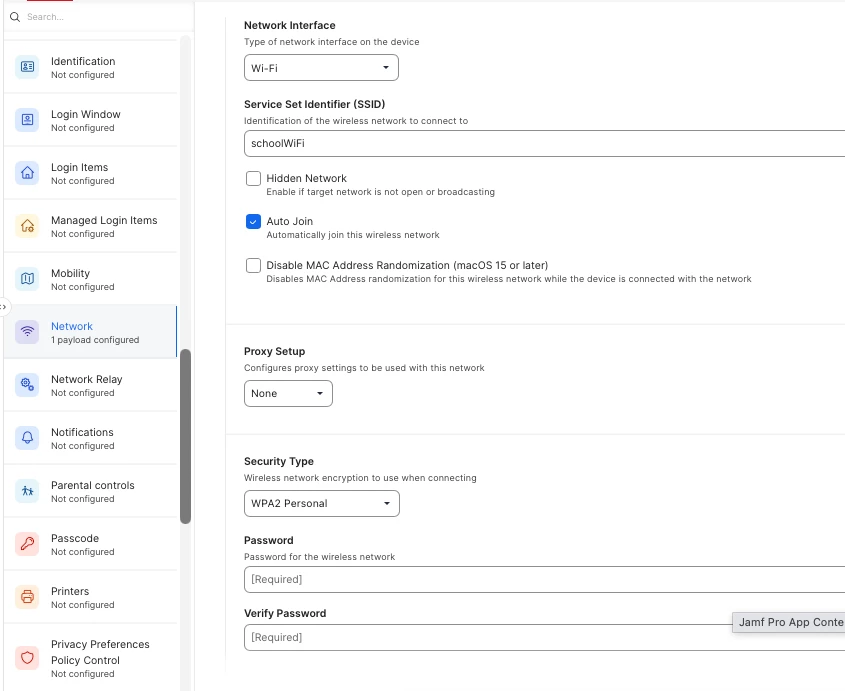
I’d go with a combination of Configuration Profile (Network) and a Script.

  1. Create a configuration profile for your school wifi network.  

This will prioritize this network, but still allow for the device to join other networks.  When the device tries to connect to a network, if this one is there it should select it over all others.

  1. Create a Script that will check if the school wifi is present.  If it IS present then it will trigger the WiFi OFF and then back ON.  What that does is since the WIFI you want is present, the device turns off the WiFi, turns WIFi back on, and then connects to the most prioritized network connection.  Set the script to run at Recuring Check-in.
  2. TEST before implimenting.  

#!/bin/bash

# Replace "SCHOOLWIFI" with your wifi SSID
SCHOOL_SSID="SCHOOLWIFI"

CURRENT_SSID=$(/System/Library/PrivateFrameworks/Apple80211.framework/Versions/Current/Resources/airport -I | awk -F': ' '/ SSID/ {print $2}')

if [[ "$CURRENT_SSID" != "$SCHOOL_SSID" ]]; then
/usr/sbin/networksetup -setairportpower en0 off
sleep 5
/usr/sbin/networksetup -setairportpower en0 on
fi

FYI: I cheated with the script and used AI to write it.


Chubs
Forum|alt.badge.img+25
  • Jamf Heroes
  • May 5, 2026

I’d go with a combination of Configuration Profile (Network) and a Script.

  1. Create a configuration profile for your school wifi network.  

This will prioritize this network, but still allow for the device to join other networks.  When the device tries to connect to a network, if this one is there it should select it over all others.

  1. Create a Script that will check if the school wifi is present.  If it IS present then it will trigger the WiFi OFF and then back ON.  What that does is since the WIFI you want is present, the device turns off the WiFi, turns WIFi back on, and then connects to the most prioritized network connection.  Set the script to run at Recuring Check-in.
  2. TEST before implimenting.  

#!/bin/bash

# Replace "SCHOOLWIFI" with your wifi SSID
SCHOOL_SSID="SCHOOLWIFI"

CURRENT_SSID=$(/System/Library/PrivateFrameworks/Apple80211.framework/Versions/Current/Resources/airport -I | awk -F': ' '/ SSID/ {print $2}')

if [[ "$CURRENT_SSID" != "$SCHOOL_SSID" ]]; then
/usr/sbin/networksetup -setairportpower en0 off
sleep 5
/usr/sbin/networksetup -setairportpower en0 on
fi

FYI: I cheated with the script and used AI to write it.

Actually the wifi protocol on macOS will use the “least path of resistance” regardless of what is set via a profile.  Ask me how I know...


FerrisBNA
Forum|alt.badge.img+5
  • Contributor
  • May 8, 2026

...


Actually the wifi protocol on macOS will use the “least path of resistance” regardless of what is set via a profile.  Ask me how I know...

Good to know.  By “path of least resistance”, do you mean the lowest latency?