In the top right corner of the screen there has been a notification stating that Check out Photos for OS X notification. Does anyone have a method to stop this notification? I have blocked it in notification center by set the alert style to none and uncheck all the uncheck boxes, and I also have unchecked Automatically check for updates. But seems all not work.
OSX Yosemite. Version 10.10.5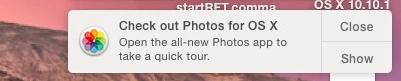

Solved
Suppress Check out Photos for OS X notification
 +4
+4Best answer by fyingf
If that fails to stop that notification launch Photos with the Option key held down and select the option to create a new, empty library. Once the new library is created close Photos and you should stop getting that notification.
Enter your E-mail address. We'll send you an e-mail with instructions to reset your password.