
Question

Suppress Google Cloud Print notification

  • June 6, 2017
  • 2 replies
  • 39 views

Forum|alt.badge.img+6

Hello All,

Since we upgraded to Google Chrome 57 and Higher, every time a user launches chrome, they are greeted by a notification that there is a "New Printer" on your network. This notification will continue to bug users unless they select the "Don't show me this again". I have also verified the "show notifications" is turned off under chrome.
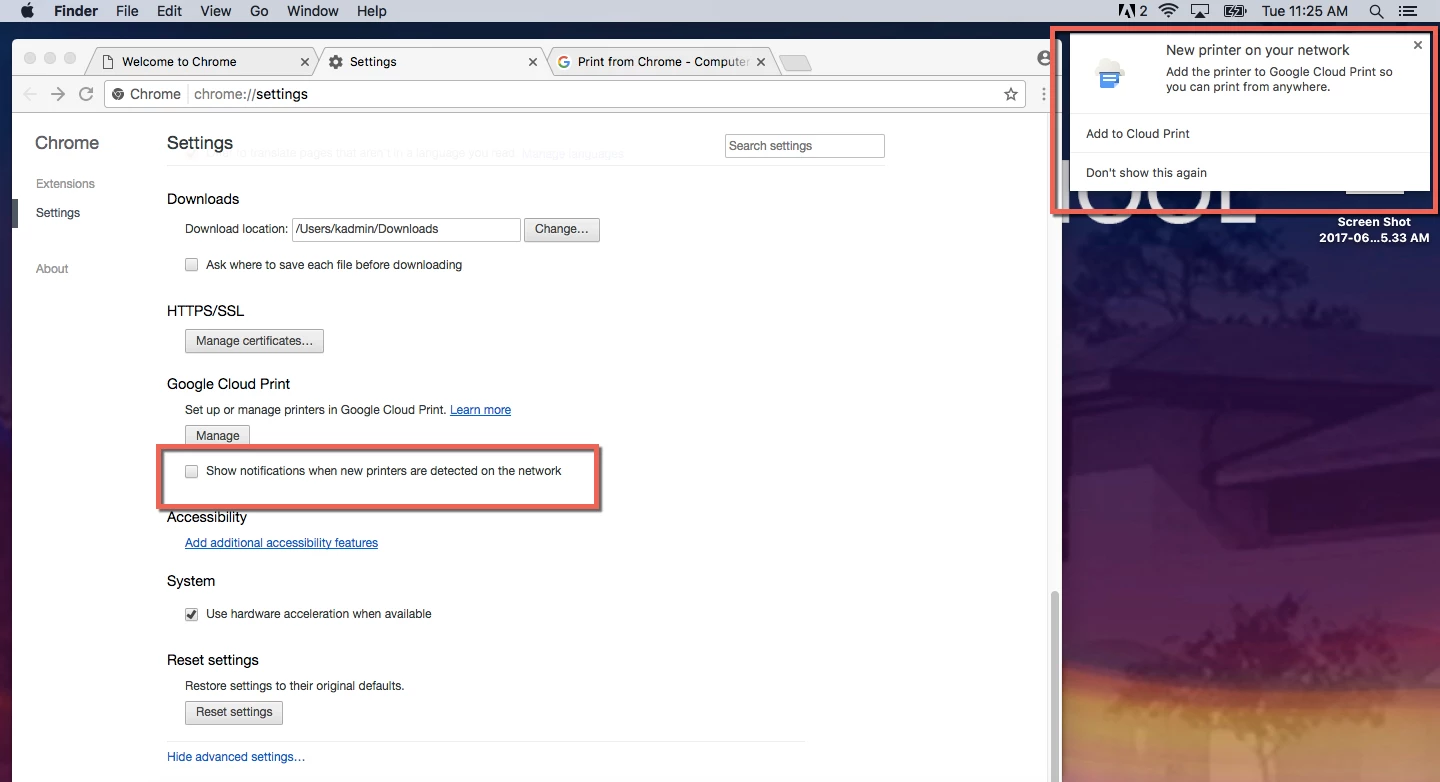
I'd like to leave notification center on...but need to find a way so this does not launch for every user. I've done some searching, but so far have found nothing relevant. I would even be open to disabling a service on the physical printer...but i can't find any documentation on what protocol is used for Google Cloud Printing.

Any help is appreciated.

OSX: 10.12.5
JSS: 9.98

2 replies

mgshepherd
Forum|alt.badge.img+11
  • Contributor
  • June 6, 2017

I probably spent too much time recently in learning how to tame Google Chrome for our lab environment. I did come across this and was able to turn off this feature by using the "Google Chrome Master Preference" file route. I had the following code mentioned in the file which didn't show the popup message when users started Chrome.

"local_discovery": {
        "notifications_enabled": false
                               }

Forum|alt.badge.img+5
  • Contributor
  • January 18, 2018

While it's cool that this can be set via Master Prefs, does it appear that there is a related policy setting to control this item?