
Solved

T2 Chip and Apple Updates

  • December 18, 2018
  • 5 replies
  • 33 views

Forum|alt.badge.img+7

I've had a couple of t2 MBP's refuse to run OS and security updates on wired connections. We aren't blocking anything and it seems to run on wireless just fine.

Is this how the t2 firmware functions? My educated guess is that the firmware for ethernet over usbc is not accessible in the preboot environment, but I'm having a hard time (imagine that) finding any Apple documentation to back this up. Or any documentation for that matter.
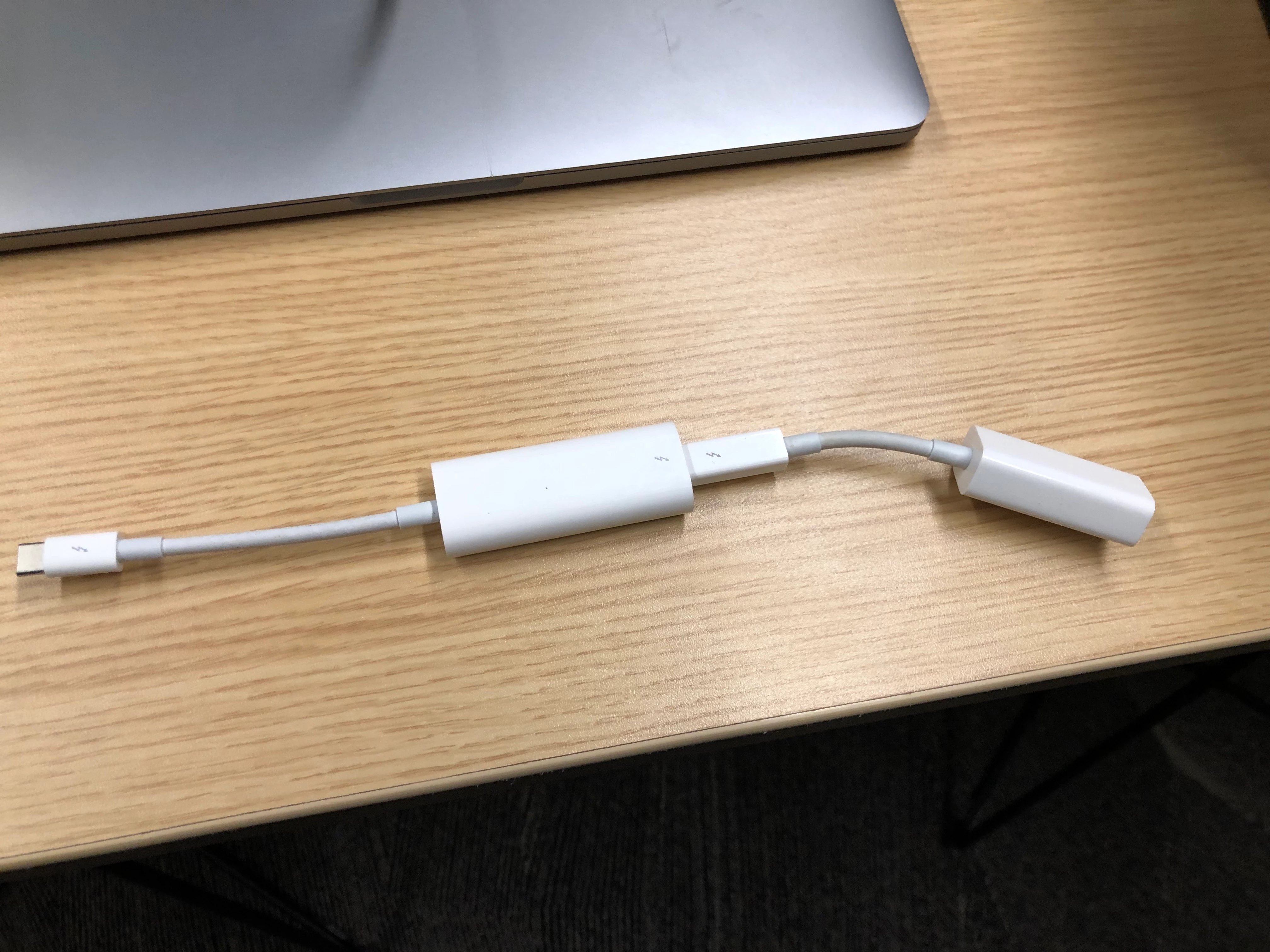
Best answer by sshort

Sadly, I've found the most reliable way to receive an security/firmware update on T2 Macs (using a wired connection) is with a "double-dongle" using the Thunderbolt to Ethernet adapter + the Thunderbolt 3 to Thunderbolt adapter.

Using a dock or the (usually excellent) Anker usb-c ethernet adapter seems to be very hit-or-miss as to whether a user encounters a failed update where they're booted to Recovery and have to select the Startup Disk to get back to the login screen.

The same goes for reliably connecting to Internet Recovery...

5 replies

Forum|alt.badge.img+15
  • Valued Contributor
  • Answer
  • December 18, 2018

Sadly, I've found the most reliable way to receive an security/firmware update on T2 Macs (using a wired connection) is with a "double-dongle" using the Thunderbolt to Ethernet adapter + the Thunderbolt 3 to Thunderbolt adapter.

Using a dock or the (usually excellent) Anker usb-c ethernet adapter seems to be very hit-or-miss as to whether a user encounters a failed update where they're booted to Recovery and have to select the Startup Disk to get back to the login screen.

The same goes for reliably connecting to Internet Recovery...


Forum|alt.badge.img+7
  • Author
  • Contributor
  • December 18, 2018

I wish I could say I was surprised.


Forum|alt.badge.img+5
  • Contributor
  • March 12, 2019

I have to use the same thing just to enroll machines with ABM (Apple Business Manager), internet recovery, anything that needs to talk to apple.

Sorry to bump an old topic, but that pic hits me in the feels... so so hard.


Forum|alt.badge.img+2
  • New Contributor
  • March 13, 2019

I have been able to update our 2018 MacBook Pros on our 802.1x wifi using the "softwareupdate --install -R --all" command. While logged into a user account it downloads the updates and automatically reboots the computer. The -R flag is the only way I have been able to download and install the firmware updates and install without getting stuck in recovery mode. A wired connection has always worked for me as well. We have been using a USB-C to ethernet adapter. If you are having an issue with using a USB-C adapter I would recommend adding its MAC address to the Removable MAC addresses list in your Jamf server settings. https://www.amazon.com/Ethernet-Adapter-uni-Thunderbolt-Compatible/dp/B077KXY71Q.


Forum|alt.badge.img+9
  • New Contributor
  • March 13, 2019

The T2 chipset does not allow the ethernet connection to be active until pre-boot has completed. You can see other external connections are available to be added by adjusting startup security (HT208198) but the Ethernet boot connections are not adjustable in this way any longer.
Lots of organizations are having to re-think their update and deployment strategies as they introduce these new chipsets to their environments.