Question

Team Viewer accessibility issue in Big Sur blank screen

  • June 15, 2021
  • 7 replies
  • 23 views

Forum|alt.badge.img+3
  • New Contributor
  • 7 replies

In BigSur when connecting to TeamViewer, operator see only background and top bar. We have a configuration Profile setup to grant full disk access and with scope All Computers and All Users (Grant Teamviewer Accessibility Rights), we do not get control user grants access, could you guide what might be the issue?
Things that are not automatically checked in SettingsSecurity & Privacy

AccessibilityTeamViewer Host
AccessibilityTeamViewer_Desktop (without it, operator cannot click)
Screen RecordingTeamViewer Host (without it, operator do not see what is happening on desktop)

7 replies

geoff_widdowson
Forum|alt.badge.img+8
  • Contributor
  • 125 replies
  • June 15, 2021

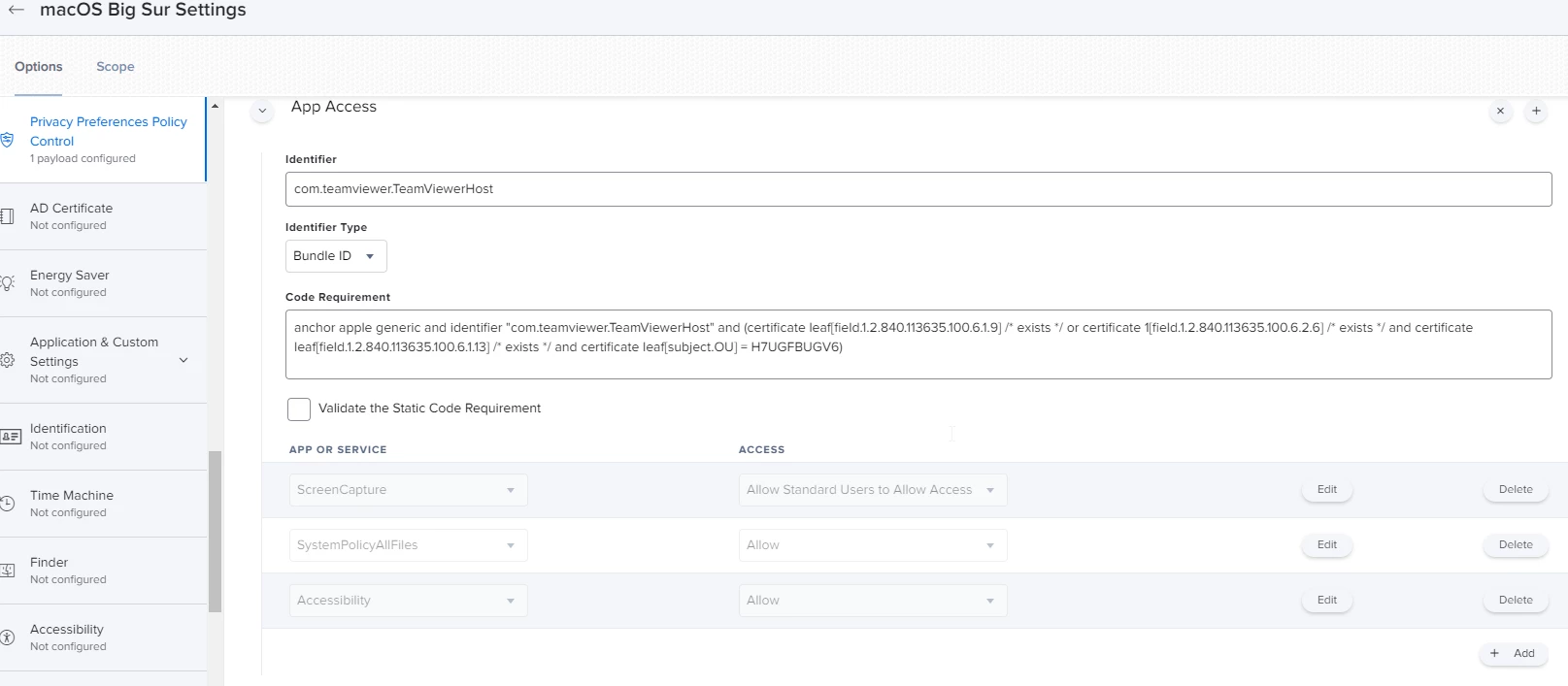
@CSD The user has to tick Teamviewer in the Screen Recording, however Big Sur requires admin rights to do this, but Jamf PPPC can override that. Below is my PPPC for Big Sur.


Forum|alt.badge.img+3
  • Author
  • New Contributor
  • 7 replies
  • June 16, 2021

Hi Geoff, thanks for your response, some how I don't see an option to add App or Service is greyed out, any thing missing here?


mickl089
Forum|alt.badge.img+11
  • Valued Contributor
  • 147 replies
  • June 16, 2021

After rollout this config file, the screen is still blank. The user has still to check the rights for screen. Only a password is not needed anymore...


geoff_widdowson
Forum|alt.badge.img+8
  • Contributor
  • 125 replies
  • June 16, 2021

@mickl089 That's by Apple's design. The user will always have to grant rights. Apple do not want IT or anyone else to be able to control Macs without the user granting rights first. This is the same for any application that uses the screen recording option.


mickl089
Forum|alt.badge.img+11
  • Valued Contributor
  • 147 replies
  • June 16, 2021

Yeah, thank you @geoff.widdowson i know. But this config profile is then for me useless, because we can“t see anything at the first connection with TeamViewer like before. I think there is no need for this then :-(


geoff_widdowson
Forum|alt.badge.img+8
  • Contributor
  • 125 replies
  • June 16, 2021

@mickl089 but if you don't use it, then the user will never be able to grant you rights when you need to remote on, as Big Sur by default only lets admin users enable Screen Recording.


geoff_widdowson
Forum|alt.badge.img+8
  • Contributor
  • 125 replies
  • June 16, 2021

@CSD the 'Add' should only be greyed out when not in edit mode. On the PPPC payload page you have the '' in the top right to add a new 'App Access' and to add new 'App or Service' you use the ' Add' button on bottom right.