
Question

The PSSO registration notification appeared again even though the device is already registered with PSSO

  • July 18, 2025
  • 7 replies
  • 223 views

Shyamsundar
Forum|alt.badge.img+14

Any had this issue , devices where PSSO was already registered, users were prompted again to register. When they attempted to register, the process failed, and the devices entries are removed from Azure, resulting in loss of all organization access.

we had to re-register the devices through System settings > User and Groups > Network account server > Edit, and then click repair.

Note: We use Secure Enclave as authentication type, No changes where done at profiles

7 replies

mvu
Forum|alt.badge.img+22
  • Jamf Heroes
  • July 18, 2025

Haven’t seen this. We use Smart Cards for authentication type. But following this thread out of curiousity. 

Were there any changes with Entra Join or anything in your identity settings?


PMullins1
Forum|alt.badge.img+14
  • Jamf Heroes
  • April 23, 2026

Any had this issue , devices where PSSO was already registered, users were prompted again to register. When they attempted to register, the process failed, and the devices entries are removed from Azure, resulting in loss of all organization access.

we had to re-register the devices through System settings > User and Groups > Network account server > Edit, and then click repair.

Note: We use Secure Enclave as authentication type, No changes where done at profiles

We’re seeing something similar now. Seems to be related to excessive uptime. We’ve added a line instructing the Users to reboot before the registration starts, and again after it finishes.

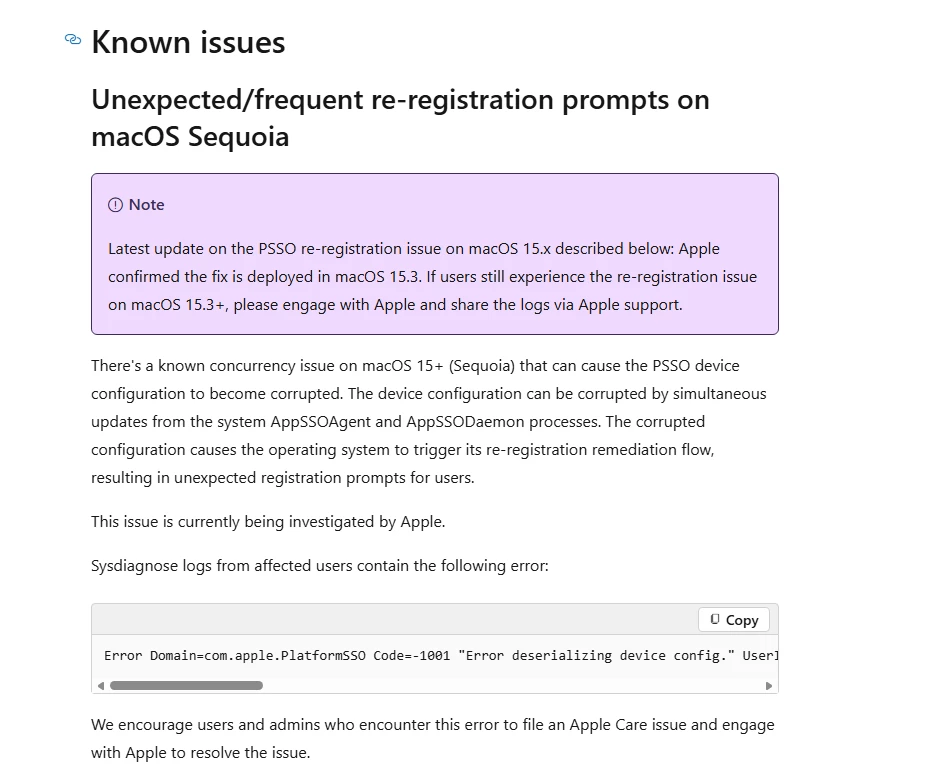
Also, this M$ site says there is a known issue with Sequoia versions older than 15.3. I’ve instructed my Techs to ensure the Users are on the latest version of their respective OS.


Steebie
Forum|alt.badge.img+1
  • New Contributor
  • April 23, 2026

Thinking outside the box - is Company Portal configured in Jamf to auto update?


Could it be relaunching Company Portal post update with the standard “Sign in” screen from not launching it via self service?


I’ve seen this happen on a test device before so wanted to check.


PMullins1
Forum|alt.badge.img+14
  • Jamf Heroes
  • April 24, 2026

Also, this M$ site says there is a known issue with Sequoia versions older than 15.3. I’ve instructed my Techs to ensure the Users are on the latest version of their respective OS.


Can confirm this has happened to Sequoia versions as late as15.7.3, but has not happened with the current version, which is 15.7.5 at this writing.


Forum|alt.badge.img
  • New Contributor
  • April 24, 2026

Any had this issue , devices where PSSO was already registered, users were prompted again to register. When they attempted to register, the process failed, and the devices entries are removed from Azure, resulting in loss of all organization access.

we had to re-register the devices through System settings > User and Groups > Network account server > Edit, and then click repair.

Note: We use Secure Enclave as authentication type, No changes where done at profiles



Forum|alt.badge.img
  • New Contributor
  • April 24, 2026

Any had this issue , devices where PSSO was already registered, users were prompted again to register. When they attempted to register, the process failed, and the devices entries are removed from Azure, resulting in loss of all organization access.

we had to re-register the devices through System settings > User and Groups > Network account server > Edit, and then click repair.

Note: We use Secure Enclave as authentication type, No changes where done at profiles

macOS Platform single sign-on known issues and troubleshooting - Microsoft Entra ID | Microsoft Lea…


Forum|alt.badge.img
  • New Contributor
  • April 24, 2026

Any had this issue , devices where PSSO was already registered, users were prompted again to register. When they attempted to register, the process failed, and the devices entries are removed from Azure, resulting in loss of all organization access.

we had to re-register the devices through System settings > User and Groups > Network account server > Edit, and then click repair.

Note: We use Secure Enclave as authentication type, No changes where done at profiles

macOS Platform single sign-on known issues and troubleshooting - Microsoft Entra ID | Microsoft Lea…