
Question

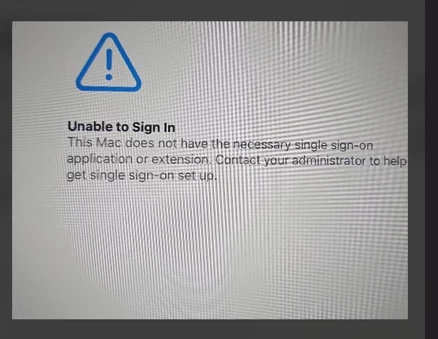
This Mac does not have the necessary single sign-on application or extension.

  • September 22, 2026
  • 5 replies
  • 155 views

JamfProSada
Forum|alt.badge.img+1

Hi Jamf Pro Ninjas,


I have getting this error. I have following links 


https://learn.jamf.com/r/en-US/technical-articles/Deploying_the_Company_Portal_App_to_Mac_Computers


No Luck

→ Wipe device Twice

→ deleted and recreate the profile twice 

→ check the version(app is on latest version) and reinstall company portal


Can you pleas assist me?
 

5 replies

_Daley
Forum|alt.badge.img+7
  • Contributor
  • September 22, 2026

I see that the latest company portal version is 5.2608.0, have you tried it with that one? 

It might also help to know what version of MacOS this device is running to find your issue. Also, it might be worth checking the SSO config with app-sso platform -s


JamfProSada
Forum|alt.badge.img+1
  • Author
  • New Contributor
  • September 22, 2026

Hi _Daley,


Thanks for your response 


Version is 5.2606.0


Tried running this command terminal app-sso platform -s there were no registrations we found. 


I am confused why extension are nor deployed. Please let me know if you need further information.


sharriston
Forum|alt.badge.img+10
  • Valued Contributor
  • September 22, 2026

Two questions, where/how are you deploying company portal and what does your PreStage Enrollment look like?


For simplified setup company portal needs to be deployed via the prestage or something like Jamf Setup manager, and the Setup manager option only works if the prestage is set to unauthenticated. 


JamfProSada
Forum|alt.badge.img+1
  • Author
  • New Contributor
  • September 24, 2026

Hi Sharriston,


Thanks for your message. I have tried it but still no luck. I still cannot get my Platform SSO going on the device. 


Can you please share any documentation you have around configuring platform SSO and I have followed this documentation but it didn’t work Deploying the Company Portal App to Mac Computers • Technical Articles • Jamf Learning Hub 


sharriston
Forum|alt.badge.img+10
  • Valued Contributor
  • September 24, 2026

I followed this guide when I set it up originally: https://hcsonline.com/support/resources/white-papers/simplified-setup-for-platform-single-sign-on-for-mac-jamf-pro-intune-addendum


You need to make sure Company Portal is distributed via your prestage and make sure the config profile for SSO is delivered via prestage as well.