Solved

Unable to upload renewed Device token

  • January 28, 2022
  • 10 replies
  • 111 views

DBrowning
Forum|alt.badge.img+24

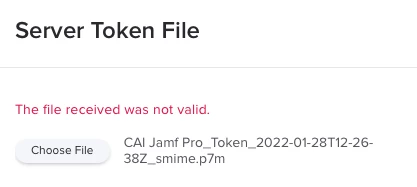
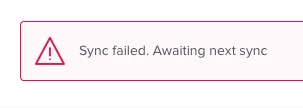
Going to upload the new device token and getting an error message "The File received is not valid".  Anyone got any ideas?  Sync is now failing due to downloading a new Token.
Best answer by DBrowning

I uploaded a new PublicKey and then downloaded another new Device Token and that seems to have work!!

10 replies

howie_isaacks
Forum|alt.badge.img+23
  • Esteemed Contributor
  • January 28, 2022

I had the same issue last year. When I called Jamf Support, they suggested that I do the upload using a private browser. That worked. 


DBrowning
Forum|alt.badge.img+24
  • Author
  • Esteemed Contributor
  • January 28, 2022

I had the same issue last year. When I called Jamf Support, they suggested that I do the upload using a private browser. That worked. 


Just tried that and still no luck.  Thanks for the suggestion!!


DBrowning
Forum|alt.badge.img+24
  • Author
  • Esteemed Contributor
  • Answer
  • January 28, 2022

I uploaded a new PublicKey and then downloaded another new Device Token and that seems to have work!!


howie_isaacks
Forum|alt.badge.img+23
  • Esteemed Contributor
  • January 28, 2022

My post from last year has a response that may help. 

https://community.jamf.com/t5/jamf-pro/quot-the-file-received-was-not-valid-quot-error-while-importing-a/td-p/233830 

@hodgesji suggested something that may solve your issue.


howie_isaacks
Forum|alt.badge.img+23
  • Esteemed Contributor
  • January 28, 2022

I uploaded a new PublicKey and then downloaded another new Device Token and that seems to have work!!


Great! I had just replied letting you know about something that someone suggested to me when I had this problem. He suggested the same thing.


Forum|alt.badge.img
  • New Contributor
  • October 25, 2022

I uploaded a new PublicKey and then downloaded another new Device Token and that seems to have work!!


Worked! Thanks


Forum|alt.badge.img+11
  • Contributor
  • June 6, 2023

I uploaded a new PublicKey and then downloaded another new Device Token and that seems to have work!!


I appreciate that many people are posting back that uploading a new JSS Public Key to ASM is the accepted solution, but I've not found additional information about whether there are OTHER CONSEQUENCES to uploading the new public key.  If I do this will I need to update/renew any other tokens or anything besides the Apple Device Enrollment tokens (which is what brought me here in the first place.... "file not valid" error.)

Can someone confirm that replacing the Jamf public key in ASM had no other consequences and resolved ONLY this problem?


howie_isaacks
Forum|alt.badge.img+23
  • Esteemed Contributor
  • June 7, 2023

I appreciate that many people are posting back that uploading a new JSS Public Key to ASM is the accepted solution, but I've not found additional information about whether there are OTHER CONSEQUENCES to uploading the new public key.  If I do this will I need to update/renew any other tokens or anything besides the Apple Device Enrollment tokens (which is what brought me here in the first place.... "file not valid" error.)

Can someone confirm that replacing the Jamf public key in ASM had no other consequences and resolved ONLY this problem?


I have had to do this several times while working as a contractor recently for a company that has over 700 Jamf Pro servers. We didn't see any issues with doing this.


Forum|alt.badge.img+7
  • Contributor
  • June 24, 2023

this worked for me! ty


Forum|alt.badge.img
  • New Contributor
  • November 6, 2023

:( No love for my attempts

