Question

Updating User and Location

  • Aug 7, 2023 5:14 PM UTC
  • 9 replies
  • 228 views

Forum|alt.badge.img+3

Hello all,

I'm trying to see if there is a way to automatically update user & location field based on the user's login. We currently have Jamf Connect setup and wanted to know if there is a way to get the logged in user to appear in the "email address" or "full name" of the user & location field. Our main goal is here to identify and tie a device to the user using it within the organization. Thanks in advance for any guidance here. 

9 replies

jamf-42
Forum|alt.badge.img+17
  • Esteemed Contributor
  • Aug 7, 2023 5:20 PM UTC

you can use recon and parse values as required.. 


Forum|alt.badge.img+3
  • Author
  • New Contributor
  • Aug 7, 2023 5:21 PM UTC

you can use recon and parse values as required.. 


Thanks for your reply!


How do I make this change?


jamf-42
Forum|alt.badge.img+17
  • Esteemed Contributor
  • Aug 7, 2023 5:30 PM UTC

Thanks for your reply!


How do I make this change?


this gives you logged in user

logdinuser=$(/usr/bin/stat -f%Su /dev/console)

then parse this to a recon with what-ever tag you require..

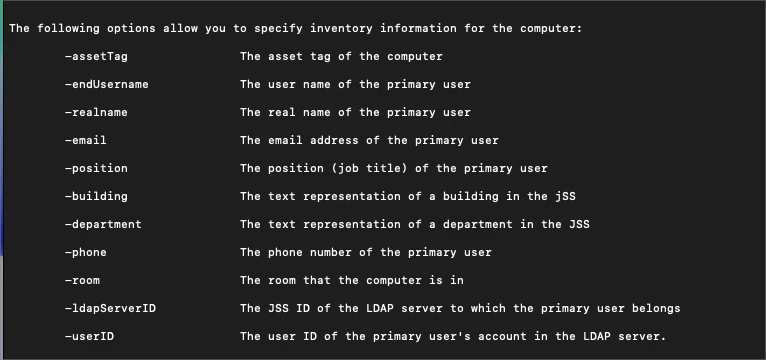
jamf recon -endUserName "$logdinuser"

 script in policy or files and processes 


Forum|alt.badge.img+3
  • Author
  • New Contributor
  • Aug 7, 2023 5:33 PM UTC

this gives you logged in user

logdinuser=$(/usr/bin/stat -f%Su /dev/console)

then parse this to a recon with what-ever tag you require..

jamf recon -endUserName "$logdinuser"

 script in policy or files and processes 


I have the below script currently and it is only listing a username as "root" but there is no account called root. It should be a UPN that is logged into the account using Jamf connect.


# Get the logged in users username
loggedInUser=`/bin/ls -l /dev/console | /usr/bin/awk '{ print $3 }'`

echo "Running recon for $loggedInUser `date`..."

# Run recon, submitting the users username which as of 8.61+ can then perform an LDAP lookup
jamf recon -endUsername $loggedInUser

echo "Finished running recon for $loggedInUser `date`..."


jamf-42
Forum|alt.badge.img+17
  • Esteemed Contributor
  • Aug 7, 2023 5:39 PM UTC

I have the below script currently and it is only listing a username as "root" but there is no account called root. It should be a UPN that is logged into the account using Jamf connect.


# Get the logged in users username
loggedInUser=`/bin/ls -l /dev/console | /usr/bin/awk '{ print $3 }'`

echo "Running recon for $loggedInUser `date`..."

# Run recon, submitting the users username which as of 8.61+ can then perform an LDAP lookup
jamf recon -endUsername $loggedInUser

echo "Finished running recon for $loggedInUser `date`..."


all scripts / file and processes run as root..  the /bin/stat works.. 

 also in case you have funky users names.. use "$variable" just in case.. 


stevewood
Forum|alt.badge.img+38
  • Hall of Fame
  • Aug 7, 2023 6:36 PM UTC

Since you are using Jamf Connect you can grab the exact UPN of the user that is logged in from the state plist file in the user's home folder:


/Users/<user>/Library/Preferences/com.jamf.connect.state.plist


Couple that with the method to grab logged in user and you get something like:


loggedInUser=$(/usr/bin/stat -f%Su /dev/console) user_upn=$(/usr/bin/defaults read "/Users/$loggedInUser/Library/Preferences/com.jamf.connect.state.plist" UserUPN) jamf recon -endUsername $user_upn


You can set that to run each login via a LaunchDaemon, OR, you can use the Login Script features of Jamf Connect: https://learn.jamf.com/bundle/jamf-connect-documentation-2.22.0/page/Login_Window_Preferences.html

As always, test, test, test, test.... and test some more.


Forum|alt.badge.img+3
  • Author
  • New Contributor
  • Aug 8, 2023 3:31 PM UTC

Hi @stevewood ,

Thanks for sending this information, I have this mentioned script running via Policy on my test machine. The username field is still not populating under "user & location" am I doing something wrong? Thanks for all the help!


Forum|alt.badge.img+3
  • Author
  • New Contributor
  • Aug 8, 2023 3:32 PM UTC

all scripts / file and processes run as root..  the /bin/stat works.. 

 also in case you have funky users names.. use "$variable" just in case.. 


Thanks, I've also tried this but nothing is populating under the username field. 


jamf-42
Forum|alt.badge.img+17
  • Esteemed Contributor
  • Aug 8, 2023 4:02 PM UTC

Hi @stevewood ,

Thanks for sending this information, I have this mentioned script running via Policy on my test machine. The username field is still not populating under "user & location" am I doing something wrong? Thanks for all the help!


on a test Mac.. just run the recon -endUsername TESTUSER

and check the record.. if that works, something wrong with the code getting the user name.. 

add

set -x 

after the shebang (#!/bin/sh) to see full output in the policy script log.


tested: