Question

User automatically logging off after 10 minutes on Shared iPads

  • Oct 22, 2024 8:00 AM UTC
  • 3 replies
  • 478 views

Forum|alt.badge.img+6

Hi!

We recently noticed that our Shared iPads automatically log off a user after 10 minutes of inactivity. (I do know about the equally unsatisfying screen lock after 2 minutes, but that's not it.)


I'm quite positive that this wasn't the case last year when we had the same scenario. Is there any way of disabling automatic logging off or modifying the period of grace for inactivity? 

(In addition, some updates must've led to the logging-off process, i. e. writing data back to the managed iCloud accounts, taking way longer [around 2-3 minutes] than earlier this year, such that easily logging in again is not really feasible.)

Any input much appreciated!

Neven

3 replies

Forum|alt.badge.img+8
  • Valued Contributor
  • Oct 22, 2024 3:55 PM UTC

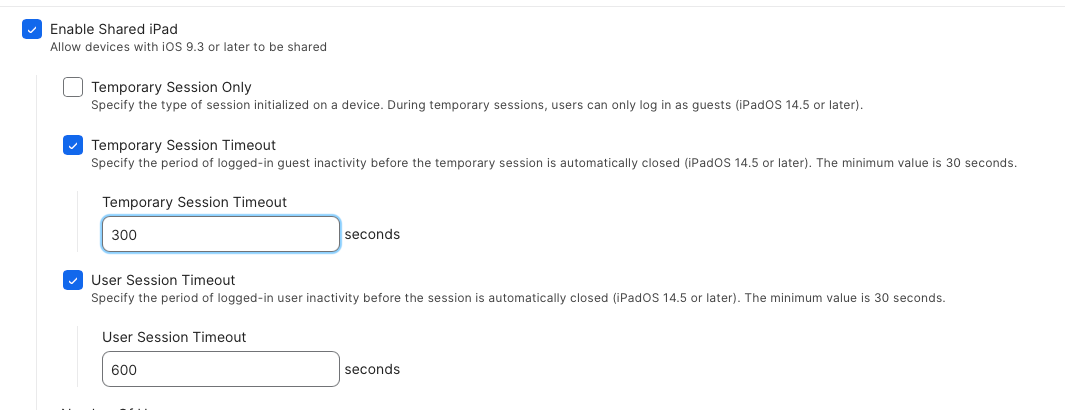
You can modify the session timeout in both the prestage and through the MDM command Adjust Shared iPad Settings. The minimum is 30 seconds.


Shyamsundar
Forum|alt.badge.img+14
  • Jamf Heroes
  • Oct 22, 2024 6:11 PM UTC

On the Prestage Enrollment page, you can change the timeout period. Instead of Temporary session timeout, try enabling user session timeout. 


Forum|alt.badge.img+6
  • Author
  • Contributor
  • Oct 25, 2024 6:28 AM UTC

@_gsm Thanks! I'm pretty sure, though, that the MDM command "Adjust Shared iPad Settings" is (unfortunately) only available in Jamf PRO. Am I overlooking something?

@Shyamsundar Thanks! I'm aware of that and have already adjusted the setting to 3600 (is there a maximum value?), but want to avoid resetting the devices. That'll be my last resort ...