Solved

VPP account "HLC Casper VPP" expiring in 30 days

  • September 12, 2022
  • 5 replies
  • 37 views

Forum|alt.badge.img+12

Googled.  Found this.  It doesnt reference anything like my Apple School Manager.

Is there documentation for exactly how to do this now?

Thanks for any help.

Best answer by RLR

Thanks.

It looks like its now under User > Preferences > Your MDM Servers > Choose Server > Download Token

This part makes me leery, so I want to verify that's the correct place:
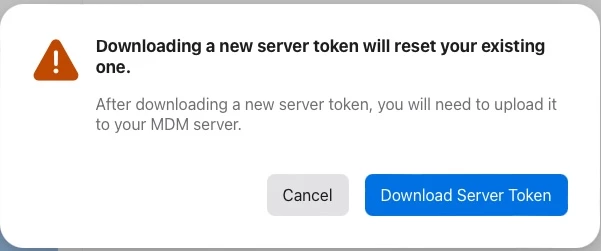
Thanks!


Found it. It's under User > Preferences > Payments and Billing > Server Tokens > Download the server token you need. 

5 replies

Forum|alt.badge.img+12
  • Honored Contributor
  • September 12, 2022

This video is slightly old but covers most of it. When it mentions about going to the VPP portal, this will be your Apple School Manager. It's a lot simpler than it sounds and the instructions on the page you listed are all there is to it.

https://www.youtube.com/watch?v=V3XtnEWJgZE


Forum|alt.badge.img+12
  • Author
  • Valued Contributor
  • September 12, 2022

This video is slightly old but covers most of it. When it mentions about going to the VPP portal, this will be your Apple School Manager. It's a lot simpler than it sounds and the instructions on the page you listed are all there is to it.

https://www.youtube.com/watch?v=V3XtnEWJgZE


Thanks.

It looks like its now under User > Preferences > Your MDM Servers > Choose Server > Download Token

This part makes me leery, so I want to verify that's the correct place:

Thanks!


Forum|alt.badge.img+12
  • Honored Contributor
  • September 12, 2022

Thanks.

It looks like its now under User > Preferences > Your MDM Servers > Choose Server > Download Token

This part makes me leery, so I want to verify that's the correct place:

Thanks!


I don't think that's the correct one. You need the VPP token. Struggling to find where it is in this new interface.


Forum|alt.badge.img+12
  • Honored Contributor
  • Answer
  • September 12, 2022

Thanks.

It looks like its now under User > Preferences > Your MDM Servers > Choose Server > Download Token

This part makes me leery, so I want to verify that's the correct place:

Thanks!


Found it. It's under User > Preferences > Payments and Billing > Server Tokens > Download the server token you need. 


Forum|alt.badge.img+12
  • Author
  • Valued Contributor
  • September 12, 2022

Found it. It's under User > Preferences > Payments and Billing > Server Tokens > Download the server token you need. 


That was well hidden and it doesnt even look like a button.

JAMF needs to keep these token help files updated better.

Thanks for all your help!  You get a solution!