Answer

VPP Portals- no search results. Anyone else?

  • November 2, 2016
  • 22 replies
  • 32 views

Forum|alt.badge.img+26
  • Esteemed Contributor

We are unable to search in the VPP portal. Every search comes up with no items found. This is happening across multiple portals and even hen not logged in. Apple System Status shows no problems at this time

Best answer by Sandy

Known issue: temp workaround: Locate app in iTunes, Get>Copy Link: Search using the link in VPP.
Edit they also asked about impct (4300 ipads for us) so they can push it up (or down??) the priority list. And others who called say Apple told them to call them back for periodic updates......phttt


22 replies

Forum|alt.badge.img+26
  • Author
  • Esteemed Contributor
  • Answer
  • November 2, 2016

Known issue: temp workaround: Locate app in iTunes, Get>Copy Link: Search using the link in VPP.
Edit they also asked about impct (4300 ipads for us) so they can push it up (or down??) the priority list. And others who called say Apple told them to call them back for periodic updates......phttt


Forum|alt.badge.img+26
  • Author
  • Esteemed Contributor
  • November 2, 2016

Lookups to add apps in the JSS appear to be broken due to this as well.
Pasting the link does not work either


Forum|alt.badge.img+5
  • New Contributor
  • November 2, 2016

Same issue here.


StaciW
Forum|alt.badge.img+2
  • Employee
  • November 2, 2016

Hey Everyone,

I just wanted to pop in here and let you all know that we have reported this to Apple early this morning. It is an intermittent issue that we are seeing not only in the VPP Portal when searching for apps, but also in the JSS when manually adding the apps. Sometimes it works, sometimes it doesn't. The AppleCare ticket is 100057643025. If you contact Apple regarding this, please reference that number. Below is the workaround given to us as well:

1) Open iTunes App and navigate its App Store
2) Search for the application in question
3) Click the down arrow next to the Download or Get option, and select "Copy Link" option.
4) Open and login to the related VPP Store (Education or Business)

5) Paste the link copied from iTunes in the VPP App Search Field.
6) Click Search and Complete the VPP purchase process for that application as you normally would.


Forum|alt.badge.img+26
  • Author
  • Esteemed Contributor
  • November 2, 2016

Thanks, Staci! Everything is currently working as expected for me right now! I Better go home!


Forum|alt.badge.img+13
  • Valued Contributor
  • February 26, 2018

Update,

Seems like it's happening again!!

:-(


Forum|alt.badge.img+1
  • New Contributor
  • March 27, 2018

Aye seeing this too. :( Broken again.


Forum|alt.badge.img+3
  • New Contributor
  • April 25, 2018

Is it broken once again? Getting zero results. Tried using different browsers.


Forum|alt.badge.img+8
  • Valued Contributor
  • April 27, 2018

Yes broken again today.


Forum|alt.badge.img+1
  • New Contributor
  • April 30, 2018

After a restart, I managed to get it working in Safari. Still not working in Chrome.

Is someone trying to tell me to migrate to Apps & Books in Apple School Manager?


Forum|alt.badge.img+7
  • Contributor
  • April 30, 2018

I got it working by uninstalling Chrome and then installing an older version (the only offline installer I had). After that the search results came up. None of the "usual tricks" worked.
Regards
Graeme


Forum|alt.badge.img+11
  • Valued Contributor
  • May 1, 2018

Not working for us either. Chrome, Safari or Firefox.


Forum|alt.badge.img+1
  • New Contributor
  • May 1, 2018

Same here. Thought I finally lost it. :/


Forum|alt.badge.img+1
  • New Contributor
  • May 7, 2018

Same thing here! Firefox, Chrome, and Safari, PC or Mac.


njabaieh
Forum|alt.badge.img+5
  • New Contributor
  • May 7, 2018

Working for me when I used Safari (Version 11.1 (12605.1.33.1.4)) but not Chrome (Version 66.0.3359.139)


Forum|alt.badge.img+4

I have the problem here while using Chrome/Firefox on Win7 PC and MacOS. The Windows machine can use IE/Opera to search VPP. Searching VPP in Safari on my MacBook works just fine.

Spoke with Apple. This is a known issue. They are actively trying to correct the issue.


Forum|alt.badge.img
  • New Contributor
  • May 9, 2018

Just received an update from Apple:

"We are aware of an issue affecting customers who use the latest version of Chrome. If that is the case, I will suggest you try a different browser such as Safari or Internet Explorer. Rest assured that we're currently working to resolve this issue."

Working for me in Safari Version 11.1 (13605.1.33.1.2)


Forum|alt.badge.img
  • New Contributor
  • May 11, 2018

Confirmed that the VPP search is working with Internet Explorer 11 and Microsoft Edge. In IE, I noticed that the search is still using a javascript to run the search.

I tried to resolve this in Chrome by ensuring javascript is set to "allowed" and by adding https://volume.itunes.apple.com to the Allow list but to no avail.


Forum|alt.badge.img
  • New Contributor
  • May 16, 2018

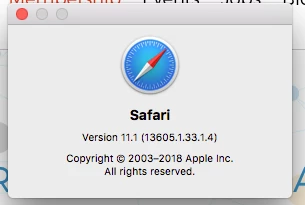
updated to the latest version of Goggle Chrome and VPP search doesn't work. I was able to access the search feature using Safari i have a screen shot of the version I am using.


Forum|alt.badge.img
  • New Contributor
  • May 16, 2018

Not working for us today either. Doesn't matter which browser we try it in. If you try to search it just bounces back to the search screen. If you try to log in it says connected to iTunes Store and just spins.


Forum|alt.badge.img+13
  • Valued Contributor
  • May 16, 2018

VPP= Apple
Safari= Apple
Chrome= Google....

Thereโ€™s a fairly obvious solution there somewhere..
๐Ÿ˜„


Forum|alt.badge.img+13
  • Valued Contributor
  • May 16, 2018

Self flaggelation =. Use IE to access the web app..๐Ÿ˜‰