New feature: How to change your Jamf Pro timeout

  • May 14, 2026
  • 5 replies
  • 112 views

talkingmoose
Forum|alt.badge.img+36

Hi folks!

Here’s a nice little quality-of-life improvement released just yesterday.

If you’re a Jamf Cloud customer and want to change the 20-minute timeout period for Jamf Pro, now you can manage it by integrating with Jamf Account — using just a Jamf ID (identity provider not required). You can extend the timeout up to 24 hours.

Basic instructions:

Log in to Jamf Account with a Jamf ID associated with your organization. The organization must have a Jamf Pro instance.

  1. Click Profile.
  2. Click Security.
  3. Adjust the settings for Inactivity timeout (up to 1440 minutes or 24 hours)
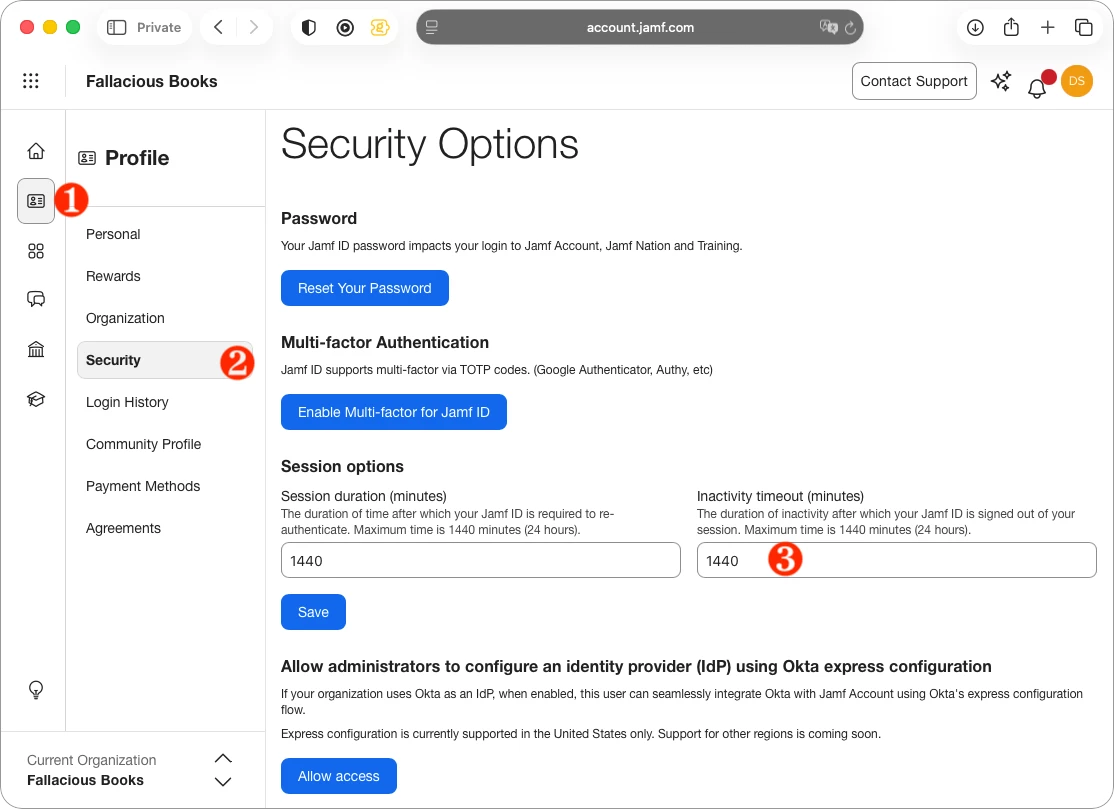
     
    Jamf Account > Profile > Security > Session Options
  4. Log in to Jamf Pro and click Settings.
  5. Click Single sign-on.
  6. Enable SSO Authentication and save.
  7. Copy your failover URL, and keep it available.
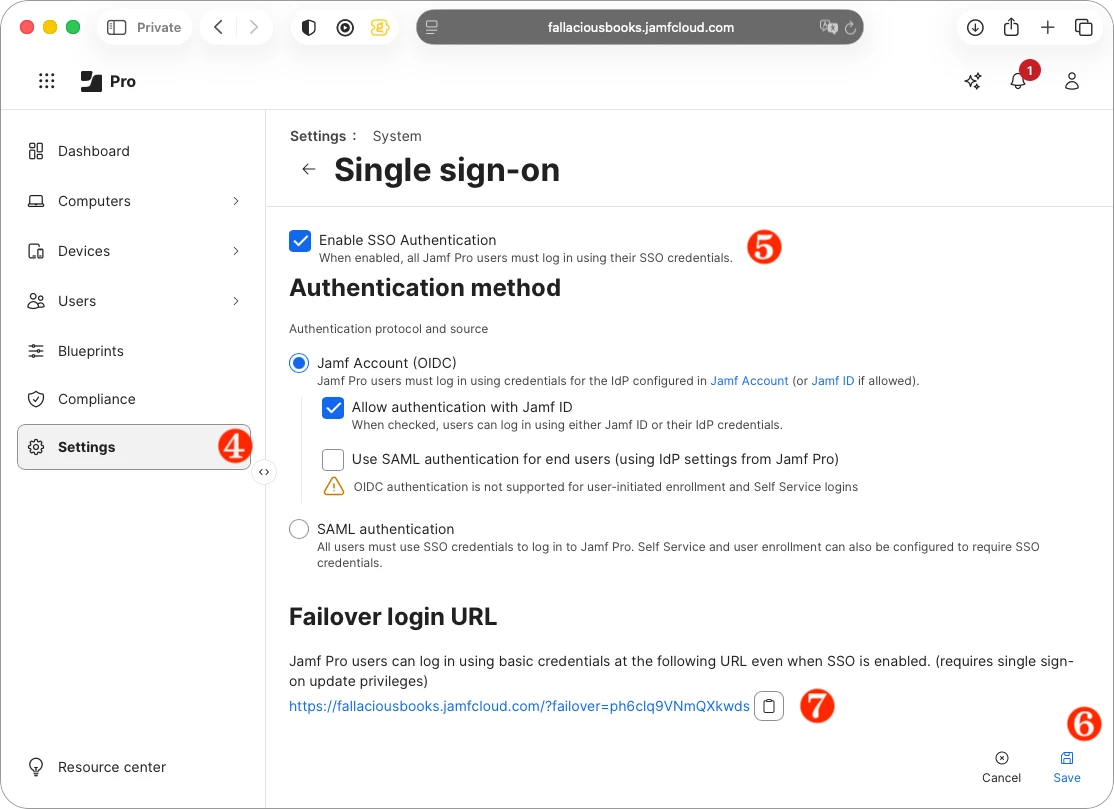
     
    Jamf Pro > Settings > Single sign-on
  8. Ensure you have a Jamf Pro account whose email matches your Jamf ID.
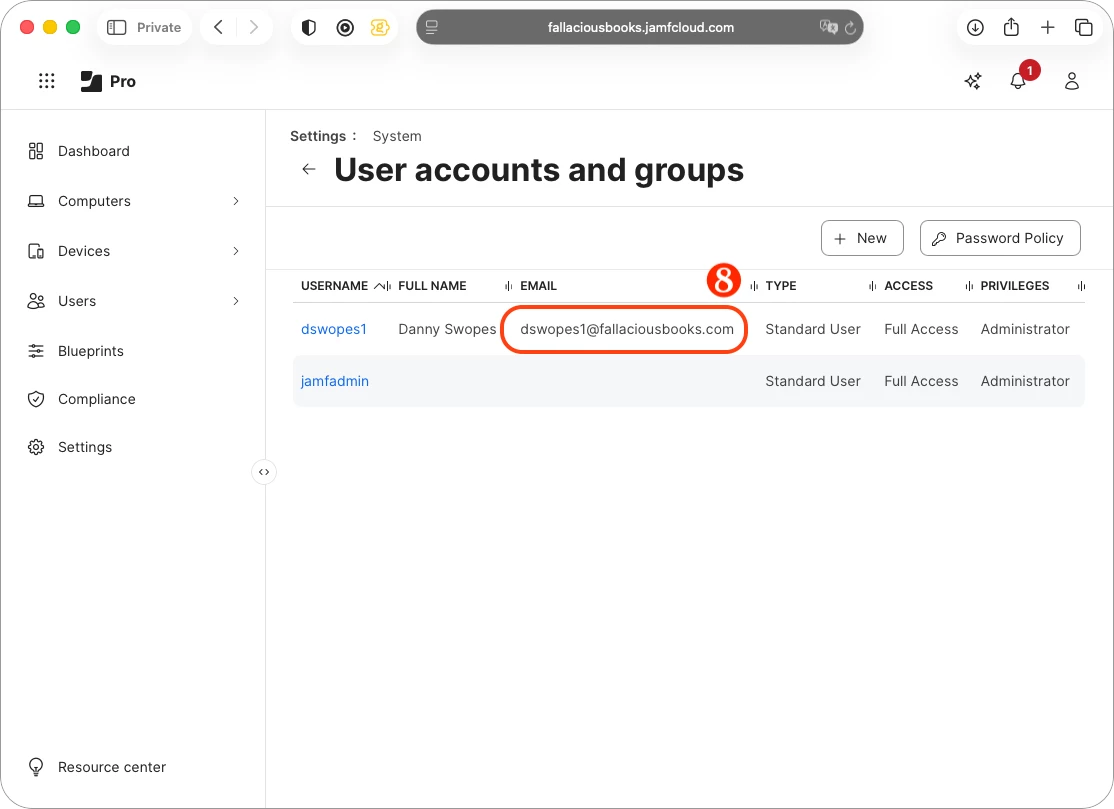
     
    Jamf Pro > Settings > User accounts and groups
  9. Open a private browser window or a different web browser. Or open a browser on a different computer.
  10. Test logging in with your Jamf ID email and password. (If you run into problems, disable single sign-on in Jamf Pro and save.)

This has one of the longest-lived and highest-voted feature requests in Jamf Ideas. Jamf Pro itself cannot manage timeout settings outside its own installation on a server, which is why a setting like this could never be part of the product. With Jamf Account integration, you can now manage the timeout.

If your organization has integrated an identity provider with Jamf Account, edit your identity provider configuration. You’ll find the same session options there.

5 replies

sdagley
Forum|alt.badge.img+25
  • Jamf Heroes
  • May 14, 2026

@talkingmoose Does the account Jamf Pro account you mention in Step 8 truly require Full Access Administrator rights? For orgs that require Group based access to the Jamf Pro console except for a break glass account having a Standard User account with those rights is probably a non-starter.


scoffey
Forum|alt.badge.img+6
  • New Contributor
  • May 14, 2026

@talkingmoose does the session timeout have to be set before Single Sign-On? I don’t have the option in Security Options, all I get is “Password is managed by your organization’s identity provider and cannot be changed in Jamf Account.”

Environment:
Jamf Cloud migrated from on-prem
SSO with Okta on Jamf Account


talkingmoose
Forum|alt.badge.img+36
  • Author
  • Community Manager
  • May 14, 2026

@sdagley Jamf Pro administrator privileges aren’t required. Custom privileges will work fine. Also, roles and privileges in Jamf Account can remain the same.

You’re only changing what you’re using to authenticate to Jamf Pro. Once authenticated, all privileges and groups are still managed by Jamf Pro.

A Jamf Pro user with privileges to modify single sign-on settings will need to enable SSO for the entire instance just one time.

A great place to start would be with a Jamf Cloud sandbox instance. Folks who don’t have a sandbox instance for testing can reach out to Customer Success through their Jamf Account login > Contact Support.


talkingmoose
Forum|alt.badge.img+36
  • Author
  • Community Manager
  • May 14, 2026

@scoffey Look in your identity provider configuration in Jamf Account. You’ll find the same session options there.


sdagley
Forum|alt.badge.img+25
  • Jamf Heroes
  • May 15, 2026

@sdagley Jamf Pro administrator privileges aren’t required. Custom privileges will work fine. Also, roles and privileges in Jamf Account can remain the same.

Thanks!, that’s great to hear. I look forward to trying it once we get Jamf Account SSO enabled (🤞this weekend’s planned change to OIDC for our Dev environment will make that possible Real Soon Now)