Question

Cisco Anyconnect Socket filter not active on Big Sur

  • November 10, 2021
  • 3 replies
  • 31 views

Forum|alt.badge.img+4

I've used Cisco's documentation:

AnyConnect macOS 11 Big Sur Advisory - Cisco

and

forums:

https://community.jamf.com/t5/jamf-pro/anyconnect-socket-filter-on-big-sur/td-p/228014

for guidance but I cannot get this socket filter to work correctly. It remains inactive, hence VPN tunnel can't be established.

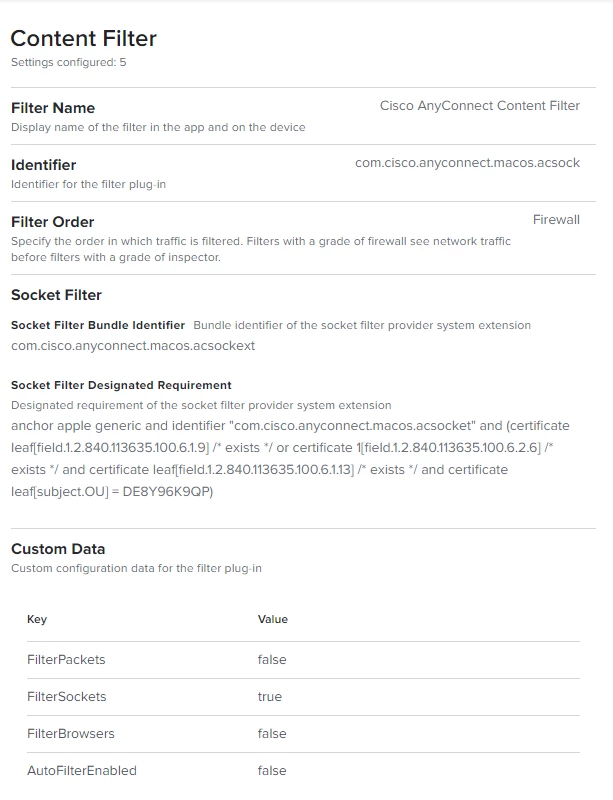
Here is my configuration profile that should allow it but it's not:
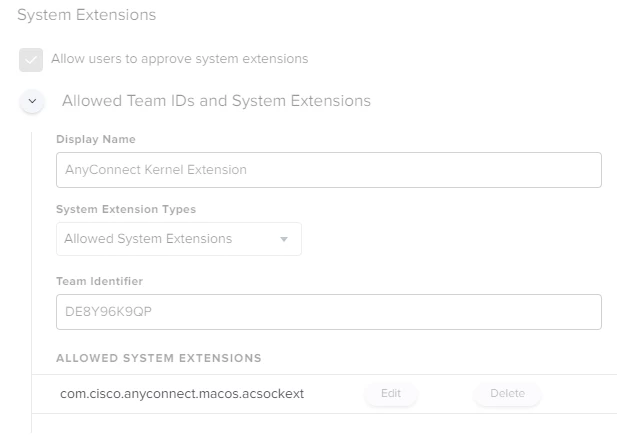
 What am I doing wrong?

3 replies

Forum|alt.badge.img+9
  • Valued Contributor
  • November 10, 2021

 Did you approved the system extension? You need two different profiles (or one profile with two payloads) for Cisco AnyConnect. Also you need to pre-approve the system extension before you install Cisco AnyConnect.

Here we deploy two configuration profiles:

  1. System Extension (pre-approves the Cisco AnyConnect system extension)
  2. Content Filter (configures the socket to be used by the system extension)

Follow instructions here: AnyConnect macOS 11 Big Sur Advisory 


Forum|alt.badge.img+4

 Did you approved the system extension? You need two different profiles (or one profile with two payloads) for Cisco AnyConnect. Also you need to pre-approve the system extension before you install Cisco AnyConnect.

Here we deploy two configuration profiles:

  1. System Extension (pre-approves the Cisco AnyConnect system extension)
  2. Content Filter (configures the socket to be used by the system extension)

Follow instructions here: AnyConnect macOS 11 Big Sur Advisory 


Thank you for replying but it looks like you didn't see my screenshots of the payload that covers both. I also have that very link in my post.


Forum|alt.badge.img+4

Thank you for replying but it looks like you didn't see my screenshots of the payload that covers both. I also have that very link in my post.


...and yes, I'm painfully aware that the payload comes before the install. Hence my frustration with it since I have to remove the package, remove the payload and restart the machine when testing any changes to make sure the new payload is in place before I do the install.