Question

Device Enrollment installation failed. The MDM server for your organization returned an unexpected status (403)

  • Sep 19, 2018 7:05 PM UTC
  • 18 replies
  • 1174 views

bpavlov
Forum|alt.badge.img+18

On some occasions when I’ve tried to use sudo profile renew -type enrollment I get the following error when i try to install the MDM profile:

"Device Enrollment" installation failed. The MDM server for your organization returned an unexpected status (403).
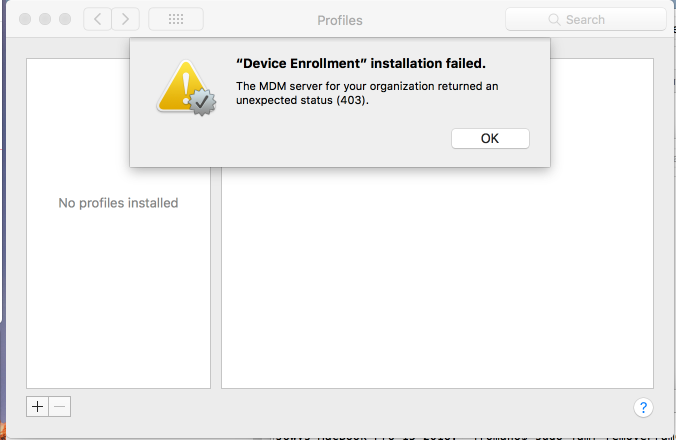
This happens even if I delete the device from Jamf Pro, unscope it, save, re-scope and save it in the Prestage Enrollment in Jamf. Anyone know why that might be coming up?

18 replies

Forum|alt.badge.img+2

I've seen that exact error several times recently. It appears to only happen on machines that have been setup for a while. (have these devices been setup for some time?) Currently working with Jamf Support on this issue. A wipe and reinstall of macOS seems to clear the issue.

Also just a side note

sudo profile -N

works as well for this function on macOS High Sierra and higher.


Forum|alt.badge.img+4
  • New Contributor
  • Sep 26, 2018 3:43 PM UTC

Hello, did you manage to find any solution to this? Other than re-install.


bpavlov
Forum|alt.badge.img+18
  • Author
  • Esteemed Contributor
  • Sep 27, 2018 7:51 PM UTC

I have not. I still have a case opened with Jamf Support. This is quite an annoying issue. They originally stated that I should erase and install the OS which is just not a solution when this is a supported command to enroll a device into DEP via the command line. In fact, even if I didn't use the command, the DEP notification would still come up which is meant to let the end-user know to join this device to the MDM. Clearly Apple intends for enrollment to take place when that DEP notification shows up.


Forum|alt.badge.img
  • New Contributor
  • Oct 31, 2018 8:36 PM UTC

No solution yet? I also have the same problem.


Forum|alt.badge.img+12
  • Valued Contributor
  • Feb 1, 2019 11:07 PM UTC

This is a macOS limitation. If you delete the /Library/keychains/apsd.keychain file and reboot the Mac then it it should enroll successfully.

I opened an AppleCare Enterprise ticket on this problem and added ourselves to the feature request to solve this problem. If you have the ability I suggest doing the same.


Forum|alt.badge.img+4
  • New Contributor
  • Feb 5, 2019 7:04 PM UTC

Thank you @UESCDurandal this just resolved the issue with a user!


Forum|alt.badge.img+18
  • New Contributor
  • Feb 20, 2019 5:41 PM UTC

@UESCDurandal Do you have a Radar # for this issue?


Forum|alt.badge.img+12
  • Valued Contributor
  • Feb 21, 2019 9:35 PM UTC

@chadswarthout Our AppleCare agent informed me that this behavior is working as designed and therefore is not considered a Radar bug. Rather, he offered to submit a feature request for "Allow macOS systems to enroll into their DEP assigned MDM, post setup assistant."


kevinmwhite
Forum|alt.badge.img+24
  • Contributor
  • Mar 7, 2019 6:44 PM UTC

Confirmed, I just saw this on another customer's device.

Ugh Apple... This is not a new feature, it is a bug for an existing feature! There is no way this isn't a fully designed and engineered feature by Apple. The profiles command is literally designed to test and initiate the enrollment. They even took the time to design a custom notification method for this and a special privilege exception so you don't have to authenticate as an admin to complete the enrollment.


bartreardon
Forum|alt.badge.img+9
  • Contributor
  • Apr 4, 2019 5:21 AM UTC

regarding why deleting /Library/keychains/apsd.keychain works, it appears that the certificate in that keychain has expired and so the jss doesn't trust it. you can run

/usr/bin/security find-certificate -a -p -Z /Library/Keychains/apsd.keychain | /usr/bin/openssl x509 -noout -enddate| cut -f2 -d=

to find out what date it expires.

delete and re-boot is easy to do for one off's but if anyone knows how to get the OS to renew the certificate without triggering a DEP notification, or perhaps trigger a DEP notification in a way that renews the cert first, that would be a huge help in trying to trigger enrolment on > a couple dozen devices.


apizz
Forum|alt.badge.img+15
  • Honored Contributor
  • Apr 4, 2019 9:42 PM UTC

Had this happen for an old 10.11.6 machine that we'd upgraded to 10.13.6. Removing the keychain and rebooting resolved.


bpavlov
Forum|alt.badge.img+18
  • Author
  • Esteemed Contributor
  • Apr 6, 2019 1:13 PM UTC

Forum|alt.badge.img+3
  • New Contributor
  • Aug 10, 2020 8:14 PM UTC

I'm getting this error on a brand new OOB iMac (Catalina) with automatic pre-stage enrollment.


Forum|alt.badge.img
  • New Contributor
  • Aug 14, 2020 4:33 PM UTC

I had the same issue with a user. Mac was on Mojave. Removing the file /Library/Keychains/apsd.keychain and rebooting worked.
Note the correct path to the file has a capital K in /Keychains.


cdenesha
Forum|alt.badge.img+14
  • Honored Contributor
  • Aug 20, 2020 11:58 AM UTC

I'm receiving an error on an out of box Macbook Pro 13" 2020 that isn't the 403 error. It is "Enrolling with management server failed - Unable to connect to the MDM server for your organization". I'm currently trying on a home WiFi network.

The first time the attempt to connect to Remote Management just spun so I restarted the Mac. I then had to 'sudo profiles renew -type enrollment' and the proper file /var/db/ConfigurationProfiles/Settings/.cloudConfigRecordFound appeared. I then restarted and received the above error.

When I examine the date of the certificate with the security command as the post 5 above this in the same thread suggests, the date is a year from now 'notAfter=Aug 20 11:11:19 2021 GMT'.

So I deleted /Library/keychains/apsd.keychain, restarted, and it found my MDM immediately and enrolled.

I'm not sure if this is an Apple issue or a Jamf issue. I have 4 more Macbooks from this shipment so I'll try again with Apple Enterprise first. Note that the feature request to ignore the certificate's validity date is marked as Implemented in Jamf Pro 10.15.0 and I'm on 10.23.0.


Forum|alt.badge.img+7
  • Contributor
  • Sep 10, 2020 11:12 AM UTC

Possibly not helpful, but we are seeing an increasing number of iPad fail on enrolment lately also - seemed to have started happenng a couple of Jamf updates ago. Brand new devices straight out of the box fail enrolment with SCEP error - for instance 9 out of 19 failed last week, and the only way to fix the error is to DFU them!


Forum|alt.badge.img+5
  • Contributor
  • Sep 10, 2020 7:04 PM UTC

Here is a excellent article that explains the issue in great detail and provides a solution:

https://nstrauss.github.io/mitigating-mac-enrollment-failures/


Forum|alt.badge.img+1
  • New Contributor
  • Jul 26, 2021 6:37 AM UTC

This is a macOS limitation. If you delete the /Library/keychains/apsd.keychain file and reboot the Mac then it it should enroll successfully.

I opened an AppleCare Enterprise ticket on this problem and added ourselves to the feature request to solve this problem. If you have the ability I suggest doing the same.


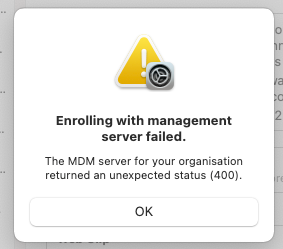
Works also for status (400) per screen shot.