Question

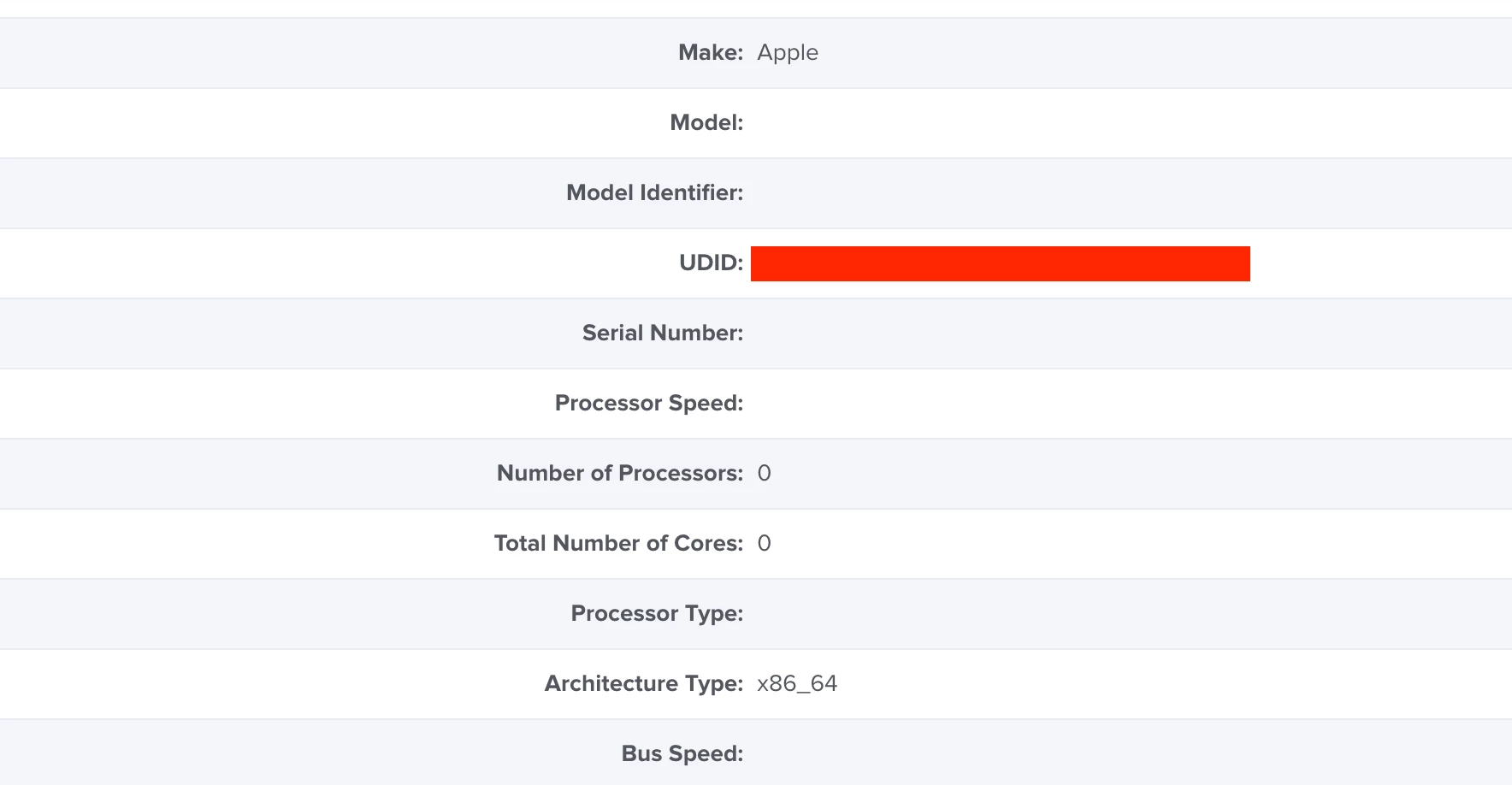
Missing 'Model', 'Serial Number' and 'Model Identifier' info for certain machines

  • May 10, 2021
  • 10 replies
  • 73 views

Forum|alt.badge.img+2

Hi all,

Have recently been granted access to my companies JAMF pro environment to lend a hand to the current admin.

Have identified that certain machines are not reporting back models, serials, identifiers (amongst other things) when being displayed in computer search.

Seems to be no pattern or obvious logical explanation, wondering if there might be some willing troubleshooters out there who can give me some advice/help?

Thanks in advance.
10 replies

junjishimazaki
Forum|alt.badge.img+10

In those affected macs, does it display whether those macs are managed or not? Also, look at the last inventory update. Usually, running recon several times and policy on the Mac solves the issue and will update the inventory and any missing policies.


Forum|alt.badge.img+18
  • Honored Contributor
  • June 16, 2021

Interesting thing is the "Hardware" tab in System Profiler on Macs which are not reporting serial or model info hangs when you try to load it, as does system_profiler datatype SPHardwareDataType -detailLevel full


mickl089
Forum|alt.badge.img+11
  • Valued Contributor
  • June 17, 2021

Same problems here with two machines... after a few days, the information came back...


jmahlman
Forum|alt.badge.img+17
  • Valued Contributor
  • June 17, 2021

We had this issue on a few clients, it actually caused a lot of our policies to run again on the endpoints because it cleared a bunch of data. Opened a ticket with jamf, nothing came of it but I asked the user to reboot and everything came back. Guessing the jamf agent is stuck somehow.


Forum|alt.badge.img+17
  • Honored Contributor
  • October 25, 2021

We keep running into this with small % of clients but when you manage thousands, it's too many.  Appears to me like failed inventory reports as soon as we run sudo jamf recon again it corrects itself.  The problem is like @jmahlman said above is we have remediation policies in place "if X missing, install it" and all that stuff tries to install again.  I've added "no serial" to exclusion lists as stop gap but I'm sure it's effecting other things (recently got report FV not enabled for X machine and again realized it was serial (i.e. most of inventory) blank issue. 

Our ticket is 5 weeks old and not much movement.


Forum|alt.badge.img+17
  • Honored Contributor
  • November 11, 2021

jamf telling me this is a system profiler issue with macOS 11.4 which just so happens to be most of our fleet.  Can anyone confirm issue still happening on 11.5+?


thanks


jmahlman
Forum|alt.badge.img+17
  • Valued Contributor
  • November 11, 2021

Haven't seen the issue in a while, so I'm assuming that it's resolved.


Forum|alt.badge.img+17
  • Honored Contributor
  • December 3, 2021

I saw the issue today with macOS 11.6 machine so doesn't seem like an 11.4 issue to me.  meh.


Forum|alt.badge.img
  • New Contributor
  • March 8, 2022

Same for me I have 8 MacBookAir M1 models doing it running either 11.5.1 or 11.6.1


Forum|alt.badge.img+17
  • Honored Contributor
  • March 17, 2022

Same for me I have 8 MacBookAir M1 models doing it running either 11.5.1 or 11.6.1


@MACauffman  do you have a ticket number?  ours is CS0002467.  would love some traction on this.  I've also started to see some inventories just not be complete (says 1 app is missing then on next check in app is there without any remediation policy running).  Frustrating.