


Most Apple admins start the same way: a console, a checklist, and a lot of repetitive
clicking. At JNUC's Level Up session on automation and the Jamf Platform API, I spent a
few hours moving from "I operate the tool" to "I teach the tool to operate itself."
Here is what stayed with me, including a few opinions I formed along the way.
1. Automation starts with decisions, not commands
I expected the scripting portion to be about syntax. It was really about decision-making if, elif, and else are how a script encodes judgment. When you write a compound condition, you are writing down
what a senior admin would think through before acting:
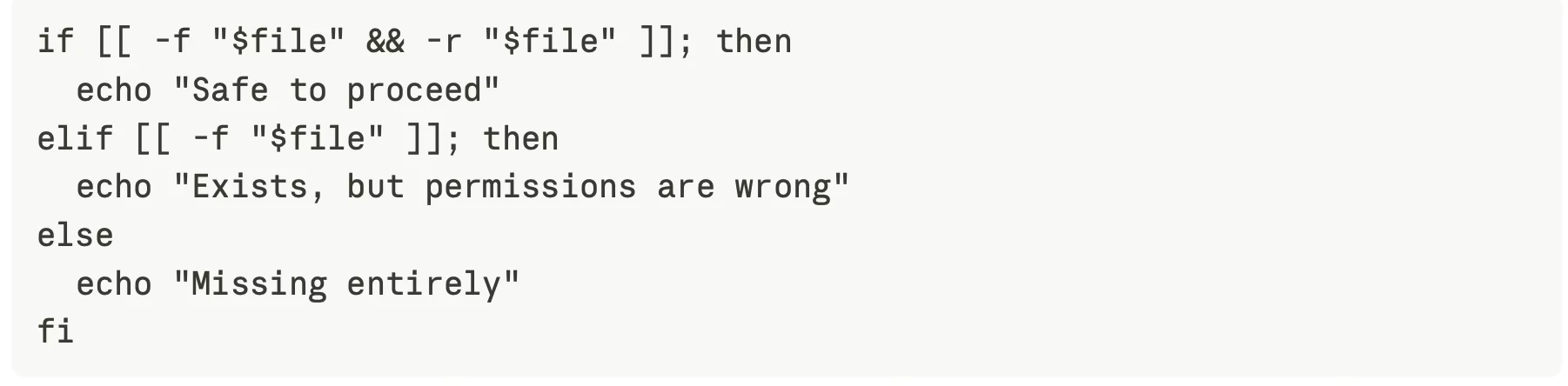
A script with only a "happy path" is a liability. The three-way branch above gives you a different, useful message for each failure, which is exactly what helps when it runs on 500 Macs and you only see the logs.
Takeaways:
- Learn the difference between
[[ ]]for strings, files, and comparisons, and(( ))for arithmetic. Using the right one makes scripts easier to read. - Test for the absence of things as deliberately as their presence. Most real-world bugs are "it wasn't there."
- Treat every branch as a message to your future self.
2. Loops turn one fix into a fleet fix
Once a script can make a decision, a loop lets it make that decision a thousand times. The course covered for, while, and until, and I now think of them by intent:
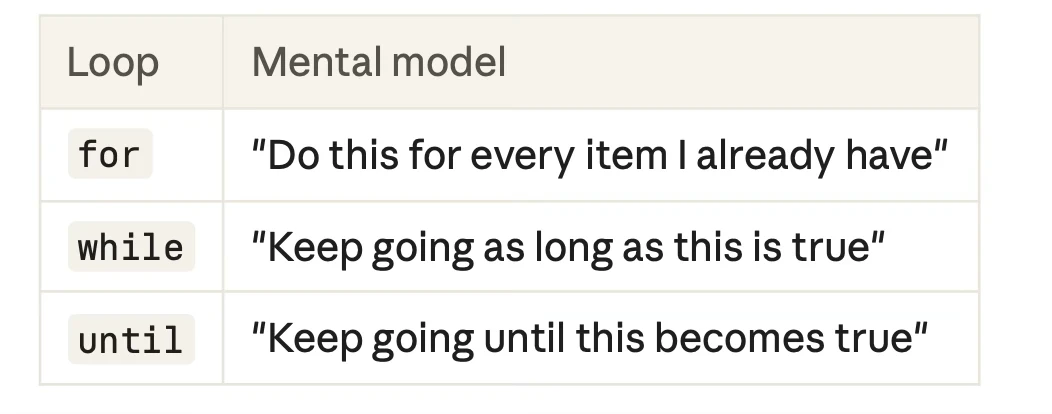
The until loop was the one I underused before. Waiting for something to happen, such as a file appearing, a service starting, or content being written, is a daily reality on managed devices, and until expresses it naturally.
The best habit I picked up is combining loops with continue. Skip what you shouldn't touch, then process the rest:

Filtering at the top of the loop keeps the main logic uncluttered. Good automation is as much about what it refuses to touch as what it handles.
A loop that waits should also have a limit. Add a retry counter to every wait. An infinite loop on a managed endpoint is a support ticket waiting to happen.
3. JSON and jq: the translator between systems and scripts
If scripting is the engine, JSON is the fuel, and jq is how you refine it. Modern platforms speak JSON, and jq is the macOS-friendly tool for reading it. The core ideas are simple:
- Dot notation reaches into objects: .
general.mdmCapable.capable - Array iteration with
.items[]handles lists - Index access with
.items[0]grabs one entry
The detail that saves the most headaches is the one about output flags.
--raw-output strips the quotes around strings. --monochrome-output removes terminal color codes. If you capture jq output into a variable without them, invisible escape characters can end up inside your data. Then comparisons fail mysteriously and you spend an afternoon wondering why "Safari" doesn't equal Safari.

I now use that combination by habit anywhere I'm capturing a value into a variable.
4. Understanding the Jamf Platform API
This was the part I was most curious about, and I came away with a clearer picture than the docs gave me on their own.
Authentication is a short, repeatable dance
The platform uses OAuth 2.0 client credentials: you create an integration in a Jamf Account, get a client ID and secret, and exchange them for a bearer token. Two practical points:
- Tokens last 15 minutes, and there's no refresh token. If your script runs long, request a new token with the same credentials.
- Every request needs a context header
( X-Environment-Id or X-Tenant-Id)that matches the scope the integration was created with. That scope is fixed at creation, so choose it deliberately.
Reading an API call is a skill
A call breaks down into a gateway host, a service name in the path (such as pro for Jamf Pro, with other services using their own names), the endpoint, and the context header. Once you can read a path this way, a 404 or 403 stops being a mystery. It becomes a checklist: wrong service? Wrong ID? Wrong header? Missing permission?
Permissions follow the principle of least privilege
Access is granted through capability permissions in a {capability}:{action} pattern, like buildings:read. Some endpoints need two capabilities together, so a "forbidden" response doesn't always mean you lack the obvious permission.
Granting each integration only the capabilities it needs is more work up front. But a leaked read-only credential is an inconvenience, while a leaked all-powerful one is an incident.
5. Blueprints and the declarative mindset
Blueprints taught me the most about where device management is heading. A blueprint describes the desired state: which settings and profile should apply, and to which scope of devices. You don't script the steps to get there. You describe the outcome and let the platform converge devices toward it.
The API makes that lifecycle scriptable: list blueprints, inspect one, deploy it, undeploy it, and pull a deployment report with succeeded, failed, and pending counts.
That report is the key to feedback. Declaring a state is only half the job. The other half is verifying it landed. A deployment you can't measure is a hope, not a deployment.
6. Where it all comes together
The most valuable realization was that these topics aren't separate skills. They stack:
1. curl fetches data from the API
2. jq extracts what matters
3. Variables and arrays hold it
4. Loops walk through it
5. Conditionals decide what to do
6. More API calls act on the decision
Combine them and you get something genuinely useful: a status report across every
blueprint that classifies each as healthy, needs attention, or critical, so an admin sees the
problem before the users do.
7. Lessons I would pass on
Fetch once, parse many times. A natural first draft calls the same endpoint repeatedly to pull different fields. Store the full response in a variable and run jq on it as many times as you like. It's faster, kinder to the API, and gives you a consistent snapshot of the data.

Never hard-code secrets in scripts you share. Keep credentials in a protected locationand load them at runtime. This matters more than any other tip here.
Put a human in the loop for destructive actions. Deploying or undeploying somethingacross a fleet should be asked first, with a clear summary of what's about to happen. Aconfirmation prompt is a small price for avoiding a very bad afternoon.
Handle empty results. APIs answer politely when you ask for something that doesn't exist, and your script needs to notice. Checking whether a value came back empty (-z) turns silent failures into clear messages.
Quote your variables. Quoting "$var" prevents a whole class of bugs with spaces and
empty values.
Rehearse in a safe environment. The hands-on lab format worked because mistakes were free. Do the same at work: build and test against a test group before you touch production.
8. A few unexpected takeaways
- Logs are a learning tool. Watching a device's management log during enrollment shows you what the framework is doing and how long each step takes. It's the best free documentation there is.
- Small scripts are enough. None of this required a framework or an IDE. A few dozen lines of
zsh,curl,andjqcan replace hours of manual work.
Final thoughts
I went into the session hoping to learn platform API and Blueprints. I left with a different way of thinking about my job: a good admin is not the person who performs the most tasks, but the person who designs the systems that perform them.
If you manage Apple devices and have not yet explored the API, start small. Authenticate, make one call, and print one value. Then add a condition, then a loop. Before long, you'll be building tools your whole team relies on.
Thanks to the JNUC Level Up instructors and teaching assistants for a hands-on, practical session. If you're attending a future one, go in curious and bring a test Mac.