


Six workflows that show how a Mac problem travels from detection to a fix, an alert or a ticket. DEX stands for digital employee experience: measuring how a device feels to the person using it, then acting on what you find.
1. The DEX loop
A single device event passes through the whole loop. Once a fix runs at Act, the device state
changes, and the next time it reaches Collect it reports a new reading. What happens
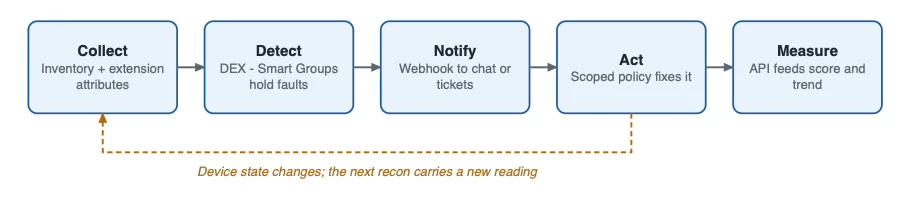
What happens
- Collect: the Mac reports built-in inventory plus your extension attributes at each recon.
- Detect: Smart Groups with DEX - names hold every device with a fault.
- Notify: a webhook tells chat or the ticket tool when group membership changes.
- Act: a scoped policy fixes what is safe to fix.
- Measure: the API feeds a score and a trend line.
2. Self-healing with a retry cap
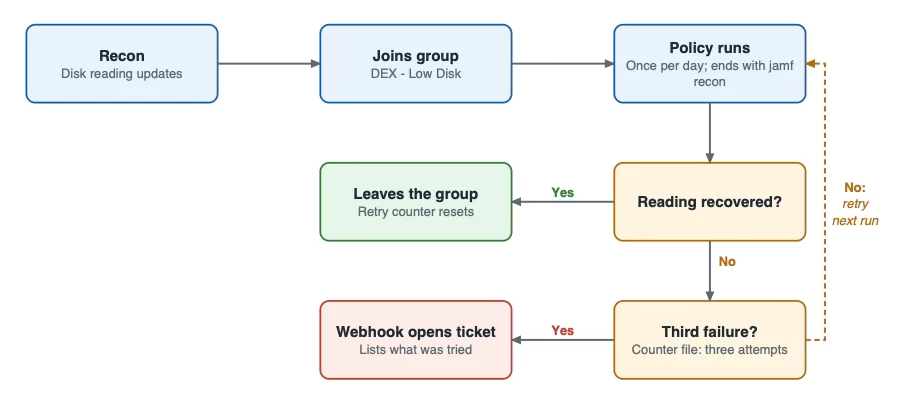
A device that heals on the first run leaves the group and is done. A device that keeps failing is retried
up to three times, then handed to a person.
What happens
1. A recon updates the disk reading and the device joins DEX - Low Disk.
2. The policy scoped to that group runs once per day and ends with jamf recon.
3. If the reading recovers, the device leaves the group and the retry counter resets.
4. If not, a counter file allows three attempts, one per policy run.
5. After the third failure, the webhook opens a ticket that lists what was tried.
Guardrails
- Keep a DEX - Pause Remediation group excluded from every fix.
- Reset the counter with a policy scoped to Macs that have a counter file but are no longer in the fault group.
- Never run destructive steps from a single reading.
3. From Smart Group to ticket
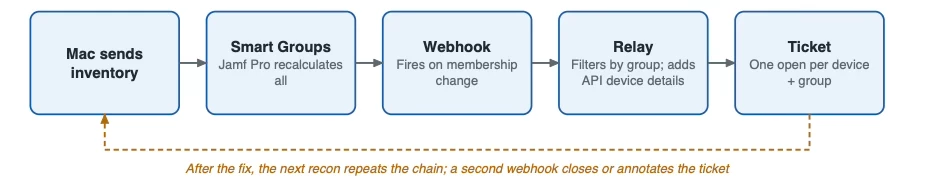
Each message in the chain has one job. The relay filters by group name, adds device details from the Jamf Pro API, and keeps one open ticket per device and condition.
What happens
- The Mac sends inventory; Jamf Pro recalculates every Smart Group.
- A membership change fires a webhook. It fires on the change itself, not on every inventory cycle,
and one message can list several devices.
3. The relay asks the API for the device details the ticket needs.
4. It creates or updates a ticket, using device ID plus group name as the dedupe key.
5. After the fix and the next recon, a second webhook closes or annotates the ticket.
Check before you build
Compare your Jamf Pro version's sample webhook payload with the fields the relay reads. Return a
success status quickly and process the event afterwards, so the call completes inside the webhook's
timeout.
4. Patch rollout in rings
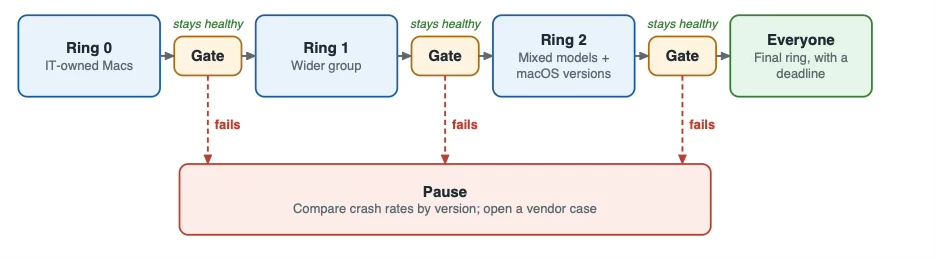
The update moves ring by ring and only passes a gate when the previous ring stayed healthy. A failed
gate sends the rollout to a pause instead of the next ring.
What happens
- Release the update to Ring 0, a small Smart Group of IT-owned Macs.
- Watch the app crash and kernel panic attributes, plus ticket counts, during the soak time.
- If they stay flat, widen to Ring 1, then Ring 2, then everyone.
- If any gate fails, pause, compare crash rates by version and open a vendor case.
Settings to decide
• Ring membership as Smart Groups, with mixed models and macOS versions in Ring 2.
• Soak time per ring, and who owns the go or no-go call.
• A deadline for the final ring, with a notice before it lands.
5. Compliance benchmark rollout
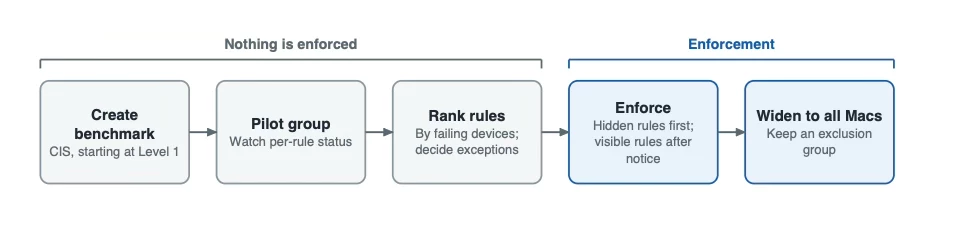
Nothing is enforced during the first three stages. Quiet rules go first, visible rules follow a notice
period, and scope widens last.
What happens
- Create a benchmark from a framework such as CIS, starting at the less strict level (Level 1).
- Deploy it to a pilot group and watch per-rule device status without enforcing.
- Rank rules by failing devices and decide which need exceptions.
- Enforce the rules users cannot see, then announce and enforce the ones they can.
- Widen to all Macs and keep an exclusion group for freezes.
Requirements
Compliance Benchmarks needs Jamf Pro 11.16 or later. It also requires OIDC-based single sign-on
configured through Jamf Account, and administrators must sign in with a Jamf ID or an identity
provider connected there. Local accounts and SAML sign-ins cannot use it.
6. A healthy first day
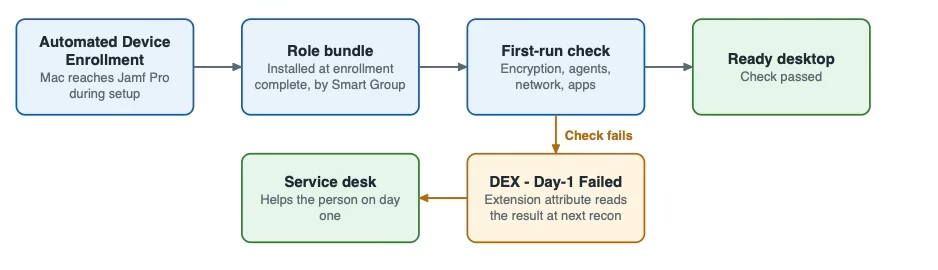
A new Mac moves from power-on to a verified, ready desktop without IT. A failed check lands in a
Smart Group the service desk watches, so the person is helped on day one.
What happens
1.Automated Device Enrollment sends the Mac to Jamf Pro during setup.
2. A policy at enrollment complete installs the role bundle chosen by Smart Group.
3. A first-run script checks encryption, required agents, network reach and required apps.
4. The script stores the result locally, and an extension attribute reads it at the next recon. That
attribute feeds DEX - Day-1 Failed.
Measure it
Track the share of new Macs that pass the check on the first attempt, and the time from power-on to
ready. Both numbers are easy to explain to leaders and to new hires.
Timings and sizes in these workflows are examples. Set your own thresholds from your fleet's data, and test
every script on a pilot group first.

