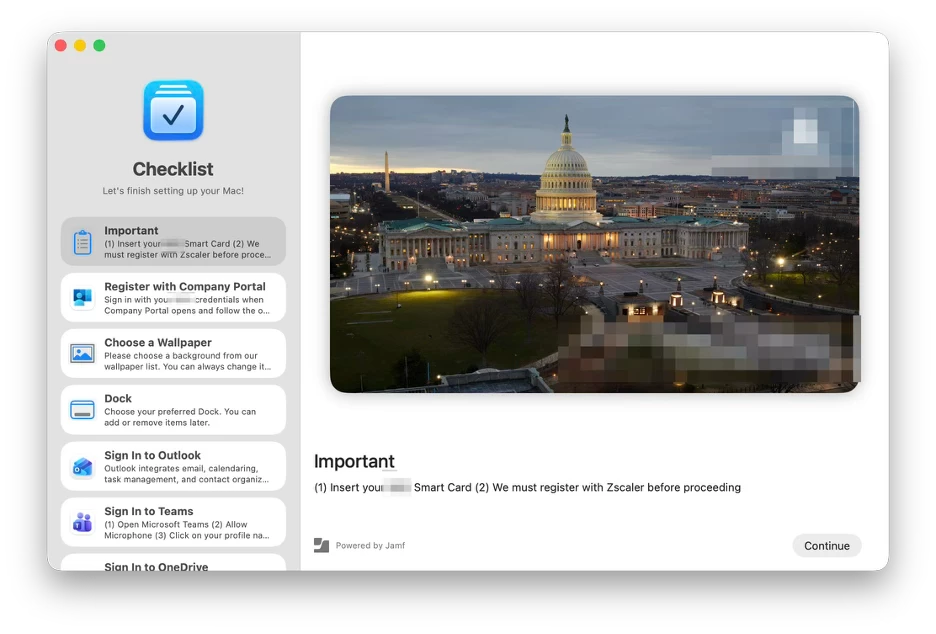
When I first learned about Jamf Setup Checklist, I didn't view it as merely an optional companion to Setup Manager. In my mind, this was the rare movie sequel that genuinely had a clear, critical purpose.
Setup Checklist was something our users needed. Something our technicians needed. And frankly, something I needed.
🤔 Imagine this scenario…
💻 Your user receives a brand-new MacBook Pro.
The user opens the lid, glides through the beautiful Setup Manager workflow, and waits patiently as Jamf Pro onboards the Mac.
⏰ 30 minutes pass. The Mac reaches the Desktop. The user is excited and ready to be productive on day one.
So, they try to open Outlook. Error: No Internet connection.
Okay… so they try to open Safari. Error: No Internet connection.
😰 Minnesota, we have a problem. Panic sets in. What’s the Help Desk number again?
Because this user is tech-savvy, instead of immediately calling support, they double-check the Wi-Fi connection and try the classic fix: toggling Wi-Fi off and on. Safari still won't load. Every other app faces the same wall.
The employee is ready for work, but their MacBook just took a sick day.
👨🏽💻 What in the Jamf just happened?
Here is the context: our organization is currently rolling out a Zero Trust security initiative. As part of this push, we migrated from Cisco Secure Client to Zscaler. Under our new architecture, all devices must route through Zscaler to access the Internet—a policy Zscaler calls Strict Enforcement.
For the end user, Strict Enforcement means one crucial thing: you must register your device with Zscaler first. Once registered, the internet lanes open up. It is the only valid pass to ride the network superhighway.
🛜 No Zscaler = No Internet.
This creates immediate friction if the user isn't guided through those exact post-login steps. And that’s precisely where Setup Checklist becomes our guiding light.
✅ Setup Checklist guides the user right at the Desktop.
Think of it as a personal, organization-defined assistant that walks users through their final onboarding tasks once they hit the desktop. For our environment, users must:
· Insert their PIV Smart Card
· Complete Zscaler registration prior to opening or configuring Outlook, Microsoft Teams, OneDrive, or other core applications
💭 Remember: Strict enforcement means no Zscaler, no Internet. Users need to understand this requirement upfront, and Setup Checklist delivers that clarity in plain sight.
No need to call the help desk. No need to escalate to a Tier 2 technician.
👩🏻💻 Power to the Mac User
Users want the autonomy to onboard themselves—so let’s empower them and make it effortless.
Furthermore, our organization is primarily a Windows shop. Our support technicians are heavily trained on Windows before they ever touch macOS, which means they aren't always fluent in native macOS navigation or troubleshooting nuances.
What I discovered is that Setup Checklist doesn't just help end users—it is an incredible safety net for support techs who don't work with the macOS platform on a daily basis. It gives everyone a standardized, visual roadmap.
Setup Checklist isn't an optional add-on to Setup Manager—we genuinely needed it. It has transformed our final onboarding slate of tasks into a smooth, self-guided experience.
📌 Key Takeaways & Getting Started
✅ Get Started with Jamf Setup Checklist
✅ Do what I do: copy someone else’s homework
✅ Play with this configuration profile and tailor it to your organization’s needs and branding
✅ Shout out to @kendallscott
✅ Follow #jamf-setup-checklist