Question

Keeping Bluetooth enabled on Macs

  • December 18, 2025
  • 4 replies
  • 75 views

ChrisChichester

Anyone want to share best practice for this? Blueutil doesn’t work as great/possibly at all in our environment after updating to macos 26.

As a workaround I’ve been using the api to send the MDM command in a policy/script to those macs that turn it off. We have an outset login script that manages to lock out bluetooth changing in the control center and system settings, but there’s a short window of 5 seconds or so where students can turn it off before it is locked.


 

4 replies

h1431532403240
Forum|alt.badge.img+6

Hi,

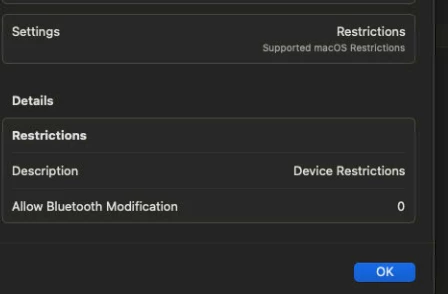
For keeping Bluetooth enabled on macOS 26, the recommended approach is to use a Configuration Profile to restrict Bluetooth modification — this is officially supported by Apple.

Solution

Deploy a Restrictions Profile with allowBluetoothModification set to false:

  • The Bluetooth toggle will be grayed out in both System Settings and Control Center
  • Students won't be able to disable Bluetooth, keeping Apple Classroom functional

Requirement: macOS 14 or later (Supervision is not required)

Reference: Device management restrictions for Mac computers - Apple Support


Chrischi99
Forum|alt.badge.img+6
  • New Contributor
  • January 5, 2026

Can you post a screenshot of what this looks like? I have only been able to ever accomplish this on iPads.


h1431532403240
Forum|alt.badge.img+6

Can you post a screenshot of what this looks like? I have only been able to ever accomplish this on iPads.


You're right — the "Allow Bluetooth modification" option exists in Mobile Device Configuration Profiles, but not in macOS Computer Profiles.

For macOS, you'll need to deploy a Custom Configuration Profile with the allowBluetoothModification key manually.

Here's a ready-made signed profile shared by GabePPS: https://community.jamf.com/general-discussions-2/enable-bluetooth-for-bluetooth-headset-pairing-and-block-rest-29123

(Requires macOS 14+ and the profile must be signed before uploading to Jamf Pro)


boberito
Forum|alt.badge.img+22
  • Jamf Heroes
  • January 5, 2026

https://github.com/usnistgov/macos_security/blob/main/rules/system_settings/system_settings_bluetooth_disable.yaml

You can also create a configuration profile to straight force disable or enable Bluetooth.