Question

Script Access Control settings on JSS client certificate

  • October 6, 2015
  • 3 replies
  • 12 views

Forum|alt.badge.img+14

Fellas,

Anyone have any advice on how to script the access control settings the JSS certificate that itsalled on every Mac once they enroll in the JSS?

I ask because Cisco AnyConnect client tries to access it this cert when it looks for compatible certs upon startup. If the JSS cert is not set to allow all apps, Cisco AnyConnect prompts the user to allow access, and it does this each time...twice...each time they launch the app.

I doubt this would be a problem if the cert names were static, but they're different for every Mac, and this is the one thing keeping us from ditching the imaging process and going straight to an all DEP workflow.
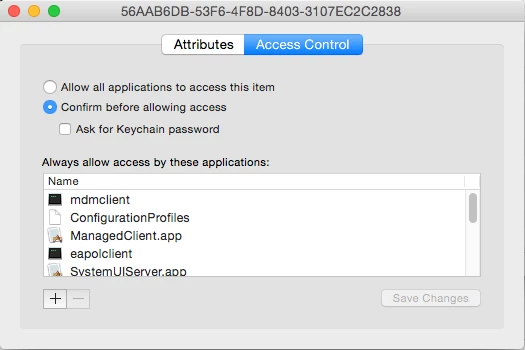
I realize there's this discussion https://jamfnation.jamfsoftware.com/discussion.html?id=10042 but dont want to have to reinvent the wheel and move certs around.

Any thoughts?
-A

3 replies

mm2270
Forum|alt.badge.img+24
  • Legendary Contributor
  • October 6, 2015

Unfortunately, as far as I know, its not possible to script adding ACL entries into a certificate in the keychain. Regular keychain items, like saved password entries, can have ACL's added via script, but the same options do not exist with the security command for certificates.


MischaB
Forum|alt.badge.img+17
  • Employee
  • January 20, 2016

@mm2270 but is it possible to set the Access Control to "Allow all applications to acces this item" in a script???


Forum|alt.badge.img+18
  • Contributor
  • January 26, 2018

Bump on this? We just rolled out MDM and new devices are having this problem with our F5 VPN client. The client is trying to read the MDM cert and prompting users for access. I'm not sure what the best client-side approach is.