
Question

silent install pkg mac os x with custom install

  • November 2, 2017
  • 2 replies
  • 14 views

Forum|alt.badge.img+4

hi all -

i'm trying to do a silent install on anyconnect client 4.5.x. it's in .pkg format.

typically i would execute the following command:

sudo installer -verboseR -pkg "/somelocation/somefile.pkg" -target /

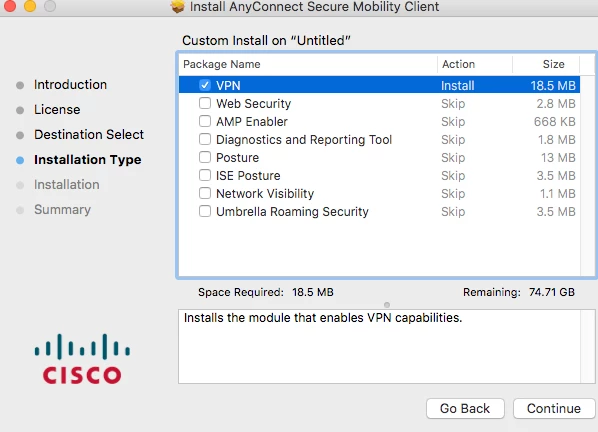
however, the installation has several options to select from: vpn, web security, amp enabler, and so on.

how can i select only vpn option and de-select the rest?

please could someone help me with this command. thanks
2 replies

Forum|alt.badge.img+16
  • Valued Contributor
  • November 2, 2017

Hi,

This might help you out

https://sneakypockets.wordpress.com/2017/07/26/using-installer-choices-xml-to-modify-anyconnect-and-mcafee-deployments/


Forum|alt.badge.img+4
  • Author
  • Contributor
  • November 2, 2017

worked! many thanks hcodfrie