Question

Teacher iPad enrolled in DEP and managed through Casper

  • October 2, 2014
  • 5 replies
  • 31 views

Forum|alt.badge.img+3

Is there any way for the teacher with a managed iPad that is enrolled in DEP to connect the ipad to their school computer? Getting "The iPad is supervised by another computer and cannot be used with this computer."

He is taking video with the ipad and wants to download it to his computer.

5 replies

Forum|alt.badge.img+5
  • New Contributor
  • October 3, 2014

Sounds like you have a Configuration Profile with Restrictions enabled. Make sure that "Allow host pairing with the exception of the supervision host" is checked in the Restrictions settings of that Configuration Profile.


John_Wetter
Forum|alt.badge.img+33
  • Hall of Fame
  • October 3, 2014

Yep, you just need to allow host pairing. When you plug this into the computer after this is applied, the first time the iPad will say something like "allow this computer: <name>?". Note that if you are in a highly secure environment this does open the iPad up for a couple more attack vectors but for most people, they just want to sync something with iTunes.


Forum|alt.badge.img+6
  • Contributor
  • September 6, 2017

Is still the case? I have iPads running the iOS 10.3.3 and have the "Allow pairing with non-Configurator hosts (supervised only)" checked off in restrictions yet I still get the "The iPad is supervised by another computer and cannot be used with this computer" when connected the iPad to a computer with iTunes.


Forum|alt.badge.img
  • New Contributor
  • November 30, 2017

sedwards,

I'm getting the same message, double-checked our settings and that option was enabled during enrollment.


Forum|alt.badge.img+5
  • Contributor
  • November 30, 2017

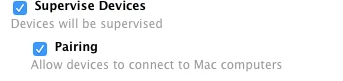
The prestage enrollment also needs pairing enabled as well. The checkbox is directly below the Supervise Devices setting.