


Background
While we graciously provide our JSS data to ServiceNow in the most automatted of fashions, it is a one-way relationship (i.e., the Facebook status between our JSS and ServiceNow is "Complicated").
We needed an easy method to occassionally update the JSS with the Asset State as recorded in ServiceNow.
We supply our Asset Team with a .CSV of all serial numbers in the JSS and they returning it with the corresponding Asset State from ServiceNow.
The script below does the heavy lifting (thanks to Steve Wood).
Extension Attribute
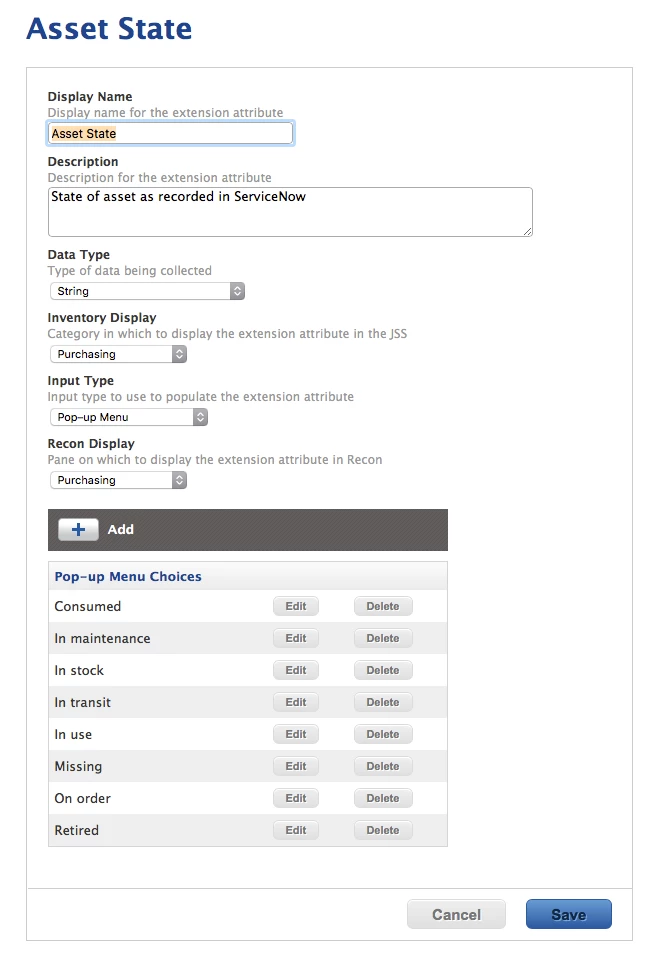
We first created a "Pop-up Menu"-flavored Computer Extension Attribute named "Asset State" with Pop-up Menu Choices as shown in ServiceNow. (Although I'm still waiting to see a computer which has been Consumed.)
Script
Usage
As @stevewood notes in his reply to More API help needed:
- Make sure the CSV file is saved as a UNIX file with LF and not CRs
- You will also need to edit the script to add your JSS server address
- This is designed to run from the Terminal by passing the api user name and password along with the CSV file name
sh apiImportAssetState.sh apiUsername apiPassword csvfile.csvCode for "apiImportAssetState.sh"
#!/bin/sh
##########################################################################################
#
# ABOUT
#
#   Import Asset State as recorded in ServiceNow from a two-column .CSV
#   Serial_Number,Asset_State
#
# Inspired by Steve Wood:
#   https://jamfnation.jamfsoftware.com/discussion.html?id=18377#responseChild109176
#
# See also:
#   https://jamfnation.jamfsoftware.com/discussion.html?id=13118
#
##########################################################################################
#
# HISTORY
#
#   Version 0.1, 26-Aug-2016, Dan K. Snelson
#
##########################################################################################
#
# USAGE: sh apiImportAssetState.sh apiUsername apiPassword csvfile.csv
#
##########################################################################################


# Enable debug
# set -x

args=("$@")
jssAPIUsername="${args[0]}"               # API user with write privileges
jssAPIPassword="${args[1]}"               # API password
file="${args[2]}"                         # CSV
jssAddress="https://jss.company.com"      # FQDN of JSS without trailing slash
eaName="Asset State"                      # Name of Extension Attribute (i.e., "Asset State")

#Verify we can read the file
data=`cat ${file}`
if [[ "${data}" == "" ]]; then
    echo "Unable to read the file path specified"
    echo "Ensure there are no spaces and that the path is correct"
    exit 1
fi

echo "==================================================================="
echo "= Begin updating computer's Asset State as recorded in ServiceNow ="
echo "==================================================================="


# Find how many records to import
recordsToImport=`awk -F, 'END {printf "%s
", NR}' $file`
echo "* Records to import: " ${recordsToImport}

# Set a counter for the loop
counter="0"

# Loop through the CSV and submit data to the API
while [[ ${counter} -lt ${recordsToImport} ]]; do
    counter=$[${counter}+1]
    echo "* Processing record number ${counter} of ${recordsToImport} ..."

    line=`echo "${data}" | head -n ${counter} | tail -n 1`
    echo "* Raw data: ${line}"

    serialNumber=`echo "${line}" | awk -F , '{print $1}'`
    assetState=`echo "${line}" | awk -F , '{print $2}'`

    # Read current value ...
    apiRead=`curl -H "Accept: text/xml" -sfku ${jssAPIUsername}:${jssAPIPassword} ${jssAddress}/JSSResource/computers/serialnumber/${serialNumber}/subset/extension_attributes | xmllint --format - | grep -A3 "<name>${eaName}</name>" | awk -F'>|<' '/value/{print $3}'`

    echo "* Serial Number ${serialNumber} current ${eaName}: ${apiRead}"

    echo "* Attempting to update Serial Number "${serialNumber}" to an Asset State of "${assetState}" ..."

    # Construct the API data ...
    apiData="<computer><extension_attributes><extension_attribute><name>${eaName}</name><value>${assetState}</value></extension_attribute></extension_attributes></computer>"

    apiPost=`curl -H "Content-Type: text/xml" -sfku ${jssAPIUsername}:${jssAPIPassword} ${jssAddress}/JSSResource/computers/serialnumber/${serialNumber} -d "${apiData}" -X PUT 2>/dev/null`

    /bin/echo "${apiPost}" 2>/dev/null

    # Read the new value ...
    apiRead=`curl -H "Accept: text/xml" -sfku ${jssAPIUsername}:${jssAPIPassword} ${jssAddress}/JSSResource/computers/serialnumber/${serialNumber}/subset/extension_attributes | xmllint --format - | grep -A3 "<name>${eaName}</name>" | awk -F'>|<' '/value/{print $3}'`

    /bin/echo "${apiRead}"

    echo "* Serial Number ${serialNumber} new ${eaName}: ${apiRead}"

    echo " "
    echo "----------------------------------------------------------------------------------------------"
    echo " "


done

echo " "
echo " "
echo " "
echo "=============================================================================================="
echo "= Done updating Asset State as recorded in ServiceNow for ${recordsToImport} computers"
echo "=============================================================================================="
echo " "
echo " "
echo " "


exit 0