Question

Simple update method script?

  • December 12, 2018
  • 5 replies
  • 11 views

Forum|alt.badge.img+8

Does there exist any "easy" update scripts for OS security updates.

What I need is quite simple. Download security updates if they exist - and install them. If reboot is needed a prompt should appear to user, that restart is needed within X minutes or it will auto restart

Do any has some usable ?

5 replies

sharriston
Forum|alt.badge.img+10
  • Valued Contributor
  • December 12, 2018

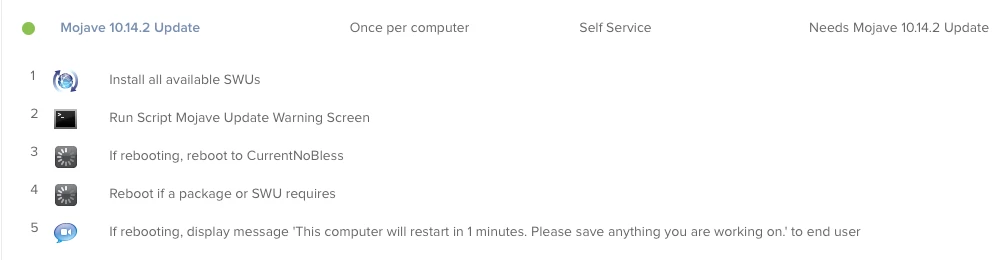
I have been using the Software Update payload in policies with a script to warn the user of download time. I haven't really tested in Mojave but in High Sierra one combo update from apple couldn't be deployed via pkg so I started using the Software Update payload. It has been working great for me ever since.


Forum|alt.badge.img+8
  • Author
  • Contributor
  • December 12, 2018

Thanks - Can you try and Add the script etc you use for this, so i Can try and test on mojave


sharriston
Forum|alt.badge.img+10
  • Valued Contributor
  • December 12, 2018

The script is just a jamfhelper window that warns the user before installing.

#!/bin/bash

"/Library/Application Support/JAMF/bin/jamfHelper.app/Contents/MacOS/jamfHelper" -windowType utility -title "Downloading Software Updates" -heading "Downloading Software Updates" -description "Software updates are downloading and installing this will take 45 minutes.  Please make sure your computer is charging and save all of your work." -icon "/Library/Desktop Pictures/Desert 6.jpg" -button1 Continue -defaultButton 1

You can download a GUI jamfhelper maker from here if you're not familiar with it.


Forum|alt.badge.img+8
  • Author
  • Contributor
  • December 13, 2018

The problem is that this Jamf helper policy shows, even when there is no updates available - and should only show if updates are available?
Or are you only running the script when you know there is some updates?


sharriston
Forum|alt.badge.img+10
  • Valued Contributor
  • December 13, 2018

You would scope it to a smart group that requires the update. So In this case I made a smart group called “Requires 10.14.2 Update” I made the criteria any macOS version that is Less than 10.14.2 and higher than 10.14. You would need to tailor this method to what updates you are looking to run.