Question

VPP App Device Assigned

  • October 23, 2015
  • 10 replies
  • 42 views

Forum|alt.badge.img+7

Hey Group!

I am trying to take advantage of the VPP Device Assigned Option. I have an app Grandma's Preschool

Link:
- https://itunes.apple.com/us/app/grandmas-preschool/id920911845?mt=8&ign-mpt=uo%3D4
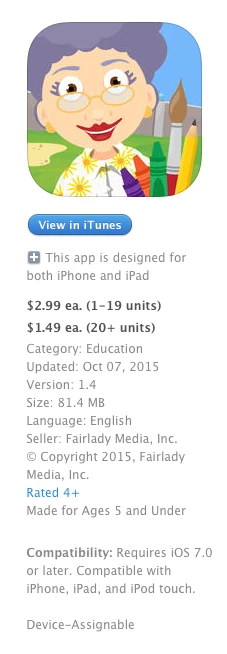
The app does say "Device Assignable"

I started the process of adding the app into Casper. However, under the VPP tab I see the following:

" Content not available to assign to mobile devices"
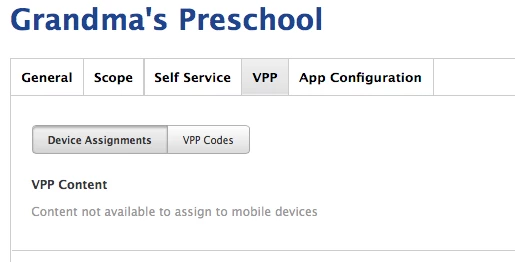
Has anyone else come across this?

10 replies

Nick_Gooch
Forum|alt.badge.img+9
  • Contributor
  • October 23, 2015

Are you using sites? If so try removing the app from the site.


Forum|alt.badge.img+7
  • Author
  • Contributor
  • October 23, 2015

@Nick_Gooch Thanks Nick for such a prompt reply. We are not using sites.

I verified this under Settings -> Network Organization -> Sites = Nothing listed


Forum|alt.badge.img+6
  • Contributor
  • October 23, 2015

Did you purchase the Apps as Codes or Managed Distribution? Did you set up the Token for the VPP account on your JSS?
Are they previous purchases or did you just purchase?


Nick_Gooch
Forum|alt.badge.img+9
  • Contributor
  • October 23, 2015

Make sure the app is showing in the JSS under Settings > Global Management > VPP Accounts > Select the proper account > Content > iOS App.


Forum|alt.badge.img+7
  • Author
  • Contributor
  • October 23, 2015

@TJ.Edgerly

  • Are they previous purchases or did you just purchase? These apps were previously purchased about a month ago. However, I just tried downloading it to the JSS.

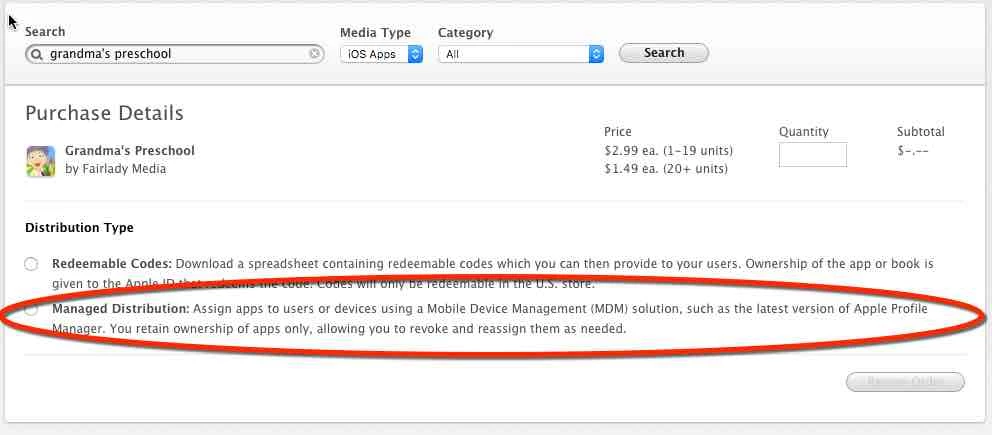
  • Did you purchase the Apps as Codes or Managed Distribution? App Codes ( I did upload the codes to Casper)

  • Did you set up the Token for the VPP account on your JSS? Yes


Nick_Gooch
Forum|alt.badge.img+9
  • Contributor
  • October 23, 2015

Ah... Never mind what I said. They need to be purchased as Managed Distribution to be distributed to devices. I'm pretty sure Apple support can convert the codes to Managed distribution for you.


Forum|alt.badge.img+6
  • Contributor
  • October 23, 2015

Only Apps purchased as "Managed distribution" will be able to utilize device assignment:

As long as the codes have not been redeemed, you can have Apple convert the codes to Managed Distibution:

Apple KB 202863

If they have been redeemed by an apple ID...then you have lost that app seat. Depending on your school's purchase process...it may be easier/faster to just purchase a new set using "Managed Distribution"


Forum|alt.badge.img+7
  • New Contributor
  • October 23, 2015

You will have to contact Apple to get those codes converted to Managed Distribution. They will ask for the Apple IDs you have for your VPP accounts and they will convert any codes that have not been redeemed.

For questions about codes that appear as redeemed (like the single codes you used for Configurator), I was told to contact Enterprise Educational Support at 866-752-7753.


Forum|alt.badge.img+7
  • Author
  • Contributor
  • October 23, 2015

Thank you all for the reminder! DOH! The sad part is I just told someone this the other day. LONG DAY/WEEK!

I will be calling Apple here momentarily.

Thanks Again!


Forum|alt.badge.img+7
  • Author
  • Contributor
  • October 26, 2015

FYI -

I did call the number 866.752.7753 requesting our Redeemable Codes be transferred to Manage Distribution. Apple pointed me to the following website:

https://support.apple.com/en-us/HT202863

I hope this helps someone else.

Thank you all again.