Question

MacOS 10.16 or 11.0 ?

  • October 8, 2020
  • 7 replies
  • 38 views

Forum|alt.badge.img+7

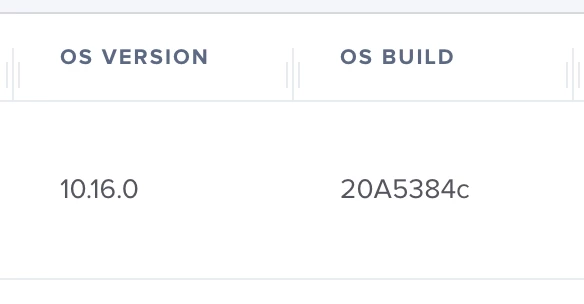
This morning i saw a couple of machines with a MacOS version of 10.16.
Isn't Big Sur supposed to be 11.0?

7 replies

Forum|alt.badge.img+13
  • Valued Contributor
  • October 8, 2020

They're using 10.16 for now. I don't know when the official switch over to 11 is going to be yet.


Forum|alt.badge.img+7
  • Author
  • Contributor
  • October 9, 2020

ok, why not use 11.0 from the start?
We probably never know...


Forum|alt.badge.img+12
  • Valued Contributor
  • October 9, 2020

it looks like Apple has changed from 10.16 and is now showing 11.0


Forum|alt.badge.img+4
  • New Contributor
  • October 9, 2020

@MikeF on Public Beta 9 of Big Sur, Apple now shows macOS 11.0 but JAMF still reports it as 10.16.0 in the current version (10.24.2)...


brockwalters
Forum|alt.badge.img+8
  • Valued Contributor
  • October 9, 2020

Sometimes the macOS version is written in different ways in multiple places on the file system. It's not (necessarily) consistent. In smart groups, this can be a little frustrating I suppose, but, just know this & have a way of handling it...

Here is one way (certainly not the only way) to deal with this in a script:

macosx="$(/usr/bin/sw_vers -productVersion | /usr/bin/awk -F '.' '{print $2}')"
macos11="$(/usr/bin/sw_vers -productVersion | /usr/bin/awk -F '.' '{print $1}')"
if [ "$macosx" -gt 15 ] || [ "$macos11" = 11 ]
then
   do something here...
fi

This would account for if the version comparison uses 11 as the 1st number, or something greater than 15 (like 16...) as the 2nd number. Enjoy!


Forum|alt.badge.img+22
  • Employee
  • November 17, 2020

Hello, thanks for the post and the discussion around this. Sorry for the confusion.

Apple reports Big Sur in two different ways depending on if the binary checking the OS build was built on previous versions of Xcode or the newly released version of Xcode 12.

Starting with Jamf Pro 10.25.2, released today, the Jamf Pro management framework has been updated with Xcode 12 so it will now report Big Sur as macOS 11.

Please let us know if you have any questions.

Thanks!
Mike


Forum|alt.badge.img+14
  • Honored Contributor
  • December 3, 2020

I have a smart group for Big Sur (Operating System Version like 11.) and another for Big Sur and later OSes (greater than or equal to 11.0.0).

Is it fair to assume that the minor build increments for Big Sur will be 11.1, 11.2 etc., and the next OS will be versioned as macOS 12?