Question

Red login screen?

  • September 9, 2015
  • 11 replies
  • 18 views

AVmcclint
Forum|alt.badge.img+21

Has anyone ever seen a red login screen where the background would normally be the ghostly image of your wallpaper or the solid color you have the desktop set to? Today I spent some time trying to tackle these crazy EFI partition problems causing kernel panics by trial and error on one test Mac. After one of my reboots the login screen was all red. See attached photo. I assure you I did not set the desktop picture to be a solid red color. No one has played a trick on me, I'm the only one who has touched this computer through 5 re-imaging sessions today.
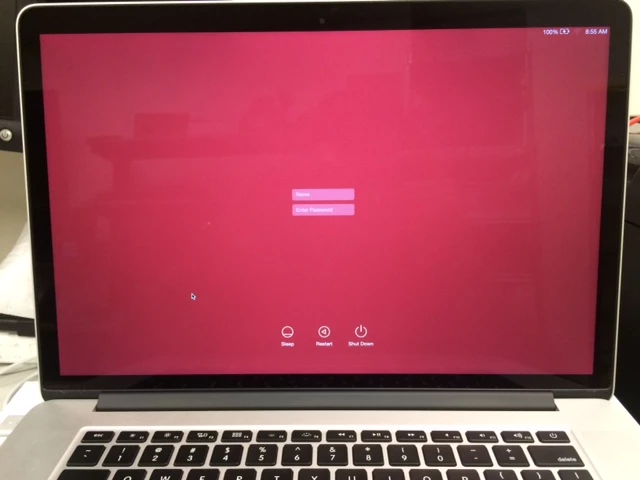
After logging in, the desktop reverts to the solid dark green that I set it to. Subsequent reboots see no change. It is always red at the login then goes back to normal after logging in. The computer starts up just fine, I still have the EFI partition mounted like I always do (ugh) and all other behaviors are what it normally does. I can find nothing in the system log to explain this sudden appearance of the red screen. I googled and only found 1 other person to have come across it but they had no explanation nor cure other than to re-image it. I ended up re-imaging it because I've got other issues to work on. It is just the strangest thing in the world and there is no explanation on Apple's site that I can find for it. You'd think there would be a note to explain why your computer screen turned red. Red = bad, right? Who knows.

11 replies

Forum|alt.badge.img+11
  • Valued Contributor
  • September 9, 2015

We have a single 27" iMac that shows logon screen in red.

Corbin


bpavlov
Forum|alt.badge.img+18
  • Esteemed Contributor
  • September 9, 2015

@AVmcclint I have seen this too. I forget what the circumstances were. But I had to re-image the computer. I was going through testing anyways. It was a rather bizarre but cool effect to see. It's only been the one time. And the OS was 10.10.4 I believe.


Forum|alt.badge.img+18
  • Honored Contributor
  • September 9, 2015

I was seeing this back when we made our base images manually, but it went away once we started using a never booted base image created in AutoDMG. Don't fight the awesome. It really is quite good!


Forum|alt.badge.img+13
  • Contributor
  • September 9, 2015

Check /Library/Caches/com.apple.desktop.admin.png. I have seen this effect if that file has alpha channels (transparency).


Forum|alt.badge.img+5
  • Contributor
  • September 9, 2015

Had this happen on a Mac mini, Mac Pro (2013) that were clean installed over the Restore Utility/Recovery Partition.

Only happened a few times and nothing since.


Forum|alt.badge.img+16
  • Valued Contributor
  • September 9, 2015

This is also I think the default login screen for AutoCasperNBI created netboot images I think.
Or at least thats the background I am getting on mine without having changed anything.


Forum|alt.badge.img+5
  • Contributor
  • September 9, 2015

ill update my response, mine was not configured with Casper or even used with casper. this was a clean install and happened a few times and nothing since i believe the OS was 10.10.4

so in case anyone is curious if its Casper related, mine was not.


acodega
Forum|alt.badge.img+15
  • Valued Contributor
  • September 10, 2015

Please do what @jacob_salmela suggested before doing anything else. OS X displays a graphics file that's normally a blurred and darker version of your wallpaper but can be changed manually.

Check /Library/Caches/com.apple.desktop.admin.png. I have seen this effect if that file has alpha channels (transparency).

mm2270
Forum|alt.badge.img+24
  • Legendary Contributor
  • September 10, 2015

Nah. You probably just happened to get one of Apple's special (Product)Redâ„¢ Mac models.


j/k for anyone not paying attention.


Forum|alt.badge.img+5
  • Contributor
  • September 11, 2015

This happens if the picture is missing and cannot be written, such as when NetBooted or if alpha channels are present. Any transparent area is show as red.


AVmcclint
Forum|alt.badge.img+21
  • Author
  • Esteemed Contributor
  • September 11, 2015

The com.apple.desktop.admin.png file is just the plain solid color dark green file that I set in System Preferences. it isn't a custom picture. It's one of the standard choices that comes with the OS. The file was not edited in any way.



