Question

Casper Suite 9.82

  • December 17, 2015
  • 51 replies
  • 144 views

Show first post

51 replies

apizz
Forum|alt.badge.img+15
  • Honored Contributor
  • December 30, 2015

Damn. Thanks @cbrewer


Chris_Hafner
Forum|alt.badge.img+27
  • Jamf Heroes
  • December 30, 2015

I have to jump in regarding the MAS blank receipt 'hack' as @donmontalvo calls it. First, Don, I agree with you. However, this is a method I still use and for the following reason that I haven't yet thought of the best way around. We use the blank receipt method to capture, package and distribute iWork/iLife apps. Primarily because it allows the app to function from first boot and offers to update/authenticate the app based on the users own AppleID in the MAS. Once the user does this they are 100% golden. It also get's the user to enter their AppleID so I can skip the AppleID setup on firstboot. (our users computers are NOT bound to AD and are offline until they are booted and authenticated to our wireless network.

I get that this isn't a viable solution for most environments but we've got it working here. Mostly because we make a big deal of a campus wide "tech refresh" every 1st of the month. This is a monthly reminder that each user is supposed to run any available 'featured' Self-Service polices, check for Apple updates and restart their computers. So, at the moment I feel generally ethical AND successful. Heck, we're an educational institution so teaching people to do things is kind of in the job description.

The big issue I have with VPP (for free apps), from a BYOD standpoint, has to do with the fact that our student users already own these apps. If I were to use VPP versions of the apps after our initial imaging, I would need to remove our VPP licenses so as to replace said apps with the users properly authenticated versions of the iLife/iWork when the students leave at the end of the year. This takes far more time than having the properly authenticated version there in the first place. That' or leave them to figure it out on their own, which isn't very nice. That said, I'm sure that I'll have to stop doing that shortly and rethink around this particular box when I no longer have the option.


donmontalvo
Forum|alt.badge.img+36
  • Hall of Fame
  • December 31, 2015

@Chris_Hafner sorry for using the word "hack", maybe "workaround" would have been better. The point I was making is when doing stuff like that, there is some risk. In this case not only does/did it break a new JSS feature (I guess we should wait for JAMF to confirm), it is also illegal in some countries to tamper with stuff like that. If it works and is legal and no kittens are hurt, go for it. :)


Forum|alt.badge.img+14
  • Contributor
  • January 4, 2016

Has anyone found any showstoppers for 9.82? I haven't heard much, which is usually a good sign.


mm2270
Forum|alt.badge.img+24
  • Author
  • Legendary Contributor
  • January 4, 2016

Yeah, we haven't heard of anything negative really so far, which is good. I'm not sure if the timing of the release being so close to EOY had something to do with that though. A lot of organizations have end of year moratorium on changes, like upgrading Casper (I know ours does) so we may wait another week just to see if any more reports start to come in.
So far so good though. Unless something major surfaces, this is probably the 9.8x release we'll make the jump to.


emily
Forum|alt.badge.img+26
  • Hall of Fame
  • January 4, 2016

No showstoppers, but I've noticed issues with enforced screenlocks on screensaver and screensaver after X minutes of inactivity. On some computers screenlock works, on some it doesn't. On some computers the screensaver after inactivity works, but then doesn't prompt for a password even though password lock is enabled. I only started noticing it after 9.82. So yeah, not really a showstopper, but definitely annoying.


scottb
Forum|alt.badge.img+18
  • Valued Contributor
  • January 4, 2016

@emilykausalik - are those screen lock/saver issues based upon Profiles delivered in the JSS or another means? I assume the former?


Forum|alt.badge.img+14
  • Contributor
  • January 4, 2016

@emilykausalik @scottb

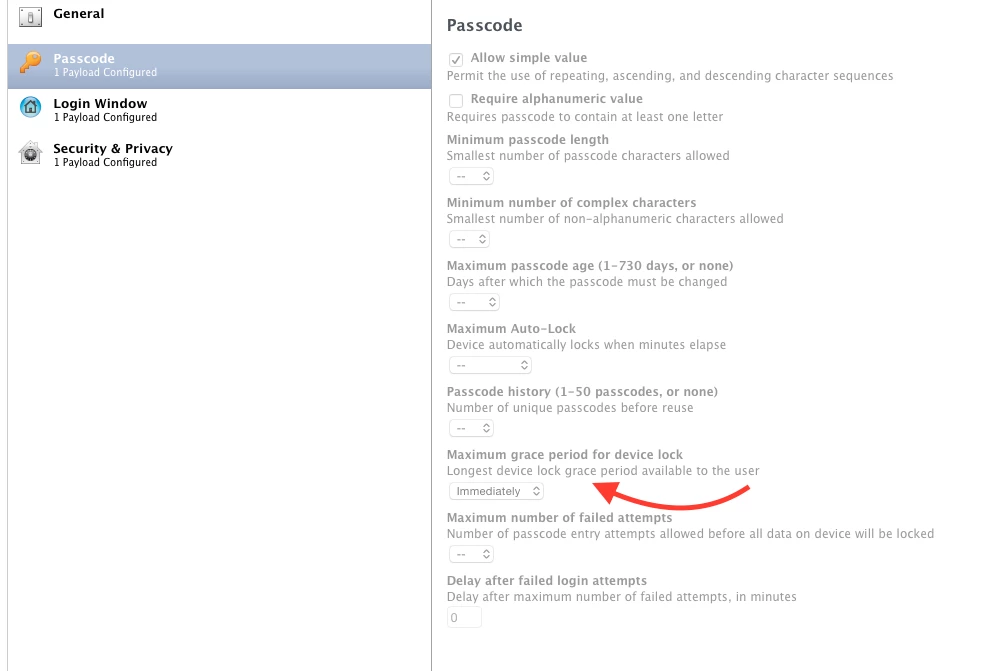
"Require password immediately" doesn't seem to be working for us on 9.82

optional image ALT text

optional image ALT text


emily
Forum|alt.badge.img+26
  • Hall of Fame
  • January 4, 2016

@Abdiaziz Yep, looks like that's it. I wonder if it's a known issue in this version?


Forum|alt.badge.img+18
  • Honored Contributor
  • January 4, 2016

Bummer... We definitely manage those settings via config profile, and its working well on 9.81...


emily
Forum|alt.badge.img+26
  • Hall of Fame
  • January 4, 2016

I just opened a case with my TAM. We'll see what happens.


mm2270
Forum|alt.badge.img+24
  • Author
  • Legendary Contributor
  • January 4, 2016

That is rather unfortunate, since we also manage that setting via Config Profile, and its a requirement to make sure its applying, per company security requirements. I'll have to poke around and see if we are using a locally created Config Profile uploaded into Casper or one created directly in the JSS UI. Can't seem to recall right now.
FWIW, I would consider not applying a security based setting properly to be a 'show stopper' for us, but I know not every environment has strict requirements around this stuff.


Forum|alt.badge.img+8
  • New Contributor
  • January 4, 2016

@Abdiaziz

Isn't this a known issue with prior versions as well?? I thought to "Require password immediately" you had to set a payload under the Passcode section.


emily
Forum|alt.badge.img+26
  • Hall of Fame
  • January 4, 2016

Isn't passcode an iOS setting? I didn't think OS X had passcode enforcement, but has password enforcement.


jhbush
Forum|alt.badge.img+27
  • Esteemed Contributor
  • January 4, 2016

I think I ended up making a custom profile to get this to stick.

askForPassword=1, askForPasswordDelay=0, idleTime=600

com.apple.screensaver


emily
Forum|alt.badge.img+26
  • Hall of Fame
  • January 5, 2016

Heard back from my TAM. Defect for the "immediately" setting is D-010036.

He also said:

If you set the time delay to any other setting other than immediately, the config profile works fine.

Forum|alt.badge.img+14
  • Contributor
  • January 5, 2016

@emilykausalik Some of our Finder settings are also not being applied. Specifically, hiding the "Shutdown" button. I'll contact my TAM when I have time.


Forum|alt.badge.img+17
  • Honored Contributor
  • January 5, 2016

I can confirm in 9.81 I had to use custom profile too for screensaver/immediately.

{tokenRemovalAction=0, askForPassword=1, askForPasswordDelay=0.0}


bpavlov
Forum|alt.badge.img+18
  • Esteemed Contributor
  • January 5, 2016

FWIW, on 9.81 and OS X 10.10.5, the setting immediately is correct.


Forum|alt.badge.img+10
  • Contributor
  • January 5, 2016

Ive been setting it in the Security & Privacy payload and it still seems to be working after upgrading to 9.82 but my clients are still on Yosemite.


Forum|alt.badge.img+8
  • Contributor
  • January 13, 2016

@aporlebeke @adamcodega

Mass update is super nice (although in the Execute command, not as cool)

I also thought that we would be able to block the updates.


cdenesha
Forum|alt.badge.img+14
  • Honored Contributor
  • January 14, 2016

Has anyone tested Mass Update with the Download Only option? In my testing, a message pops up after the download that says 'iOS 9.2 will begin installing in 10 seconds' for both 'Download Only' and 'Download and Install and Restart', so I don't know what the expected outcome is supposed to be.


cdenesha
Forum|alt.badge.img+14
  • Honored Contributor
  • January 15, 2016

From my TAM:

A Product Issue was just created that describes the behavior you are seeing. We have this noted as D-010049.

Edit: To be more specific, The Download Only option is also Installing.


chris_kemp
Forum|alt.badge.img+20
  • Jamf Heroes
  • January 19, 2016

I happened to look into the screensaver passcode delay issue this morning, before seeing this post - have y'all actually confirmed that the delay is not being enforced, or are you going off of the Security window?

Reason I ask: I tested by removing the profiles from my machine, which previously showed "Immediately" for passcode requirement - and when I did, the UI defaulted to my old MCX setting which was 5 seconds.

After reapplying the profiles, it never reflected the change in timing – it still said 5 seconds.

However, I then removed the profiles again, changed the time setting to 5 minutes, and saw the UI update accordingly. When I then reapplied the profiles it still said 5 minutes - but when testing actual functionality, it did in fact ask me for a password after only a few seconds when the screensaver kicked in.

So, it appeared to be working but just not reflecting in the UI itself.

I ran the command

defaults write com.apple.screensaver askForPasswordDelay 0

to update the UI so it says “immediately”, reflecting the setting being applied by the profile. If I run the same command with

defaults write com.apple.screensaver askForPasswordDelay 600

The UI updates again - with the Profiles still in place - to show 5 minutes.

tl;dr - The Preferences -> Security UI is basing its timeout setting on the com.apple.screensaver askForPasswordDelay key.


Forum|alt.badge.img+1
  • New Contributor
  • February 5, 2016

I've attempted the iOS update push a couple of times without success. The logs on the iPads show the following (reversed from logs page into chronological order):

DeviceInformation Yesterday at 6:40 AM
Update Inventory Yesterday at 12:48 PM
AvailableOSUpdates Yesterday at 12:49 PM
ScheduleOSUpdate Yesterday at 12:49 PM
DeviceInformation Today at 6:40 A

iPad is still running 9.1

Little help here?