Question

macOS 12 - macOS Monterey

  • June 7, 2021
  • 40 replies
  • 197 views

Show first post

40 replies

Forum|alt.badge.img+1
  • New Contributor
  • October 1, 2021

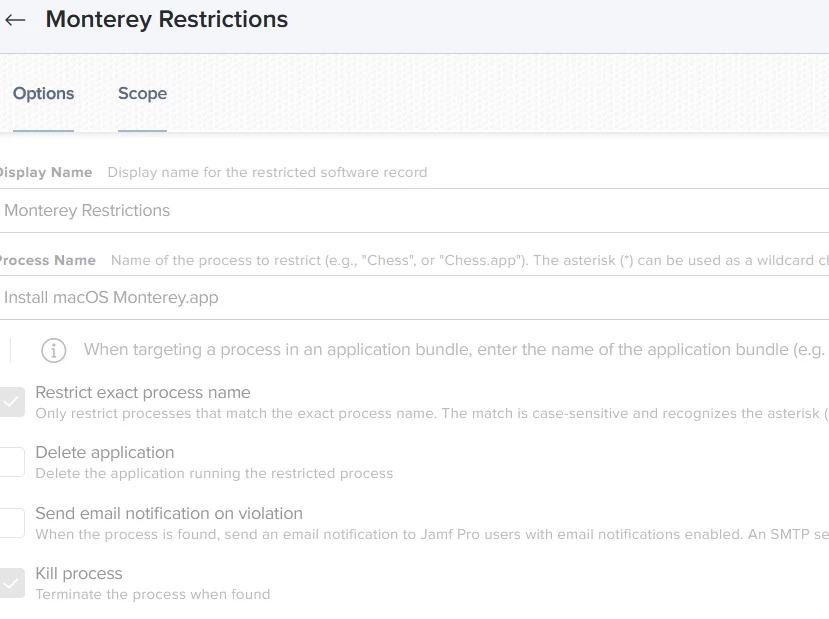
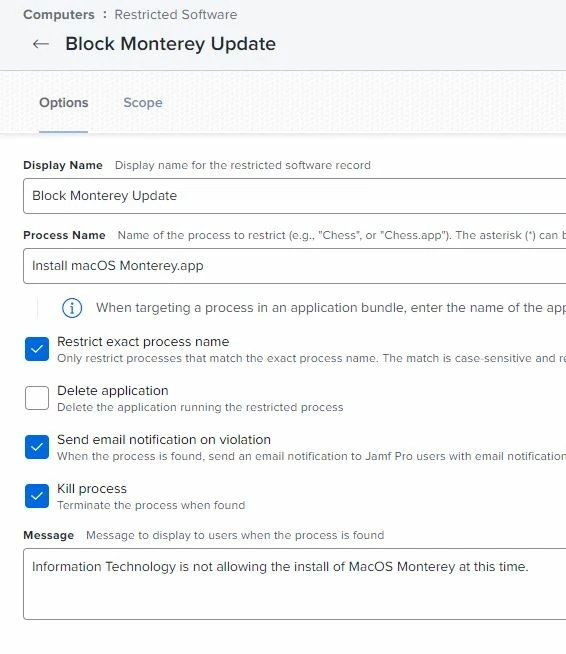
@mickl089  You'll be able to add the installer app or the installassistant to your restricted software.  You can also use the new softwareupdate profile payloads.  


Is there a way to ignore monterey when it's release.  I don't think the "sudo softwareupdate --ignore "macOS Monterey" works any more.


Forum|alt.badge.img
  • New Contributor
  • October 26, 2021

Is there a way to block the macOS Monterey using a script.


Forum|alt.badge.img+3
  • New Contributor
  • October 26, 2021

Hello, anyone how to block Monterey from the Restrictions Software part. We do this with Big Sur and works fine in the past, with Monterey now not, Users able to start the install, As i see you say we can block the InstallAssistant but i have during the start of the upgrade this not in my process list. second here, when we set the restrictions and apply to all computer, correct me this is applied then to all in JAMF, right? Sorry really new to JAMF and lerning a lot at the Moment.


bradtchapman
Forum|alt.badge.img+20
  • Valued Contributor
  • October 26, 2021

Hello, anyone how to block Monterey from the Restrictions Software part. We do this with Big Sur and works fine in the past, with Monterey now not, Users able to start the install, As i see you say we can block the InstallAssistant but i have during the start of the upgrade this not in my process list. second here, when we set the restrictions and apply to all computer, correct me this is applied then to all in JAMF, right? Sorry really new to JAMF and lerning a lot at the Moment.


Uncheck “restrict exact process name.”


sbrammer
Forum|alt.badge.img+6
  • Contributor
  • October 27, 2021

I am having the same issues as others with blocking Monterey. What did work before with Big Sur is no longer working. I am using restricted software to block the actual Install macOS Monterey.app as well as the InstallAssistant. I also have a policy to ignore, but it does not seem to work like it did when i was blocking Big Sur

Run Unix command 'sudo softwareupdate --ignore "macOS Monterey"'
===


The only way i have found is to defer it for 90 days, which i wish they would give a longer time as we are in higher education and only do major upgrades like these in the summer to give us time to test all the software prior


Forum|alt.badge.img+1
  • New Contributor
  • October 27, 2021

Same as Sbrammer, they only solution right now is the 90 option within Jamf's configuration Profile, under restrictions, and Functionality, the scroll down and change Delay software updates from Major updates the max 90 days.  My companies IS teams takes like 8 months to approve the new releases.


Andreas_Schenk
Forum|alt.badge.img+8

I am having the same issues as others with blocking Monterey. What did work before with Big Sur is no longer working. I am using restricted software to block the actual Install macOS Monterey.app as well as the InstallAssistant. I also have a policy to ignore, but it does not seem to work like it did when i was blocking Big Sur

Run Unix command 'sudo softwareupdate --ignore "macOS Monterey"'
===


The only way i have found is to defer it for 90 days, which i wish they would give a longer time as we are in higher education and only do major upgrades like these in the summer to give us time to test all the software prior


The --ignore flag for the softwareupdate command has been deprecated by Apple. Thats why it does not work anymore (and unlikely to come back anytime soon)


sbrammer
Forum|alt.badge.img+6
  • Contributor
  • October 28, 2021

Is there a way to defer the update past 90 days? Would be nice to at least have an option for deferring 180 days. Also, will the restricted software option in Jamf still work?  Would really not like it to show up at all, so the defer option will be great until the 91st day, then will the restricted software still apply? I haven't tested it yet but will work on that today to find out. 


mateow
Forum|alt.badge.img+4
  • New Contributor
  • October 30, 2021

Defer only works for updates not upgrades.  (10.15 to 10.15.2 for example)


DBrowning
Forum|alt.badge.img+25
  • Esteemed Contributor
  • October 30, 2021

Defer only works for updates not upgrades.  (10.15 to 10.15.2 for example)


In 11.3 and above, there is now the ability to delay Major updates.  Apple Restrictions 


mhasman
Forum|alt.badge.img+22
  • Valued Contributor
  • November 2, 2021

I am having the same issues as others with blocking Monterey. What did work before with Big Sur is no longer working. I am using restricted software to block the actual Install macOS Monterey.app as well as the InstallAssistant. I also have a policy to ignore, but it does not seem to work like it did when i was blocking Big Sur

Run Unix command 'sudo softwareupdate --ignore "macOS Monterey"'
===


The only way i have found is to defer it for 90 days, which i wish they would give a longer time as we are in higher education and only do major upgrades like these in the summer to give us time to test all the software prior


softwareupdate: unrecognized option `--ignore' 


Andreas_Schenk
Forum|alt.badge.img+8

softwareupdate: unrecognized option `--ignore' 


Exactly. Thats the error message that you get when you still try to run it.


mhasman
Forum|alt.badge.img+22
  • Valued Contributor
  • November 2, 2021

Same as Sbrammer, they only solution right now is the 90 option within Jamf's configuration Profile, under restrictions, and Functionality, the scroll down and change Delay software updates from Major updates the max 90 days.  My companies IS teams takes like 8 months to approve the new releases.


That works, thank you @Windbiel!

At list we have 90 days to figure out compatibility with other enterprise IT parts with no users asking "I see Monterey in Software Update, should I install it?"


mhasman
Forum|alt.badge.img+22
  • Valued Contributor
  • November 2, 2021

Is there a way to defer the update past 90 days? Would be nice to at least have an option for deferring 180 days. Also, will the restricted software option in Jamf still work?  Would really not like it to show up at all, so the defer option will be great until the 91st day, then will the restricted software still apply? I haven't tested it yet but will work on that today to find out. 


It works, too; unfortunately, action happens after 12GB downloaded 


MacMaul
Forum|alt.badge.img+6
  • Contributor
  • November 5, 2021

I'd probably want a second pair of eyes to double check my shaky regex, but here is a string to identify devices incompatible with Monterey using the model identifier criteria:

^(iMac[1-9],|iMac1[0-4],[0-4]|MacBook[1-8],|MacBookAir[1-6],|MacBookPro[1-9],|MacBookPro1[0-1],[0-3]|Macmini[1-6],|MacPro[1-5],)

According to everymac.com, iMac15's aren't supported on Monterey either, so I updated your regex to include them:

^(iMac[1-9],|iMac1[0-5],|MacBook[1-8],|MacBookAir[1-6],|MacBookPro[1-9],|MacBookPro1[0-1],[0-3]|Macmini[1-6],|MacPro[1-5],)