Blog Center
Recently active
Earlier this week, our Community team brought members of Jamf Nation together for a special event — an hour of inspiration, celebration and gratitude. World-renowned keynote speaker, author and all-around good guy, Chris Schembra, led the conversation: Jamf Nation 2026: The Power of Human Connection. As the largest online community of Apple admins in the world, Jamf Nation members understand the power of connection. They’ve been using it to move mountains in the Apple space for the better part of two decades. But as the environment around us changes, Chris challenged the group to consider mindset shifts that could lead to even better outcomes. He encouraged them to move both fast and slow, referencing the Emilia-Romagna mindset of “holding the tension of opposites to achieve world-class excellence.” He asked, Where in your life do you need to go slower? Where in your life do you need to go faster? How do you hold the tension between those two? The chat lit up. Thoughtful, deeply mea
It must be 8 or 9 years ago that I started supporting customers with ZuluDesk (now Jamf School). This was my first step into the device management world. Before that, I was a repair technician. As my curiosity grew, I was lucky enough that my employer allowed me to do the Jamf 100 and 200 courses. Managing iOS devices is all good and well, but with Mac you need a little more tools. Things like setting a wallpaper sound easy, but they actually require a bit more work than I expected. Welcome to the world of Mac Admins! I discovered that for everything I wanted to figure out how to do, there is usually someone with the same question, and maybe they’ve already found a solution for it. Coming in as a completely new Mac Admin, it might be a bit difficult to find your way. But knowing the right people, tools or places to ask for help are really valuable and make all the difference. So I thought, why not try and create some sort of list with starting points for f
Enrolling in a Jamf Training Course is an exciting step in expanding your skills, but once your class is scheduled on the calendar, you might wonder: How should I prepare for training? What devices should I use? How should I set up my workspace? While Jamf will send you important setup instructions prior to your course beginning, here are additional preparation steps and strategies you can take to ensure you’re fully ready to succeed. 1. Review the Student Setup GuideOne week before your training begins, you will receive an email from Jamf Training with important details about your course. This email will look like the following: This email will contain:Instructions to log into Jamf Account to view customer requirements and prerequisites A link to access the remote training session the following week A link to the Student Setup Guide A contact for your instructor. If you have questions, you can reach out to them. The Student Setup Guide is essential. It outlines:Device Requirements R
Originally posted in MacAdmin Musings Why I Try to Stop Working Before Everything Is Finished For a long time, I treated the end of my workday as a finish line.I’d keep going until the problem was solved, the task was complete, or I was too drained to continue. If something was still broken or unanswered, I felt pressure to push through it before logging off. Ending the day with loose ends felt like failure, like I wasn’t completing my tasks.Over time, I realized that approach was quietly working against me.Not because unfinished work is bad, but because how you leave work unfinished matters. The Hidden Cost of Draining the Tank When you work until you have nothing left, you don’t just end the day tired. You also make tomorrow harder.The next morning starts cold:You have to remember what you were thinking You have to reconstruct context You have to re-load mental state before you can make progressThat ramp-up cost is real, whether you’re writing small scripts or a large project. Moment
If you’re not using any enrollment progress tool in your Mac Environment now, or if you’re shopping for a replacement, consider Jamf Setup Manager. When exploring options, we wanted something easy to configure. Something we’d be able to set and forget. And if configurations needed tweaking later, it’d be easy to update. I am lazy. There, I said it. Enter Jamf Setup Manager (JSM). Setup Manager is the best gift I gave myself this Holiday Season. The best part is that we pass this onboarding experience to our customers and technicians. No heavy lifting. No scripting skills are needed. Just add these two ingredients and you’re on your way. The Setup Manager Package A new Setup Manager configuration profile Add the two items to your Prestage The folks at Jamf added a QuickStart guide to help you get started. I’d recommend giving this a read. This helped me generate ideas for customizing Setup Manager for my organization (more on that below). &nb
Here’s the problem we need to address: many of the things IT teams do aren’t documented because they’re seen as busy work, there’s no time, people forget, or they just don’t want to. But here’s the thing: documentation may take some time, but it takes exponentially more time to research a solution every time you need it. For example, it might take 20–30 minutes to create a quality document. Researching a solution can take 10–15 minutes, and if you need to research it 2–3 times, that’s 20–45 minutes of research. Meanwhile, it only takes about 5 minutes to re-read a well-written document. So, let’s get started on how to do this. It happens all the time: you figure out a solution or process, implement it, and move on to the next task on your never-shrinking to-do list. A few months later, you need to do the same thing again and must dig through scripts, tickets, blogs, Slack, or wherever you found the solution, trying to recreate it. It takes a lot of time, and you think, “I really should
As an Apple Partner (I work for an Apple Premium Partner in Belgium) Managed Apple Accounts are a bit of a challenge. Last November we concluded our transition after a 2 year adventure. I’ll spare the details I cannot talk about and focus on what’s the same for everyone.There generally are 5 parts of your Managed Apple Account quest:1) Verify your domain2) Lock your domain3) Capture the domain4) Federate with your Identity Provider5) Provision new accountsBefore you get started with this, please know your why. Currently there are not that many reasons why you would absolutely - need - Managed Apple Accounts. Generally we only start the capture (and federation) part with customers of ours whom want to use Account Driven Enrollment (e.g for BYOD purposes). That being said we do advise any customer to verify and lock their domains to prevent issues in the future.Step 1: Verify your domainThe first part is the easiest. You can add a domain in Apple Business Manager and you will be asked to
When I look back on where I started, joining the Matter Career Readiness Institute (MCRI) was one of the most defining decisions of my tech journey. What began as an opportunity to learn about career readiness quickly became a launchpad into a world of innovation, purpose, and growth. Laying the Foundation: Learning Beyond the CodeAt MCRI, I didn’t just learn how to code, I was taught how to be a better professional and, honestly, a better person. Through communication workshops, critical thinking sessions, and collaborative projects that mirrored real-world work environments, I discovered that being “career ready” in tech isn’t just about what you can build, it’s about how you approach problems, adapt to change (roll with the punches), and connect with others.One of my biggest takeaways from the program was understanding the importance of continuous learning and curiosity, realizing that in technology, the moment you stop evolving, you risk falling behind. From Learning to Building:
Jamf announced in January that the Jamf Pro Classic API will no longer support basic authentication in a future release. Classic API scripts can still run—administrators just need to make a simple change in how they authenticate. Let’s look at why this change is coming and how to convert Classic API scripts to use bearer tokens for authentication instead of usernames and passwords. The token obtained during this workflow will allow authentication to either the Classic API or the more modern Jamf Pro API. We’ll cover: How bearer tokens improve security Request the first token Parse the token Use the token to send an API command Expire the token Renew the token How bearer tokens improve security This change to move away from supplying usernames and passwords as credentials for authenticating to Jamf Pro is a good thing. Bearer tokens improve security by reducing the number of times credentials are sent to the server. Instead of sending them with every request, a token is sent instead,
A Bold Leap Into AppleIt was the summer of 2024 when we were asked to do something our company had never done before. We were going to introduce MacBooks into an environment that had always been 100% Windows. Naturally, questions started flying. How would we manage them? What tools would we need? And, most importantly, how could we ensure the experience was seamless for our users? The hardware part was easy. We knew we could purchase them from Apple anytime. So, the MacBooks were purchased and ready to go, eagerly awaiting their release into our environment. The real challenge was management and integration. After speaking with our team and several vendors, we made our decision: we decided on Jamf. Paperwork signed, onboarding scheduled, and a new chapter began.One Year Later: A Transformation We Didn’t ExpectFast-forward to October 2025, about a year plus, and what a journey it’s been! We’ve faced challenges, learned a ton, and grown stronger as a team. Looking back, we couldn’t have
The heartbeat of Jamf has always been its customers. From day one, your passion and expertise have shaped a community unlike any other. What began as a simple email newsletter eventually grew into Jamf Nation - a space to troubleshoot, share wisdom, and connect with people who just get it. Along the way, we noticed a group of customers consistently going the extra mile, and that sparked the creation of Jamf Heroes - our deeply engaged, wildly generous champions who support Jamf and the wider community in incredible ways. Whether answering questions, offering solutions, or hopping on calls to help someone out, their impact was undeniable. But over time, we realised something bigger: meaningful contributions happen across our entire customer base, every single day. So, we built a way to recognise all of it. Enter Jamf Nation Rewards. We launched Jamf Nation Rewards at JNUC 2024 to celebrate the everyday actions that strengthen our ecosystem. Joining Jamf Nation discussions and thr
It’s already November, and that means the end of 2025 is clearly in sight. Can you believe it? It’s been an eventful year at Jamf, especially for the Jamf community and User Groups! Earlier this year, we officially launched the User Group program with the goal of connecting as many Apple Admins as possible. We created a starter kit to help new groups get up and running, complete with all the information and resources they need. We also introduced a brand-new community platform, featuring a User Group landing page and an interactive Groups map that displays all the groups around the globe. It’s been a great year! To end on an even higher note, we want to give an extra boost to all the groups thinking about getting started. We’ve heard from several soon-to-be User Group leaders who are eager to start but haven’t yet hosted their first meeting. While it’s a busy time of the year, it’s also the perfect time to gather your community, whether in person or online. To help make that happen,
This past July, I gave my third-ever presentation at a large conference: "swiftDialog for Overworked MacAdmins," at the Penn State University MacAdmins Conference. It wasn't my first time: I also presented in 2024 at MacAdmins on the topic of Compliance, and at the Consortium of Liberal Arts Colleges as part of our security response team on a phishing response workflow. I'm not a big name speaker. I'm not a well-known blogger, or tech writer, or popular person on Slack. I'm not on LinkedIn. I don't have any particular expertise, or much formal training. I'm not even a people-person. So what do I think I have to contribute to the community? I think, like you, that I have a lot to offer. Let me tell you why. If you're at all like me, and I think most IT admins are, we're just doing the best we can in often difficult circumstances: slim budgets, staffing issues, fractally-expanding scope of work. I don't know anyone who has enough time to do all the professional development work they thin
Attending JNUC 2025 in Denver was an incredible experience, a mix of innovation, collaboration, and community. Being surrounded by Apple IT professionals, consultants, and Jamf engineers reaffirmed how rapidly the Apple ecosystem is evolving across management, automation, and security. Key Takeaways 1. Jamf Blueprints and Compliance FrameworksThe new Blueprints feature truly changes how we approach configuration management. The ability to combine configuration profiles, policies, and restrictions into modular blueprints simplifies deployment and compliance alignment, especially for large environments.It also pairs perfectly with automated compliance reporting and remediation workflows, something I’m already planning to test in our sandbox. 2. Jamf Pro + AI IntegrationOne of my favorite announcements was the AI integration in Jamf Pro, providing smart recommendations, faster troubleshooting insights, and context-aware automation. This is going to significantly reduce admin time on repet
If you are looking to manage a fleet of Apple devices at scale, Jamf Pro Cloud is one of theleading tools out there. Whether you are handling Mac, iPads, iPhones, or even Apple TVs, thecloud-hosted version of Jamf Pro makes setup and ongoing management so much easier, no on-premise servers, no manual patching, and security managed by the experts at Jamf. Below, Ibreak down the main steps to get up and running with Jamf Pro Cloud, share key concepts,real-world workflows, and actionable tips.Table of Contents1. What is Jamf Pro Cloud?2. How to Implement Jamf Pro Cloud3. Core Concepts ExplainedPolicies Configuration Profiles Smart and Static Groups Extension Attributes Scripts App and Patch Management The Self Service Portal Inventory and Reporting Security and Compliance Integrations and Automation4. Example Workflows 5. Best Practices What is Jamf Pro Cloud?Jamf Pro Cloud is a fully cloud-based platform for managing Apple devices. Everything runsover the internet; you simply log in to a
This guide will walk you through setting the local macOS account pictures for end-users via Jamf Connect Requirements: Jamf Pro Jamf Connect Formatted ID Token Path setup in Jamf Connect Login Config (/private/tmp/token) Azure Storage Blob Email addresses of users follow a pattern for all users (john.smith@myorg.com, jsmith@myorg.com, etc..) Tested with: Azure AD and Jamf Connect Test User: John.smith@ericsontech.com Steps: 1. First step is to get all of your user images. To make this easy on yourself name them the same as the user's email address. So for John Smith his email is john.smith@ericsontech.com I would name his image as john.smith@ericsontech.com.png and upload that image and all other user's images to an Azure Storage blob. Example: 2. Setup this script to run via Jamf Pro. I have mine setup to run via Jamf Connect Notify Note: You will need to update this with your Azure Storage Blob url curl -L "https://myazureblobname.blob.core.windows.net/mdm/$EMAIL.png" -o /tmp/
This article is based off of the presentation at JNUC given by @tommypatzius , @Jordy-Thery and @glennu Our session at this year’s JNUC 2025 was designed to present a list of helpful tools available to Mac Admins of all skill levels and backgrounds. We know that everyone’s experience with Apple device management is different, so we’ve pulled together a collection of tools that are approachable, practical, and, in many cases, free. Many of them have a low learning curve, making them accessible whether you’re brand new to managing Macs or have years of experience. Our goal is that everyone walks away with at least one new tip, trick, or tool they didn’t know before. To make things clear and easy to follow, we’ve divided the tools into categories by function: Apple apps, Jamf tools, maintenance, setup & customization, notifications & support, and inspection tools. We took a closer look at a few specific highlights—Jamf Helper Constructor, Self Service+, and IBM Data Shift—befo
This guide represents the synergy of the latest technologies from Apple and Jamf. It harnesses the power of the new Declarative Device Management (DDM) framework built into macOS 15 (Sequoia). This modern approach is unlocked by Jamf Pro version 11.8.0 or later, which introduces Software Update Blueprints. Critically, this entire workflow is powered by the Jamf Account SSO, which connects your instance to the cloud micro-services required for Blueprints to function, creating a truly modern administrative experience.The guide outlines the modern, three-part strategy for managing macOS 15 and newer in Jamf Pro. It leverages DDM via Blueprints for a reliable, automated workflow and is based on enterprise best practices for both aggressive and controlled rollouts.PrerequisitesBefore you begin, ensure your environment meets these minimum requirements:Jamf Pro: Version 11.18.0 or later. Target Computers: macOS 15 (Sequoia) or later. Device Supervision: Devices must be Supervised. Administrat
This October, I’ll be heading to Denver, Colorado, for the Jamf Nation User Conference (JNUC 2025). It’s a week that brings together community, learning, and all things new with Jamf, and this year, I’m especially honored to be attending as one of the recipients of the JNUC Diversity Sponsorship. The Sponsorship ExperienceThe Diversity Sponsorship program reflects Jamf’s commitment to amplifying the voices of underrepresented individuals in the tech industry. Now in its ninth year, the program selects up to 10 individuals to attend JNUC with full conference registration, a travel stipend, and access to exclusive networking opportunities. Being chosen for this year’s sponsorship is both humbling and energizing. It’s not just about attending sessions or seeing the latest product announcements—it’s about being recognized as part of a broader effort to ensure diverse perspectives are present in conversations that shape the future of Apple administration and security. Why I AppliedThis will
Have you ever had to manage devices from a DEP instance you don’t control or even own? Or send DEP or BYOD devices to another campus where they need to be managed with a different MDM? This was the situation we encountered last year, and here’s how we solved it. Institutional ContextOur institution has expanded globally, adding new international campuses in Spain. These schools serve students from K–12, with management needs that differ significantly from those in the U.S. Because of local legal and operational differences, we chose to build independent technology stacks for each campus, modeled after our flagship U.S. campus. This provided consistency while allowing for flexibility.U.S. campus: Jamf Pro + Protect; BYOD model for students, DEP-managed devices for staff and faculty. Spanish campuses: Jamf Pro + Protect + Connect + Safe Internet; all DEP-managed, school-owned student devices.This design gave Spain the flexibility to support younger students in a day-school environment, w
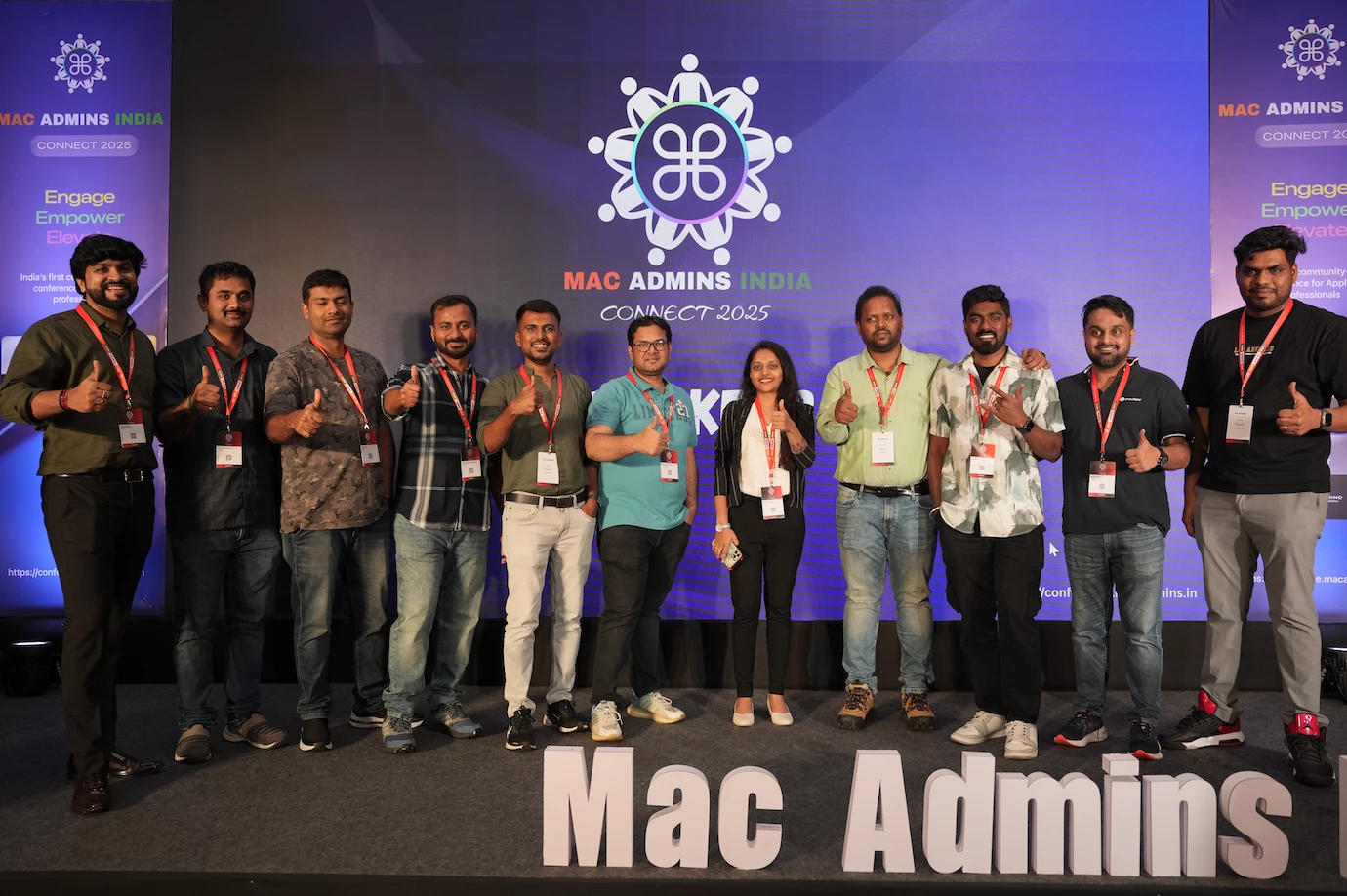
Mac Admins India Connect is more than just a meet-up, it’s a movement. This conference was built by and for the growing community of Apple IT professionals across India. This event is the country’s first dedicated space for those who manage, secure, and support Apple devices at scale in order to meet and learn from one another in a larger scale, one day event. We’re so excited and still buzzing from our inaugural event, and we’re excited to keep it going for next year! Why We Started This India has long been a powerhouse for Apple device management, with admins supporting businesses and schools not only locally, but across the globe. That changed with the formation of Mac Admins India which is a grassroots tech community born on a Google group, and eventually, into real-world meetups. And now, with Mac Admins India Connect, we’re taking it one step further: an annual gathering to celebrate our craft, share our stories, and inspire each other. By the Numbers:👥 160+ attendees 🏢 80+ org
Last month, we announced through this Tech Thoughts blog article that Jamf Nation will get an upgrade later this summer. Well, friends...the time has come! On Friday, July 4, Jamf Nation shifted from its current platform to a new space, and we couldn't be more excited. What you need to know about the migration Any new content published on Jamf Nation between JUNE 23 – JULY 3 will need to be re-posted to the new site after launch. (If you got your answer in that timeframe and don’t care that it’s on the new site, that’s fine too!) All content that was posted to Jamf Nation BEFORE JUNE 23 will migrate. No action needed! Yes, your profile information will migrate. Yes, your User Group information will migrate. Yes, your postings to the job board will migrate. It will ALL migrate. 😊 Improvements in the new space We’re excited for you to come in and see the new space soon! Warning...it will look and feel different, this is by design. This upgraded version of Jamf Nation w
This article and many others can be found on Rich Trouton’s blog Der Flounder As part of Apple’s unveiling of Declarative Device Management (DDM) at WWDC 2023, Apple announced that DDM management included the ability to deploy MDM configuration profiles using DDM as the delivery mechanism in place of using MDM to deliver the profiles. Jamf Pro’s Blueprints leverages this capability to support device restrictions.Let’s see how this works using a device restriction configuration, using the example of setting the following Apple Intelligence management functions to false in order to block the corresponding Apple Intelligence functions on macOS: Restriction Setting available in version Description Key Key value Default setting in macOS Allow Image Playground macOS 15.0.0 If key value is set to FALSE, prohibits the use of image generation. allowImagePlayground Boolean TRUE Allow Writing Tools
In the MacAdmin world, few names command the kind of respect Charles Edge does. Not just for his technical expertise, but for his relentless curiosity and generosity. After his unexpected passing in 2024, I found myself reflecting on a behavior I learned through Charles's actions. A mindset I've come to call the Edge Methodology. It's not a framework or a management technique in the traditional sense. It's a response to fear. A refusal to fake confidence in things not yet understood. And it's inspired by the way Charles lived: by digging in, learning with humility, and lifting up others in the process. The Problem: Fear of Not Knowing At some point in our careers, many of us have worked in environments where saying "I don't know" felt like admitting defeat. Where curiosity was mistaken for incompetence, and asking questions risked being seen as unqualified. I've definitely been there. In those spaces, people would often bluff their way through techni
I don't know about you, but my in-person conference skills need a brush-up. For me, it's been a little over three years since my last in-person. So here are some tips I've put together with some help from a few friends. If you are turning up on Monday before dinner, check the JNUC Slack Channel for any pre-conference get-togethers Monday night. The same is true every night. You can sleep when you get back home. This may be the only chance you get to talk to these people for some time. Go to the Keynote. It's the start of the conference, and at JNUC it starts well. I know it might be hard getting out of bed after the long flight the day before but do it. In fact, get into the conference venue for breakfast and a gossip every day before the first presentation. Talk to people. Don't be afraid to talk to anyone. The "hallway" track can be a great part of the in-person experience. Ask questions. Seriously, the presenters want questions and hope all the attendees go away with
Earn a cool badge and Jamf Nation Reward Bytes for your published articles. We’re looking forward to your submissions!